
OpenAI Files Patent for a Live Timeline That Shows an AI Working Through Your Question
Ever wait on a chatbot and wonder whether it froze? OpenAI's filing describes a live timeline that shows the AI cropping your photo, reading websites and running code while you wait.
What OpenAI's live reasoning timeline shows
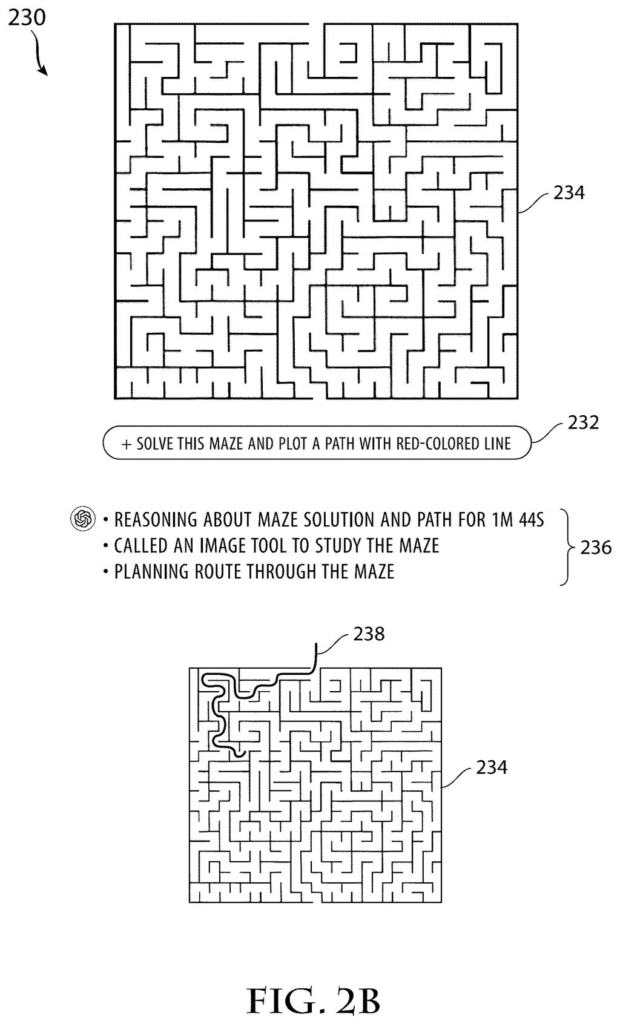
A chatbot goes silent for nearly two minutes while it works on a maze puzzle you uploaded. You stare at a spinner and wonder whether it is stuck, wrong, or just thinking.
This OpenAI patent application describes a fix: a live timeline that shows the AI's work as it happens. While the model reasons, you see short notes on its thinking, your picture cropped or zoomed in on the part that matters, the websites it is reading, and the code it runs to check itself. Each kind of update gets its own look and pace, so a search result slides in differently than an image does.
You can also keep the view tidy. A collapsed view shows only the latest step, while an expanded view lays out every step for anyone who wants to check the work.
… each reasoning message including metadata identifying a message type, the message type comprising at least one of: a text output, an image output, a search result, or a code execution result …
Translation: Every step the AI takes is labeled as text, image, search, or code execution.
How each message gets its own look and pacing
The filing describes software that sits between an AI model and the screen you read. While the model works, a server sends the app a stream of reasoning messages (small updates about each step). Every message carries a tag saying what it is: a text note, an image, a search result, or a code result.
The app then picks a presentation format for each tag, meaning a visual style, an animation, and how long the item stays on screen. In the description, text fades in and pauses for about 200 milliseconds after the last word, while images hold a little longer, around 400 milliseconds. Search results arrive as staged "pills" for each query and website, with a progress indicator showing which page is being read. The filing says these timings were tuned by testing.
Everything lands on a reasoning timeline that updates live. Collapsed mode shows only the newest step, and expanded mode shows them all. Images the model crops, rotates or annotates appear right in the timeline, and a new image can blur the area around it to draw your eye.
Behind the scenes, the description says a separate model condenses the AI's raw thoughts into short titled summaries. The raw version stays in a hidden channel that can be thrown away after the turn. Text is released in batches (about 50 tokens, or small word fragments, or one second, whichever comes first) so the display feels smooth.
… render, via the user interface, the plurality of reasoning messages in a reasoning timeline according to their respective presentation formats; and update the reasoning timeline in real time …
Translation: The app displays the AI's thoughts on a live timeline as they happen.
Why OpenAI wants you to watch the AI work
The practical payoff is for you: long AI answers stop feeling like a black box. If a chatbot spends a minute or two on your question, a visible trail of searches, image edits and code checks tells you it is working, and lets you spot a wrong turn before the final answer arrives.
It also shows a design choice. The filing says the raw reasoning stays hidden and only cleaned-up summaries and selected tool results reach your screen. That gives you a window into the process without showing everything the model produced internally. For OpenAI, the timeline is a way to earn trust as its AI takes on longer, multi-step jobs.
OpenAI's seventh filing we've tracked since July in our AI agents that act for you watchlist builds on earlier work like calling outside tools unprogrammed and built-in file search.
Claim 1 covers a wide slice of a chat screen. An app receives progress messages from an AI, each tagged as text, image, search result or code result. It picks a look, an animation or an on-screen time for each one, and draws them on a live timeline. The claim names no specific timing, animation or layout.
The specifics sit in the later claims: the collapsed and expanded views, the staged arrival of search results, the blurring that spotlights a new image. Those details narrow the idea, while claim 1 stays broad and describes any assistant that tags its updates by type and paces them differently on a timeline.
If granted as written, that breadth would matter more than any single animation. Most AI apps already show something while they think, so the open question is how much of that familiar design the first claim could reach.
Get our take in your Top Stories
Liked this breakdown? Add Patentlyze as a preferred source on Google, and our plain-English take shows up more often in your Top Stories the next time OpenAI patent news breaks.
There are more where this came from
We read every patent application Big Tech publishes and send you the ones worth knowing. Plain English, free, every week.
The drawings
12 drawing sheets from US 2026/0330194 A1 · click any drawing to enlarge


Show the other 4 sheets


Want this weekly breakdown for a company we don't cover? Patentlyze Pro →
Be the first to weigh in