
Adobe Files Patent to Change the Lighting in a Scene After You've Photographed It
Adobe's filing describes photographing a shiny metal toaster under one lamp, then showing it from a new angle in the light of a snowy winter day. The software works out what the toaster is made of, so the reflections update on their own.
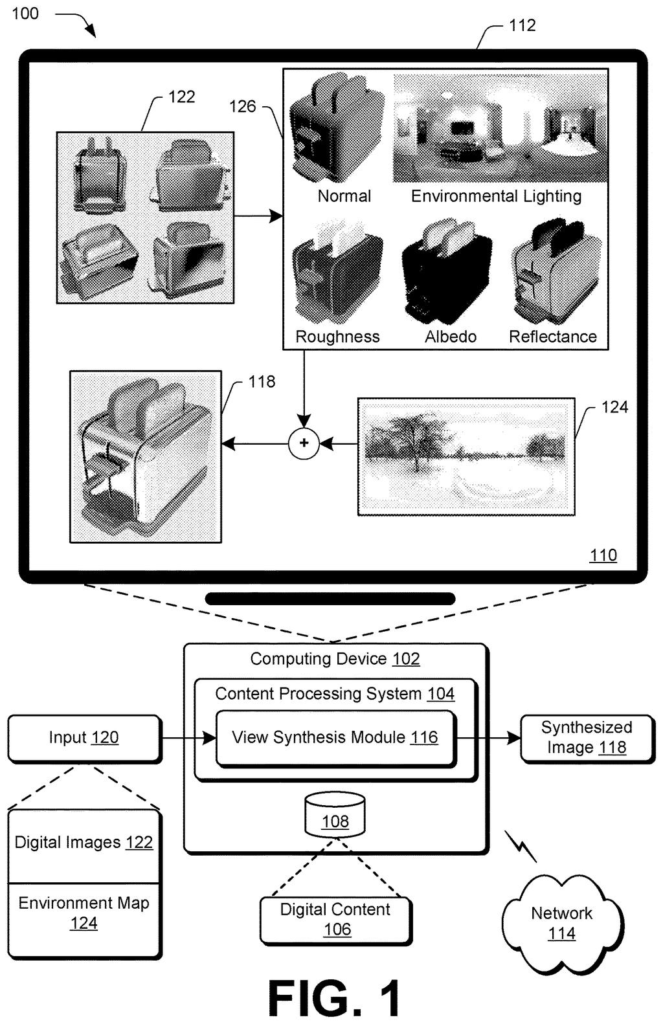
What Adobe's relighting patent does to a toaster
Ever photographed something shiny, like a metal toaster, and wished you could see it in different light? Normally you'd have to reshoot it, because the reflections are baked into the picture.
This patent application describes software that studies a set of photos of an object taken from several angles, then works out what the object is made of: its base color, how glossy it is, and how it bounces light around. With that knowledge, it can relight the object. The filing's own example takes toaster photos under one directional light, then shows the toaster from a new angle, with surfaces mirroring a wintry outdoor scene.
The key move is keeping the object's real surface separate from the lighting it happened to be photographed in. Swap the lighting, and the shiny parts update to match.
… overfitting, by the processing device, a neural network based on the digital images to determine radiance characteristics of the scene …
Translation: The computer intensely trains an AI on the photos to figure out how light interacts with the scene.
How Adobe splits matte color from shine
The system takes a set of photos of one scene from different angles and trains a neural network (a pattern-learning program) on just those photos. Training on a single scene is called overfitting, which is normally a flaw, but here it is the point: the network memorizes this one scene in detail.
It then splits the light it sees into two parts, using two neural radiance fields (networks that describe how light leaves each point in a 3D space):
- View-independent radiance: the matte, diffuse look that stays the same from any angle.
- View-dependent radiance: the shine and glints that shift as your viewpoint moves.
These two outputs act as a teacher for a physics-based renderer, which is checked separately on its diffuse and specular (shiny) results. To keep the split clean, the filing describes a dropout layer, a step that randomly switches off the shine output for a small share of samples during training (1 percent in the example). That pushes the matte network to explain everything it can without help from the viewing angle.
Lighting is stored in an environment map built as a Laplacian pyramid, a stack of layers where each holds a different level of detail (the example uses six). To relight, the stored map is swapped for a new one, and the radiance fields are used only during training.
… accurately render 3D scenes under different lighting conditions and perspectives than original source images from which the scenes are constructed …
Translation: The technology lets you completely alter the lighting and camera angle after the picture is taken.
Why product photos could skip the reshoot
If you work with product photos, game assets, or 3D models built from phone shots, the practical payoff is simple: capture once, then show the object in other lighting without a new shoot. A shiny kettle could appear in a bright kitchen or a dim cafe from the same set of pictures.
The filing names no Adobe product, so it is hard to say where this would land. The pain point it targets is clear, though. The filing says earlier methods struggle with very glossy or very matte surfaces, which are the ones most likely to look fake when the light changes. Better handling of those materials would make relit images look more believable to the people who look at them.
Adobe's 49th filing we've tracked in our AI photo editing race since May continues its video object work, following a transfer of video graphics and fixing drifting video edits.
The biggest cost here is that the network is trained on one scene at a time. Per the filing, analyzing a different set of photos means retraining from scratch. You cannot point it at a new object and get instant results.
The design also leans on a lot of moving parts: separate networks for density, materials, radiance, and lighting, plus a lighting map that has to be rebalanced every so often during training. More parts means more places for a reconstruction to go wrong, especially with odd materials.
Still, the trade reads as sensible for the use it targets. If you photograph a product once and use it in many lighting setups, paying for a slow, scene-specific training run up front is a fair price for reflections that hold up.
Get our take in your Top Stories
Liked this breakdown? Add Patentlyze as a preferred source on Google, and our plain-English take shows up more often in your Top Stories the next time Adobe patent news breaks.
There are more where this came from
We read every patent application Big Tech publishes and send you the ones worth knowing. Plain English, free, every week.
The drawings
11 drawing sheets from US 2026/0330755 A1 · click any drawing to enlarge


Show the other 3 sheets


Want this weekly breakdown for a company we don't cover? Patentlyze Pro →
Be the first to weigh in