
Adobe Files Patent for an AI That Finds the Right Table Before Editing Your PDF
Adobe describes an AI that finds the exact table, bullet or title you mean in a PDF from one typed or spoken sentence. It learns where things are from practice requests that another AI writes and then checks with its own code.
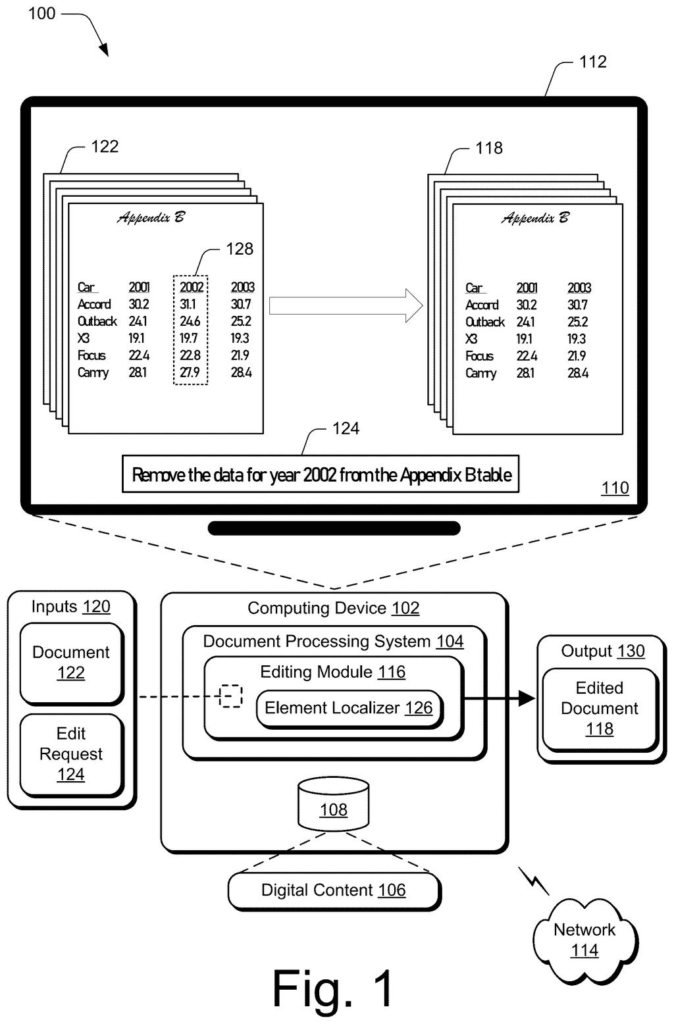
What Adobe's talk-to-your-PDF editor actually does
Ever tried to delete one column from a table buried in the appendix of a long PDF? You scroll, squint, drag a selection box, and hope you grabbed the right thing.
Adobe's patent application describes an AI helper that skips that hunt. You type or say something like "remove the data for 2002 from the Appendix B table." The AI looks at a picture of your document, works out which part you mean, and marks it with an invisible rectangle. Then it makes the change there and shows you the updated document.
The hard part is teaching the AI to find the right spot. Adobe describes training it on a large pile of made-up requests, each paired with the correct rectangle, and rewarding it when its rectangles line up closely with the real ones. If a request is unclear, like "change the color of the heading" when there are several headings, the system can ask you which one you meant.
… localizing, by a machine-learning model, a region of the document that corresponds to the element based on an image of the document and a description of the element in the edit request, the machine-learning model being trained to localize the region using a loss function for bounding box identifications of document elements; …
Translation: The AI finds the exact spot to change by matching your text request to a picture of the document.
How the AI learns to box in the right table
The first claim covers a simple chain. The system receives an edit request, and a machine-learning model studies an image of the document plus the description in your request to find the matching region. It then edits that region and shows you the updated document. The region is marked by a bounding box, a rectangle defined by four numbers: the top-left corner and the bottom-right corner. In the filing's example, the box [76, 76, 179, 95] marks where "Appendix B" sits on the page.
Most of the detail is in how the model is trained:
- Made-up practice requests: a large language model (the AI behind chatbots) writes fake edit requests paired with the correct box. It works from documents already partly labeled with titles, paragraphs, lists, tables, figures and captions, stored as a tree that shows what sits inside what.
- Code-based cleanup: the AI writes code to check each pair. For example, it confirms that "the third paragraph in section 2" really is that paragraph. Pairs that fail are dropped.
- Scoring: the model is rewarded for boxes that overlap the true box (called intersection over union) and that have corner coordinates close to the true ones.
- Easy to hard: training starts with simple jobs, like finding a lone heading, and moves to nested elements.
The filing also describes batch edits (change every instance of a company name), moving a bullet point from one list to another, and chat or voice requests on a mobile device.
What this means for editing PDFs on your phone
If you have ever edited a PDF on your phone, you know how fiddly it is to tap the exact line, cell or image you want. A tool that works from a typed or spoken sentence, such as "move the third bullet point in the second list to the end of the first list," could make quick fixes on a small screen far less painful. The filing says this helps most on low-resource devices or ones that are hard to type on.
The filing centers on PDFs and a cloud document service, so an editing assistant inside an app like Adobe Acrobat could be a natural fit. Adobe also describes edits that apply across a whole document, and a prompt that asks which heading you meant when there are several. None of this is an announced feature, but it shows where document editing could head: you say what you want, and the software finds the spot.
Adobe's sixth filing we've tracked on our agents that act for you since August follows a marketing automation step builder and a self-rewriting copy system.
Claim 1 is wide. It covers any machine-learning model that takes a request to edit part of a document, looks at an image of the page, finds the matching region, edits it, and shows the result. The one tight condition is that the model was trained with a scoring method built around rectangles drawn on document parts.
The first claim never names PDFs, tables, chat or voice. Those details show up only in later claims, which narrow the idea. Claim 10 stands apart and covers the training recipe itself: an AI writes made-up edit requests with correct boxes, and a model learns from them.
If granted, claim 1 would cover editing tools that find the right piece of a page through a box-drawing model trained this way. That is a lot of ground for a fairly ordinary idea, and the training recipe is where the specific work sits.
Get our take in your Top Stories
Liked this breakdown? Add Patentlyze as a preferred source on Google, and our plain-English take shows up more often in your Top Stories the next time Adobe patent news breaks.
There are more where this came from
We read every patent application Big Tech publishes and send you the ones worth knowing. Plain English, free, every week.
The drawings
8 drawing sheets from US 2026/0330123 A1 · click any drawing to enlarge


Want this weekly breakdown for a company we don't cover? Patentlyze Pro →
Be the first to weigh in