
Apple Files Patent to Let Your Scribbles on 3D Objects Travel With the File
Most 3D file formats have no place to keep your handwriting. Apple's filing describes a file that stores the object and your notes together, so the notes stay put wherever the object goes.
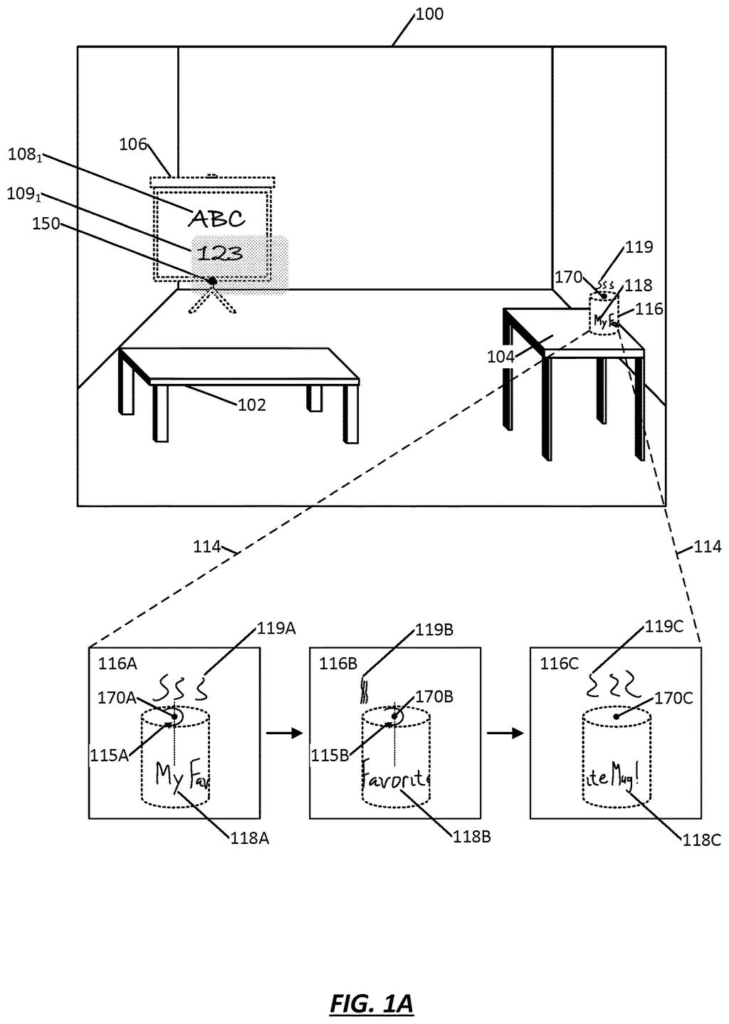
What Apple's markup-saving 3D file actually does
A woman in a headset walks up to a virtual coffee mug and writes "My Favorite Mug!" around its side with her fingertip. Then she sends the mug to a friend. The common 3D file formats have no place to store that handwriting, so the mug would arrive blank.
Apple's filing describes a file that holds two things side by side: the 3D object and your markings on it. Each mark is saved along with its position on the object. Spin the mug, move it across the room, or open it on someone else's device, and the writing stays exactly where you put it.
You can hide the markings when they crowd your view, add more later, or send only the markings to a collaborator. Marks can be drawn right on the surface, or placed where the headset infers you are looking, and those fade as you walk away from the spot.
… obtaining a first markup at a first location corresponding to the 3D object, wherein the first markup comprises a direct mark on the 3D object; obtaining a second markup at a second location corresponding to the 3D object, wherein the second markup comprises an indirect mark associated with the 3D object …
Translation: Users can draw directly on a 3D model or place notes floating nearby.
How the file separates the object from the marks
The filing describes a 3D object markup file with two main parts. One part holds the 3D model itself, which can be stored in a standard format such as USD (a widely used 3D file type). The other part holds the markings. The file is laid out as a tree of "nodes" (labeled slots inside the file), so the object and its markings sit on separate branches.
The claims cover two kinds of marks:
- Direct marks are drawn right on the object's surface with a fingertip, stylus or cursor.
- Indirect marks are placed where the device infers you mean, for example from your gaze. They can appear on a floating plane and fade out as you move away from the angle where you made them.
Strokes are bundled into groups (a word, say), and each stroke is saved as its own node with curve data (the line described mathematically). That keeps strokes editable, rather than baked into the object's surface. Each mark's position is measured from an "origin point" on the object, so it stays in place when the object moves. The file can also record stroke order so a viewer can replay the drawing.
For sharing, the device can send only the markings, either on a schedule (the filing gives every 5 minutes as an example) or each time something changes, which allows live teamwork. Exporting to a standard format bakes the marks in, viewable but locked.
… sharing of 3D object markup files (including any persistent markup information) with other users, e.g., asynchronously or in real-time, allowing for collaboration in the process of marking up virtual 3D objects …
Translation: Collaborators can share marked up 3D files either live or later on.
What this means for sharing 3D objects in a headset
If you look at 3D models in a headset, your notes would stop being throwaway. You could mark up a design, send it to a colleague, and they would see your notes right where you put them and add their own. When the notes get in the way, you switch them off.
The sharing design looks built to stay light. The 3D model is usually much bigger than the markings, so sending only the changed part could be quicker. Files in the new layout can still open as a plain object in software that does not know about markings, so nothing breaks. You just miss the notes.
Apple's 102nd filing in Apple's AR glasses patents we've tracked since May follows work like finding friends through walls and easing motion sickness.
Anyone who has emailed a document and watched the comments vanish knows the annoyance this targets. Here, your scribbles on a 3D object stay attached and in the right spot, even after the object is moved or passed to someone else.
You would notice it most when working with other people. A teammate can add notes, you can hide them when they crowd your view, and nobody has to resend a huge model for each small tweak.
The catch is that the full experience needs both people's software to understand the new file layout. Everyone else gets either the plain object or a locked copy with the marks frozen in. Handy for design reviews, mostly invisible otherwise.
Get our take in your Top Stories
Liked this breakdown? Add Patentlyze as a preferred source on Google, and our plain-English take shows up more often in your Top Stories the next time Apple patent news breaks.
There are more where this came from
We read every patent application Big Tech publishes and send you the ones worth knowing. Plain English, free, every week.
The drawings
9 drawing sheets from US 2026/0330760 A1 · click any drawing to enlarge


Show the other 1 sheets

Want this weekly breakdown for a company we don't cover? Patentlyze Pro →
Be the first to weigh in