
Apple Files Patent to Fight Headset Motion Sickness by Resizing What You Watch
Apple's headset patent treats motion sickness as a window-sizing problem: stretch the picture sideways, then all the way around you, when things get too intense.
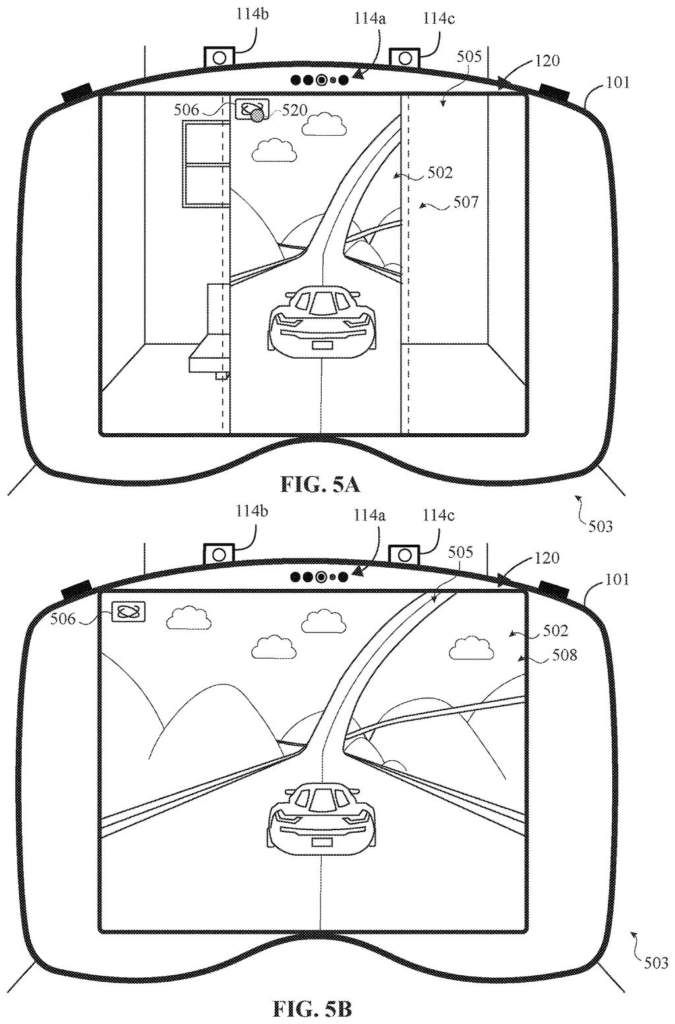
What Apple's resizing headset window does
Right now, a racing game in a headset shows your eyes a car tearing around corners while your body sits perfectly still. Your brain gets two conflicting stories, and the mismatch can leave you queasy. Apple's filing describes a headset that notices the problem and changes how big the picture is.
It starts with a floating window in your room. When trouble looks likely, the window stretches sideways and wraps around you, while its height stays put so you can still see your surroundings above and below. If that is not enough, it grows upward too, until the content surrounds you completely.
The trigger can be a button press, a glance, or a hand pose. It can also be automatic: the game is flagged as a racing game, the on-screen motion gets fast, or a paired watch notices your heart rate climbing. The same triggers can shrink the picture back down.
extending a size of a first dimension of the virtual content from a first size in the first display mode to a second size in the second display mode …
Translation: Making one side of the virtual screen larger when a user wants to change how it looks.
How the window grows from floating to full wrap
The claims cover a ladder of display modes. In the first mode, content sits in a floating window with your surroundings visible around it. When the device gets an indication (a request to change modes), it moves to a second mode that extends one dimension, such as width, while keeping the other dimension, such as height, unchanged. A second request can move it to a third mode that extends the other dimension too.
The filing lists many possible triggers:
- A button or an on-screen prompt
- You moving within a threshold distance of the content, or walking from one spot to another
- Physiological signs, such as a rising heart rate reported by a paired watch
- A motion sensitivity setting (low, medium or high) you pick before launching
- The content itself, such as a racing game flagged in its metadata
One example uses numbers. When things on screen move faster than 500 pixels per second (a measure of how quickly the picture changes), the window moves to the second mode, and above 1,000 pixels per second it moves to the third. The change plays as a slow animation, so the transition does not add to the sickness.
The gap between the content and the edge of the display can be tuned with settings such as opacity, and an important object can be cut out so it still shows in that gap. Turning away from the content by a set angle can shrink it or switch it off.
… detects an indication corresponding to a request to modify a display mode of the virtual content …
Translation: The device notices when you ask to change the way your content is being shown.
Why headset motion sickness is Apple's problem to fix
If a fast game or chase scene has ever turned your stomach in a headset, this is aimed at you. Instead of making you dig through settings or quit, a headset like Apple's Vision Pro could change the picture's size on its own. The filing even describes the game warning the device about a sharp turn a moment early, so the change happens before you feel anything.
For Apple and app makers, this is a comfort feature that could keep people in headsets longer. Racing games and action movies are the content most likely to cause trouble, and they are also what many people want on a giant virtual screen. Keep in mind this is a patent application, so it says nothing about whether the feature will ship.
Apple's 100th filing we've tracked since May in our AR glasses watchlist adds to a picture built by applications like one skipping repeat eye scans and one cutting cellular wake-ups.
If you get motion sick in a headset, the only real fix today is to stop. A headset that eases you down before the nausea hits would be a concrete benefit, and you would notice it the first time a racing game takes a hard corner and your stomach stays put.
The most useful part is the automatic side. A watch that reports a rising heart rate, or a game that warns about a sharp turn early, means you do not have to recognize the problem and fix it yourself.
Whether it works well is still open. Changing the picture's size to cure sickness is a bold bet, and the filing shows no test results. On paper it is a sensible comfort feature, with the proof still ahead.
Get our take in your Top Stories
Liked this breakdown? Add Patentlyze as a preferred source on Google, and our plain-English take shows up more often in your Top Stories the next time Apple patent news breaks.
There are more where this came from
We read every patent application Big Tech publishes and send you the ones worth knowing. Plain English, free, every week.
The drawings
23 drawing sheets from US 2026/0330790 A1 · click any drawing to enlarge


Show the other 15 sheets


Want this weekly breakdown for a company we don't cover? Patentlyze Pro →
Be the first to weigh in