
Apple · Filed Jul 2, 2026 · Published Oct 22, 2026

Apple Files Patent to Preview Your Stylus Mark as You Twist It Above the Screen

Apple's filing gives your stylus a fake shadow and a live preview, so you can twist a chisel-tip highlighter in midair and see its angle before any ink touches the screen.
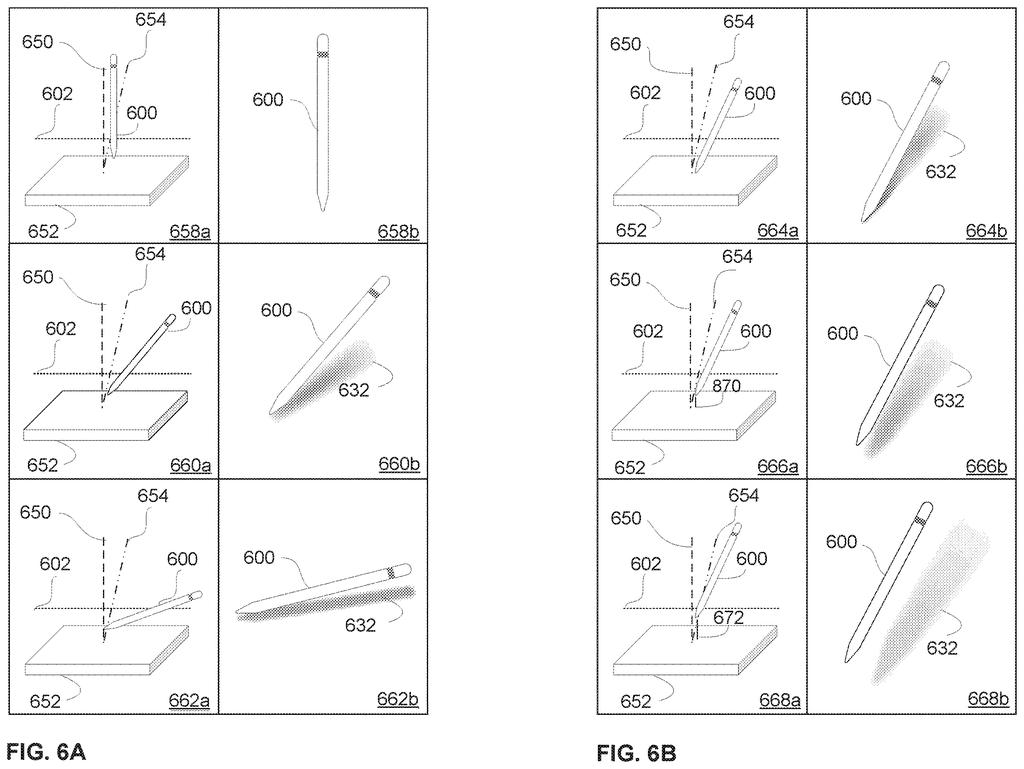
A stylus held at various angles above a screen previews how tilting and rotating changes the mark it makes. Drawing from patent filing US 2026/0329428 A1.
A stylus held at various angles above a screen previews how tilting and rotating changes the mark it makes.
See all 61 drawings from this filing ↓
Publication number US 2026/0329428 A1 US20260329428A1
Applicant Apple Inc.
Filing date Jul 2, 2026
Publication date Oct 22, 2026
Inventors Marcos ALONSO, Daniel T. PRESTON, Peder BLEKKEN, Christopher D. SOLI
US classification 345/179
Status when we published Waiting for an examiner (Jul 15, 2026)
Parent application is a Continuation of 18952761 (filed 2024-11-19)
Document 24 claims

What Apple's stylus twist preview actually does

A person hovers a stylus just above a tablet, ready to highlight a line of text. The highlighter has a flat, chisel-shaped tip, so how the mark looks depends on which way that tip is facing. Until the pen touches down, you can't tell.

Apple's patent filing tries to take the guesswork out. Your screen shows a preview mark of where ink would land, plus a faint virtual shadow of the pen itself. Roll the stylus between your fingers and the preview turns with it, even if the pen hasn't moved from its spot.

The filing also describes ways to lock the tip's angle so it stops following your twists, and ways to snap it back to a default angle, such as picking a different tool or pulling the pen away from the screen and bringing it back.

From the filing · CLAIM 1
… detecting, via the one or more sensors, rotational movement of the input device about the first axis associated with the input device, the rotational movement of the input device corresponding to a change in orientation of the input device about the first axis …

Translation: Sensors track when you twist the stylus around its central axis.

How the pen's roll turns the preview mark

The patent covers a drawing screen that tracks two things about a stylus. The first is its pose (where it is and how far it is tilted relative to the surface). The second is its orientation about its own long axis (how much it has been rolled, like twisting a pencil between your fingers). The core claim is about that second part: while the pen holds still, rolling it changes how the on-screen preview mark looks.

A second layer is a virtual shadow, shown when the pen is within a threshold distance of the screen. It has one piece for the tip and one for the barrel. When the tip has no radial symmetry (it looks different from different sides, like a chisel), the shadow's shape changes as you roll the pen. The preview mark also grows or shrinks with the pen's distance from the screen.

The claims add several controls:

  • Lock: an event tells the screen to hold the tool's angle even as you keep rolling the pen.
  • Reset: the angle returns to a default if you move between screen areas and back, pull the pen away from the display and return, or select another tool.
  • Visibility: a toggle turns the shadow off, and user settings can show only the preview in the drawing area.

One example in the description: a 90-degree roll turns a highlighter's preview by 90 degrees, while a 180-degree roll on a pill-shaped tip looks identical because of its shape.

From the filing · THE ABSTRACT
… providing feedback about the pose and/or orientation of an input device relative to a surface, such as feedback about a change in an orientation of the input device relative to the surface due to rotational movement …

Translation: The system shows visual cues about how the stylus is angled and twisted above the screen.

Why hovering stylus feedback matters for artists

If you draw or annotate with a stylus, you know the loop: lay down a stroke, see it came out wrong, undo, try again. Seeing the tip's angle before ink lands could cut down on that, especially with highlighter or brush tools whose marks change shape depending on how the tip is turned.

The description frames the idea as a time and battery saver, since fewer wasted strokes means less for the device and a battery-powered pen to process. The filing is also a continuation of an earlier application, so this wording has been through at least one earlier round of paperwork.

Apple's 579th filing in our Apple coverage since May adds to a run of audio ideas that includes sleep-detecting earbuds and shared audio settings.

Editorial take

The shortest route to a product here is software. The filing describes a pen that can carry motion sensors (an accelerometer, a magnetometer and a gyroscope) and report its angle and position to the screen over Bluetooth. If a stylus and screen already supply that data, the feature is mostly drawing-app code.

What has to exist first is a set of brushes with real tip shapes, like a chisel highlighter or a fan brush. A round tip looks the same however you twist it, so without those tips the preview has nothing to show.

Bottom line: this is a modest layer that could ride on a compatible pen and screen, so the distance to a shippable feature is short. The slow part is polish: deciding when a twist counts, when it locks, and when it resets.

Get our take in your Top Stories

Liked this breakdown? Add Patentlyze as a preferred source on Google, and our plain-English take shows up more often in your Top Stories the next time Apple patent news breaks.

There are more where this came from

We read every patent application Big Tech publishes and send you the ones worth knowing. Plain English, free, every week.

The drawings

61 drawing sheets from US 2026/0329428 A1 · click any drawing to enlarge

Hardware parts that run the touchscreen device, drawing sheet 1 from US 2026/0329428 A1
Sheet 1 Hardware parts that run the touchscreen device
Software that recognizes and routes user inputs, drawing sheet 2 from US 2026/0329428 A1
Sheet 2 Software that recognizes and routes user inputs
Phone layout supporting finger and stylus controls, drawing sheet 3 from US 2026/0329428 A1
Sheet 3 Phone layout supporting finger and stylus controls
Computer setup with a separate display and touchpad, drawing sheet 4 from US 2026/0329428 A1
Sheet 4 Computer setup with a separate display and touchpad
Home screen showing available built-in apps, drawing sheet 5 from US 2026/0329428 A1
Sheet 5 Home screen showing available built-in apps
Using two-finger gestures on a separate touchpad, drawing sheet 6 from US 2026/0329428 A1
Sheet 6 Using two-finger gestures on a separate touchpad
Smartwatch face showing physical buttons and display, drawing sheet 7 from US 2026/0329428 A1
Sheet 7 Smartwatch face showing physical buttons and display
Motion sensors and processors inside a smartwatch, drawing sheet 8 from US 2026/0329428 A1
Sheet 8 Motion sensors and processors inside a smartwatch
Show the other 52 sheets
Corner sensors measuring pressure from multiple fingers on a screen, drawing sheet 9 from US 2026/0329428 A1
Sheet 9 Corner sensors measuring pressure from multiple fingers on a screen
Calculating the exact force behind each finger tap, drawing sheet 10 from US 2026/0329428 A1
Sheet 10 Calculating the exact force behind each finger tap
Lightly pressing a trackpad to target a dock icon, drawing sheet 11 from US 2026/0329428 A1
Sheet 11 Lightly pressing a trackpad to target a dock icon
Pushing harder on the trackpad to pop open a file, drawing sheet 12 from US 2026/0329428 A1
Sheet 12 Pushing harder on the trackpad to pop open a file
Increasing pressure further reveals a second file, drawing sheet 13 from US 2026/0329428 A1
Sheet 13 Increasing pressure further reveals a second file
Deep press opens a third document from the dock, drawing sheet 14 from US 2026/0329428 A1
Sheet 14 Deep press opens a third document from the dock
Internal parts linking a television box to phone controllers, drawing sheet 15 from US 2026/0329428 A1
Sheet 15 Internal parts linking a television box to phone controllers
Shading effects change as the stylus tilts over the screen, drawing sheet 16 from US 2026/0329428 A1
Sheet 16 Shading effects change as the stylus tilts over the screen
Tilting the stylus projects a simulated shadow on screen, drawing sheet 17 from US 2026/0329428 A1
Sheet 17 Tilting the stylus projects a simulated shadow on screen
Dropping the stylus lower expands the shadow preview, drawing sheet 18 from US 2026/0329428 A1
Sheet 18 Dropping the stylus lower expands the shadow preview
Moving closer replaces the shadow with a mark preview, drawing sheet 19 from US 2026/0329428 A1
Sheet 19 Moving closer replaces the shadow with a mark preview
Raising the tip shrinks the mark preview above the glass, drawing sheet 20 from US 2026/0329428 A1
Sheet 20 Raising the tip shrinks the mark preview above the glass
Aligning the pen vertically displays both shadow and tip previews, drawing sheet 21 from US 2026/0329428 A1
Sheet 21 Aligning the pen vertically displays both shadow and tip previews
Twisting the stylus rotates the mark preview on screen, drawing sheet 22 from US 2026/0329428 A1
Sheet 22 Twisting the stylus rotates the mark preview on screen
Rolling further continues turning the digital brush angle, drawing sheet 23 from US 2026/0329428 A1
Sheet 23 Rolling further continues turning the digital brush angle
Angling the barrel sideways shifts the virtual tip orientation, drawing sheet 24 from US 2026/0329428 A1
Sheet 24 Angling the barrel sideways shifts the virtual tip orientation
A marker tip preview shifts with stylus tilt, drawing sheet 25 from US 2026/0329428 A1
Sheet 25 A marker tip preview shifts with stylus tilt
Twisting the stylus rotates the marker tip preview, drawing sheet 26 from US 2026/0329428 A1
Sheet 26 Twisting the stylus rotates the marker tip preview
Moving the hovering stylus upward across the screen, drawing sheet 27 from US 2026/0329428 A1
Sheet 27 Moving the hovering stylus upward across the screen
Hovering near a toolbar icon alters the preview, drawing sheet 28 from US 2026/0329428 A1
Sheet 28 Hovering near a toolbar icon alters the preview
The preview contracts to highlight a camera icon, drawing sheet 29 from US 2026/0329428 A1
Sheet 29 The preview contracts to highlight a camera icon
Tapping the toolbar selects a fan brush tool, drawing sheet 30 from US 2026/0329428 A1
Sheet 30 Tapping the toolbar selects a fan brush tool
Wide brush previews match the tilted stylus angle, drawing sheet 31 from US 2026/0329428 A1
Sheet 31 Wide brush previews match the tilted stylus angle
Rolling the stylus narrows the fan brush mark, drawing sheet 32 from US 2026/0329428 A1
Sheet 32 Rolling the stylus narrows the fan brush mark
Rotating the stylus barrel previews the angled brush stroke, drawing sheet 33 from US 2026/0329428 A1
Sheet 33 Rotating the stylus barrel previews the angled brush stroke
Previewing an angled marker stamp before touching the glass, drawing sheet 34 from US 2026/0329428 A1
Sheet 34 Previewing an angled marker stamp before touching the glass
Drawing a line using the thin edge of the marker, drawing sheet 35 from US 2026/0329428 A1
Sheet 35 Drawing a line using the thin edge of the marker
Making a wide stroke with the flat marker edge, drawing sheet 36 from US 2026/0329428 A1
Sheet 36 Making a wide stroke with the flat marker edge
Turning the barrel aligns the marker horizontally, drawing sheet 37 from US 2026/0329428 A1
Sheet 37 Turning the barrel aligns the marker horizontally
Pulling downward creates a thick vertical stroke, drawing sheet 38 from US 2026/0329428 A1
Sheet 38 Pulling downward creates a thick vertical stroke
Twisting the tip vertically narrows the hovering preview, drawing sheet 39 from US 2026/0329428 A1
Sheet 39 Twisting the tip vertically narrows the hovering preview
Gliding the turned marker leaves a thin line, drawing sheet 40 from US 2026/0329428 A1
Sheet 40 Gliding the turned marker leaves a thin line
Angling the tilted stylus rotates the broad preview mark, drawing sheet 41 from US 2026/0329428 A1
Sheet 41 Angling the tilted stylus rotates the broad preview mark
Touching down draws a thin stroke along the tip edge, drawing sheet 42 from US 2026/0329428 A1
Sheet 42 Touching down draws a thin stroke along the tip edge
Rotating the hovering stylus reorients the broad marker preview, drawing sheet 43 from US 2026/0329428 A1
Sheet 43 Rotating the hovering stylus reorients the broad marker preview
Lowering the stylus tip produces a wider line, drawing sheet 44 from US 2026/0329428 A1
Sheet 44 Lowering the stylus tip produces a wider line
Twisting the barrel while drawing alters the stroke orientation, drawing sheet 45 from US 2026/0329428 A1
Sheet 45 Twisting the barrel while drawing alters the stroke orientation
Rolling the barrel narrows the drawn stroke on the fly, drawing sheet 46 from US 2026/0329428 A1
Sheet 46 Rolling the barrel narrows the drawn stroke on the fly
Squeezing the stylus body triggers an alternate brush behavior, drawing sheet 47 from US 2026/0329428 A1
Sheet 47 Squeezing the stylus body triggers an alternate brush behavior
Ignoring barrel twist maintains a fixed stroke width during drawing, drawing sheet 48 from US 2026/0329428 A1
Sheet 48 Ignoring barrel twist maintains a fixed stroke width during drawing
Rotating the stylus barrel without changing the brush angle, drawing sheet 49 from US 2026/0329428 A1
Sheet 49 Rotating the stylus barrel without changing the brush angle
Drawing a narrower line after sliding the stylus tip, drawing sheet 50 from US 2026/0329428 A1
Sheet 50 Drawing a narrower line after sliding the stylus tip
Squeezing the stylus sides to change stroke thickness, drawing sheet 51 from US 2026/0329428 A1
Sheet 51 Squeezing the stylus sides to change stroke thickness
Producing a thinner stroke segment from the squeeze, drawing sheet 52 from US 2026/0329428 A1
Sheet 52 Producing a thinner stroke segment from the squeeze
Hovering above the display to preview brush stamp orientation, drawing sheet 53 from US 2026/0329428 A1
Sheet 53 Hovering above the display to preview brush stamp orientation
Lifting the stylus too high hides the hover preview, drawing sheet 54 from US 2026/0329428 A1
Sheet 54 Lifting the stylus too high hides the hover preview
Lowering the stylus back into range restores the preview, drawing sheet 55 from US 2026/0329428 A1
Sheet 55 Lowering the stylus back into range restores the preview
Twisting the hovering stylus rotates the brush stamp preview, drawing sheet 56 from US 2026/0329428 A1
Sheet 56 Twisting the hovering stylus rotates the brush stamp preview
Rotating the stylus barrel to adjust a tool, drawing sheet 57 from US 2026/0329428 A1
Sheet 57 Rotating the stylus barrel to adjust a tool
A wide brush preview shown as the tilted stylus hovers, drawing sheet 58 from US 2026/0329428 A1
Sheet 58 A wide brush preview shown as the tilted stylus hovers
Drawing a thin stroke after twisting the stylus edge-on, drawing sheet 59 from US 2026/0329428 A1
Sheet 59 Drawing a thin stroke after twisting the stylus edge-on
Settings menu toggles for virtual tool shadows and stylus gestures, drawing sheet 60 from US 2026/0329428 A1
Sheet 60 Settings menu toggles for virtual tool shadows and stylus gestures

Sheets 61 to 61 are in the full USPTO filing.

Browse all the drawings 61 drawing sheets
Patent filing page

Source. Full patent text and figures from the official USPTO publication PDF.
Reader comments

Be the first to weigh in

Start the discussion

Real name or a handle, either is fine. Comments are read by a person before they appear, so allow a little time. Keep it about the filing.