
Apple Files Patent to Let Audio Add-Ons Share Settings in Music Software
Move a sound in one window of Apple's music-editing setup and every other window showing that sound changes with it. The filing gets there by giving separate add-on tools one shared place to keep their numbers.
What Apple's shared audio settings actually do
Every time you drag a drum track a little to the left in a spatial audio mix, you expect every number describing it to change too. In music software, that is harder than it sounds. Apple's filing says the small add-on tools inside these apps, called plug-ins, are walled off from each other and can only trade a few kinds of information through the main app.
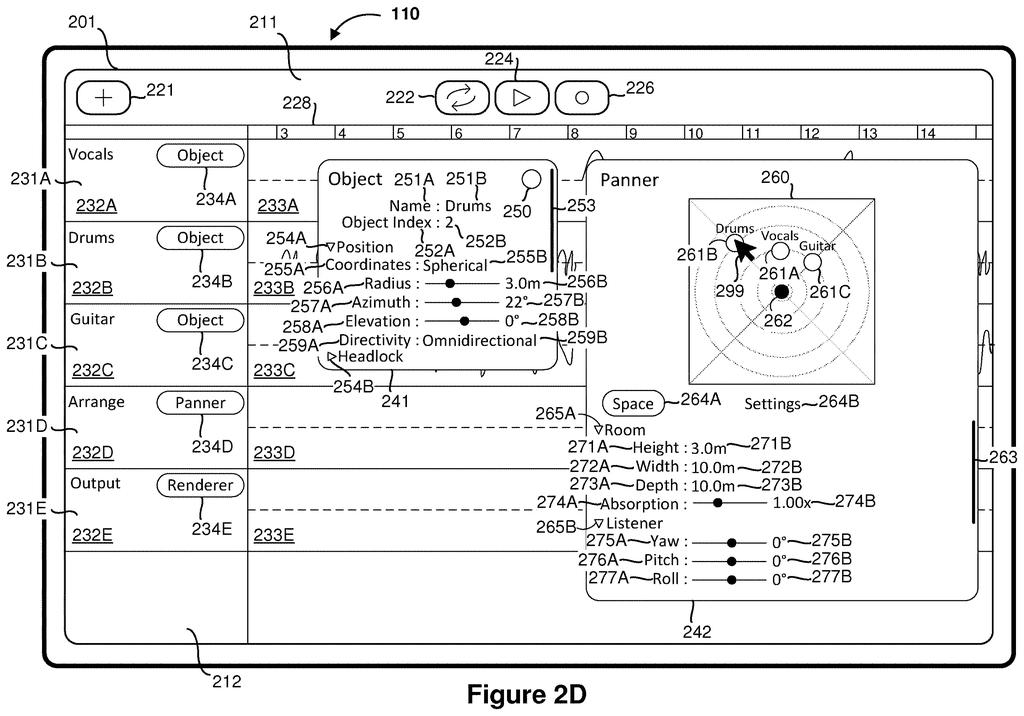
Apple's fix works like a shared notebook. Each add-on writes to and reads from the same spot in memory, so one tool's window and another's always show the same value. In the filing's example, a Drums track sits 3.0 meters from the listener. Drag it on a map of the room, and a second window full of settings flips to 2.3 meters right away.
Change it in either window and the other follows. The tool that builds the final mix reads from the same notebook, too.
displaying a first audio plug-in window including a first value of a first property of a first audio asset; displaying a second audio plug-in window including the first value of the first property of the first audio asset; …
Translation: Two separate audio effect windows show the exact same setting at the same time.
How audio plug-ins trade data through shared memory
Music apps like this are called digital audio workstations (DAWs): software that arranges recorded sounds on a timeline and mixes them into one output. Add-on tools called plug-ins run inside the app, and each one opens its own window showing settings for a sound, such as its position in a 3D space.
The filing's problem is that plug-ins are isolated from each other. They can only pass data through the main app, which accepts certain data types. Apple's answer is a dynamic library (a shared piece of code loaded into the app) that manages a dedicated chunk of memory. Every plug-in in the suite can read from and write to that chunk.
The claims cover the core behavior:
- Two plug-in windows both show the same value of a property of a sound, such as its distance or whether it is switched on.
- When the user changes that value, in either window, both windows show the new one.
- Optional parts: a window can show a second sound or the room itself, and the final audio is built from the stored values, including ones no window displays.
In the filing's example, an Object window and a Panner window (a map of where sounds sit around a listener) both show a drum track at 3.0 meters. Drag the drum on the map and both read 2.3 meters. Switching a track to inactive also removes it from the map and from the final mix.
Why spatial audio mixers should care about this
If you make spatial audio, where each sound is placed around the listener, this means fewer moments of wondering which window holds the true setting. Move a guitar in one place and every view of it updates, so what you see matches what the mix uses.
The filing also describes other add-ons sharing data the main app could not pass along, such as a head-tracking device feeding other tools, or a loudness reading that an export tool writes into the finished file. That points to a mixing setup built from tools that cooperate with each other, though the filing names no product.
Apple's 577th filing in our Apple coverage since May follows patents like the AI app builder and scribbles on 3D files.
Most people will never see this, and that is fine. It matters to the small group who build spatial audio mixes, where two windows disagreeing about where a guitar sits is a bug you might only catch by ear, late in a session. A single shared source for each number removes that failure before it starts.
The core claim is simple: one value, shown in two places, updated together. Even so, a mixing tool you can trust to stay in step saves you from double-checking your own settings, and that adds up over a long project.
One detail deserves a second look. The final mix can use numbers that no window on screen displays. That could simplify your workflow, or it could surprise you, depending on how clearly the app shows what is shaping your sound.
Get our take in your Top Stories
Liked this breakdown? Add Patentlyze as a preferred source on Google, and our plain-English take shows up more often in your Top Stories the next time Apple patent news breaks.
There are more where this came from
We read every patent application Big Tech publishes and send you the ones worth knowing. Plain English, free, every week.
The drawings
17 drawing sheets from US 2026/0329525 A1 · click any drawing to enlarge


Show the other 9 sheets


Want this weekly breakdown for a company we don't cover? Patentlyze Pro →
Be the first to weigh in