
Samsung Files Patent for Dragging One Finger to Select Whole Rows of Photos
Samsung's filing describes dragging one finger down a photo grid and having every row you cross selected in full, even the pictures your finger never touched.
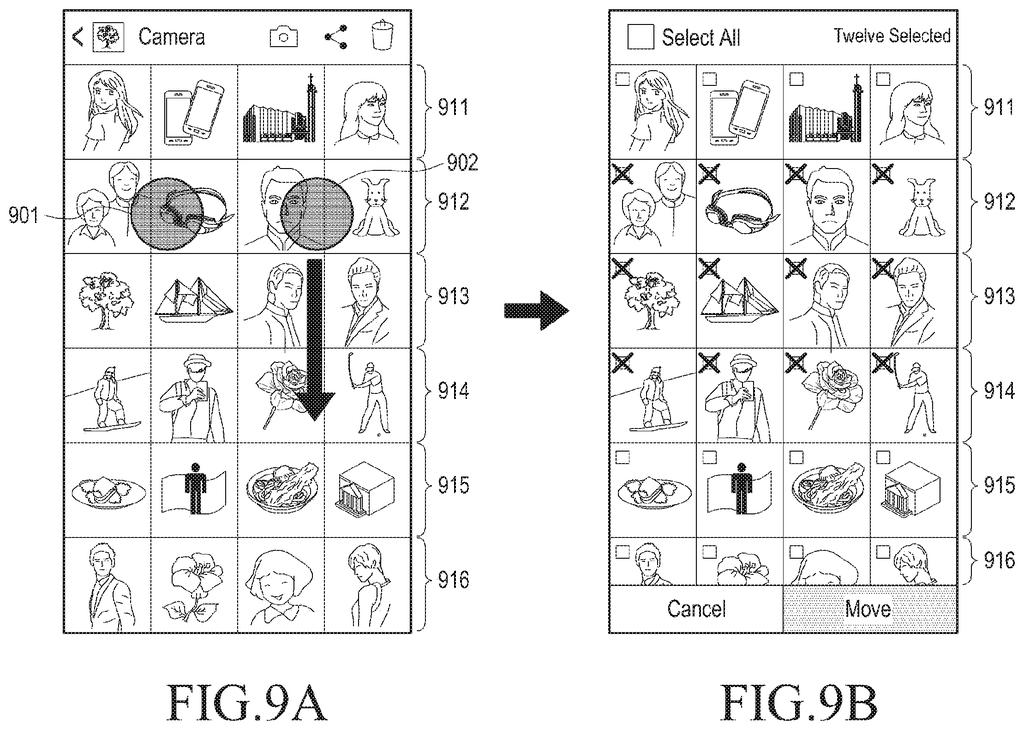
What Samsung's drag-to-select gesture does
Right now, picking five photos to delete usually means tapping five times. Samsung's own filing says typical phones only let you select one item at a time, or select everything or nothing, with little in between.
The patent describes a different gesture. You switch your phone into a selection mode, touch one picture, then drag your finger down the screen. Every row you cross gets selected as a whole, including pictures your finger skipped, and checkmarks show what you've picked.
Changed your mind? A second drag can back the selection out. And if your gallery runs past the bottom of the screen, the page can scroll while you keep dragging, so one long swipe could cover a lot of photos.
… detecting that the first touch input is moved from the selected first item on the first row to a second item on a third row, wherein at least one second row of the first set of items is positioned between the first row and the third row …
Translation: Dragging your finger across rows to select multiple photos at once.
How a drag grabs whole rows of items
The filing starts with a screen of items laid out in a grid of rows and columns, such as a photo gallery or a song list. You first switch the device into a selection mode, a state where touches pick items instead of opening them or simply scrolling.
Once you're in that mode, touching an item selects it. If you then drag that same finger to an item on a lower row, with at least one row sitting in between, the device selects every item in the rows between, including ones your finger never touched, plus the row where you stopped. One dependent claim has the finger ending on the last item of that final row, and another says the untouched items in that final row get picked too.
Other things the claims cover:
- Checked boxes appear next to each selected item.
- A second touch dragged in the opposite direction can deselect items.
- The screen can scroll to bring in more rows while your finger keeps dragging, and the selection carries on into those new rows.
- A delete command removes the selected items and their images.
The description also shows the mode being entered with two fingers, and says scroll speed could change with how far apart those fingers are. Those are variations the filing describes, not what the claims require.
… selecting all of the items arranged in the second row and the third row, the all of the items including at least one touched item arranged in the second row of the first set of items, and at least one untouched item arranged in the second row of the first set of items …
Translation: Even items your finger never directly touched get selected automatically.
What drag-to-select means for photo cleanup
The practical payoff is cleanup speed. Clearing out a messy photo gallery, building a playlist, or moving a batch of files could take one drag instead of a tap on every item. Because the filing uses photo galleries and song lists as its examples, the gain would show up in everyday apps rather than specialist tools.
There's also a bit of history here. The filing is a continuation of an application first filed in 2014, so the core idea has been around for a long time. What's new in this version is how tightly the claims pin down the row-based behavior: skipped items in the crossed rows get picked up automatically.
Samsung's 1532nd filing we've tracked since May joins earlier applications like a recent-apps chat view and sliding car displays in our Samsung coverage.
Selecting by whole rows trades precision for speed. Drag across a row of photos and every one of them gets picked, including the ones you wanted to leave out.
The filing covers that risk with a second drag that backs the selection out, and with checkmarks that show what's picked before you act. That safety net matters most for deleting, where a sloppy grab can cost you a photo.
For cleaning up a crowded gallery, the trade looks worth it, since speed beats finesse there. Given that the idea traces to a 2014 application, it's a polish on a familiar gesture, and its value will depend on how well it holds up when your finger drifts across the wrong row.
Get our take in your Top Stories
Liked this breakdown? Add Patentlyze as a preferred source on Google, and our plain-English take shows up more often in your Top Stories the next time Samsung patent news breaks.
There are more where this came from
We read every patent application Big Tech publishes and send you the ones worth knowing. Plain English, free, every week.
The drawings
17 drawing sheets from US 2026/0329414 A1 · click any drawing to enlarge


Show the other 9 sheets


Want this weekly breakdown for a company we don't cover? Patentlyze Pro →
Be the first to weigh in