
Samsung · Filed Jan 28, 2026 · Published Oct 22, 2026

Samsung Files Patent for a Recent-Apps Screen That Lists Your Chats, Files and Searches

Samsung wants the screen you use to switch apps to show what you were doing inside each one, not just which app it was. Tap a chat, a search, a draft or a washing machine setting, and you land right where you left off.
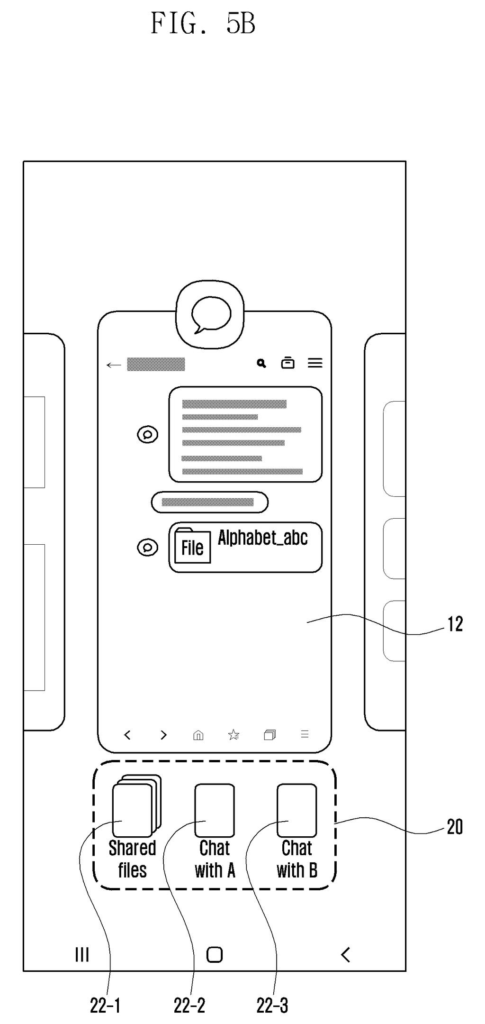
A phone recent-apps screen groups a messaging window with quick buttons to open specific chats and shared files. Drawing from patent filing US 2026/0329601 A1.
A phone recent-apps screen groups a messaging window with quick buttons to open specific chats and shared files.
See all 33 drawings from this filing ↓
Publication number US 2026/0329601 A1 US20260329601A1
Applicant SAMSUNG ELECTRONICS CO., LTD.
Filing date Jan 28, 2026
Publication date Oct 22, 2026
Inventors Haebahrem Ahram SUH, Jungmi KIM, Jinwan AN, Jinkyo CHUNG, Heeyoung CHUNG
US classification 715/764
Status when we published Waiting for an examiner (Jul 23, 2026)
Parent application is a Continuation of PCTKR2024005858 (filed 2024-04-30)
Document 20 claims

What Samsung's recent-apps screen would show

Ever switched away from a messaging app and then couldn't remember where that one PDF ended up? Today your phone's recent-apps screen shows a card for the app and not much else, so you tap it and start hunting again.

This Samsung patent application adds a second panel next to the big app card. It lists what you actually did in that app: the three chats you had going, the files you downloaded, the searches you ran, or a half-written memo. Tap one and the app opens right at that spot.

The filing also gets personal. Tasks you use over and over, like a meditation session in a health app, can be pinned automatically, and the phone can nudge you about a downloaded file you never touched.

From the filing · CLAIM 1
… generating a user interface including: a primary display region configured to present a most recently executed application from the at least one recently executed application; and a secondary display region configured to display task information associated with the most recently executed application …

Translation: It builds a screen split into sections for your latest app and the specific tasks you did inside it.

How the task panel sits beside each app

When you ask your device to show recent apps, it builds a screen with two parts. A primary region shows the app you used last. A secondary region (the task area) lists tasks you did inside that app, each one a tappable item. The description says you can swipe the main card to switch apps, and the task list changes with it.

What counts as a task depends on the app:

  • Messenger: individual conversations (chat with A, B or C) and downloaded files.
  • Search: earlier searches, such as camping or restaurants, plus downloaded files.
  • Memo or community apps: unfinished drafts that were saved temporarily.
  • Health and smart-home apps: actionable tasks, such as a 30-minute treadmill setting or a washing machine at 40 degrees, three rinses and high spin.

To make this work, the device saves a small record for each task: a link back to it, its type, a file name, and its last state. Tapping a task opens the app and shows that last state. Tapping a file offers open, go to (jump to the folder it lives in) and delete. If a downloaded file sits untouched for a preset time, the device shows a message about it. The description gives seven days as an example.

The device also tracks habits. A task you use a preset number of times becomes a frequent-use task, and you can register tasks yourself. It can also link apps you run back to back, such as a points app and a membership app.

From the filing · THE ABSTRACT
… a main area which indicates a first application among the at least one application, and a task area which indicates information on at least one task executed in the first application …

Translation: The view separates your top app from the specific chats or files you had open.

Why your recent-apps screen could do more

The practical change is where a tap takes you. Today the recent-apps screen gets you back to an app and leaves you to find the thing inside it. Here, it could take you straight to that chat, that half-written post, or the washing machine settings you used last time. If you juggle a lot of apps, that cuts a lot of tapping and remembering.

For Samsung, this screen is one every phone owner sees daily, so small changes reach a lot of people. The filing traces back to Korean applications from 2023, and the description lists phones, wearables, cameras and home appliances as possible devices.

Samsung's 1531st filing in our Samsung coverage since May follows patents like sliding car screens and app-grouping phones.

Editorial take

Claim 1 is short and wide. It asks for three things: a request to see recent apps, a main region showing the app you used last, and a second region with at least one tappable item from inside that app. It names no app type, no learning feature and no special hardware.

That breadth is the whole story. If granted, the wording would reach any device whose recents screen pairs the latest app with shortcuts to things done inside it. The details that make the idea feel inventive sit in the dependent claims instead: the reminder about unopened files, the frequent-use tasks, and the pairing of a points app with a membership app.

A sensible convenience feature, then, with a main claim wide enough to draw close scrutiny. The narrower claims are where the specific ideas live.

Get our take in your Top Stories

Liked this breakdown? Add Patentlyze as a preferred source on Google, and our plain-English take shows up more often in your Top Stories the next time Samsung patent news breaks.

There are more where this came from

We read every patent application Big Tech publishes and send you the ones worth knowing. Plain English, free, every week.

The drawings

33 drawing sheets from US 2026/0329601 A1 · click any drawing to enlarge

Internal hardware and network connections for the phone, drawing sheet 1 from US 2026/0329601 A1
Sheet 1 Internal hardware and network connections for the phone
Core parts that process and show app content, drawing sheet 2 from US 2026/0329601 A1
Sheet 2 Core parts that process and show app content
A recent-apps screen pairing an open app with tasks, drawing sheet 3 from US 2026/0329601 A1
Sheet 3 A recent-apps screen pairing an open app with tasks
Downloading a file found inside a web search, drawing sheet 4 from US 2026/0329601 A1
Sheet 4 Downloading a file found inside a web search
Notification banner confirming the file downloaded, drawing sheet 5 from US 2026/0329601 A1
Sheet 5 Notification banner confirming the file downloaded
Tapping the recent-apps button to leave the browser, drawing sheet 6 from US 2026/0329601 A1
Sheet 6 Tapping the recent-apps button to leave the browser
Recent-apps view displaying downloaded files and search results, drawing sheet 7 from US 2026/0329601 A1
Sheet 7 Recent-apps view displaying downloaded files and search results
Chat window showing a received file attachment, drawing sheet 8 from US 2026/0329601 A1
Sheet 8 Chat window showing a received file attachment
Show the other 25 sheets
Recent cards show active conversations and files below a chat, drawing sheet 9 from US 2026/0329601 A1
Sheet 9 Recent cards show active conversations and files below a chat
Tapping a specific conversation card beneath the messaging app, drawing sheet 10 from US 2026/0329601 A1
Sheet 10 Tapping a specific conversation card beneath the messaging app
Opening straight into a selected chat thread full screen, drawing sheet 11 from US 2026/0329601 A1
Sheet 11 Opening straight into a selected chat thread full screen
Selecting recent downloads directly from below the browser card, drawing sheet 12 from US 2026/0329601 A1
Sheet 12 Selecting recent downloads directly from below the browser card
Action cards letting you open or delete recently downloaded files, drawing sheet 13 from US 2026/0329601 A1
Sheet 13 Action cards letting you open or delete recently downloaded files
How the phone manages quick actions for downloaded files, drawing sheet 14 from US 2026/0329601 A1
Sheet 14 How the phone manages quick actions for downloaded files
Notification alerts offering instant options to open or delete files, drawing sheet 15 from US 2026/0329601 A1
Sheet 15 Notification alerts offering instant options to open or delete files
Choosing past web search results beneath the browser preview, drawing sheet 16 from US 2026/0329601 A1
Sheet 16 Choosing past web search results beneath the browser preview
Recent web searches shown directly inside the multitasking view, drawing sheet 17 from US 2026/0329601 A1
Sheet 17 Recent web searches shown directly inside the multitasking view
Unsaved draft posts waiting below a social app preview, drawing sheet 18 from US 2026/0329601 A1
Sheet 18 Unsaved draft posts waiting below a social app preview
Reopening an unfinished draft to continue editing right away, drawing sheet 19 from US 2026/0329601 A1
Sheet 19 Reopening an unfinished draft to continue editing right away
Saved note drafts listed under the memo app preview, drawing sheet 20 from US 2026/0329601 A1
Sheet 20 Saved note drafts listed under the memo app preview
Tapping a saved note opens it directly for editing, drawing sheet 21 from US 2026/0329601 A1
Sheet 21 Tapping a saved note opens it directly for editing
Quick workout shortcuts displayed beneath the fitness app card, drawing sheet 22 from US 2026/0329601 A1
Sheet 22 Quick workout shortcuts displayed beneath the fitness app card
Launching a treadmill timer directly from the app switcher, drawing sheet 23 from US 2026/0329601 A1
Sheet 23 Launching a treadmill timer directly from the app switcher
Smart home controls surfaced under the connected devices app, drawing sheet 24 from US 2026/0329601 A1
Sheet 24 Smart home controls surfaced under the connected devices app
Appliance controls open instantly when you pick an action, drawing sheet 25 from US 2026/0329601 A1
Sheet 25 Appliance controls open instantly when you pick an action
Shortcut icons sit below a health app in the switcher, drawing sheet 26 from US 2026/0329601 A1
Sheet 26 Shortcut icons sit below a health app in the switcher
Tapping the icon jumps straight to mindfulness options, drawing sheet 27 from US 2026/0329601 A1
Sheet 27 Tapping the icon jumps straight to mindfulness options
Adding a custom shortcut with the plus button, drawing sheet 28 from US 2026/0329601 A1
Sheet 28 Adding a custom shortcut with the plus button
Picking a favorite activity from the list to pin, drawing sheet 29 from US 2026/0329601 A1
Sheet 29 Picking a favorite activity from the list to pin
Your new hiking shortcut now appears in the switcher, drawing sheet 30 from US 2026/0329601 A1
Sheet 30 Your new hiking shortcut now appears in the switcher
Rewards apps can show quick access to your membership card, drawing sheet 31 from US 2026/0329601 A1
Sheet 31 Rewards apps can show quick access to your membership card
Tapping the shortcut pulls up your barcode ready for scanning, drawing sheet 32 from US 2026/0329601 A1
Sheet 32 Tapping the shortcut pulls up your barcode ready for scanning
How the phone tracks app tasks to display later, drawing sheet 33 from US 2026/0329601 A1
Sheet 33 How the phone tracks app tasks to display later
Browse all the drawings 33 drawing sheets
Patent filing page

Source. Full patent text and figures from the official USPTO publication PDF.
Reader comments

Be the first to weigh in

Start the discussion

Real name or a handle, either is fine. Comments are read by a person before they appear, so allow a little time. Keep it about the filing.