
Adobe Files Patent to Turn Pixel Images Into Artwork That Never Blurs
Turning a picture into scalable artwork usually leaves you with a pile of flat color patches. Adobe's filing swaps them for a few colored dots per shape that let the colors blend smoothly.
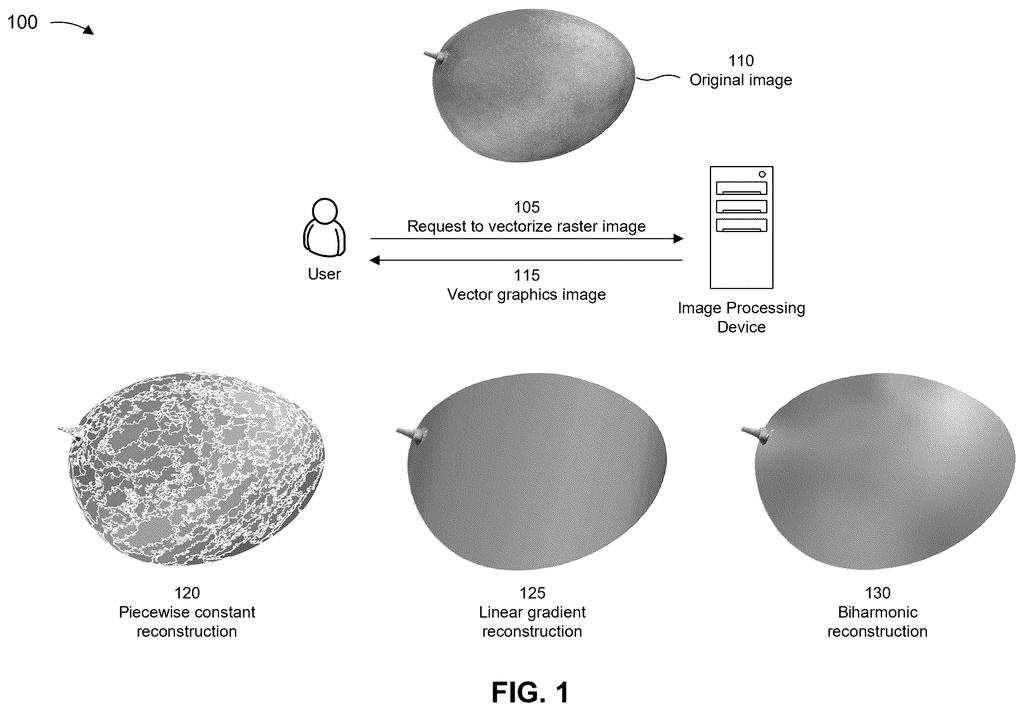
What Adobe's gradient-tracing patent actually does
You're holding a small logo you found as a regular picture file, and the second you stretch it onto a banner, the edges turn fuzzy and the colors fall into visible stripes. Artists fix this by redrawing the image as shapes and math instead of pixels, which stays sharp at any size.
Adobe's new patent application describes a way to do that conversion automatically. The software carves your picture into smooth patches, then describes the color blend inside each patch using only a few colored dots, a bit like pinning swatches to a shape and letting the paint spread between them.
The payoff is a file you can edit by nudging a dot or two, instead of fighting a pile of flat color blocks that were stacked up to fake a smooth blend.
segmenting a raster image into multiple piecewise smooth regions; identifying, for each region of the multiple piecewise smooth regions, a respective set of control points that approximates the region as a biharmonic gradient; …
Translation: The software breaks a pixel image into smooth mathematical patches mapped out by specific points.
How the image gets split and rebuilt from dots
A pixel image (a raster) is a grid of colored squares. A vector file instead stores shapes and fills as math, so it scales to any size. Converting one to the other normally means splitting the image into regions and filling each with a flat color, which causes visible banding where colors should blend.
This filing fills each region with a biharmonic gradient (also called a freeform gradient), where a few control points hold colors and the rest of the shape blends smoothly between them. The method has three main steps:
- Segment: smooth the image, detect edges, and join them into closed regions with no sharp edges inside, using a technique called spectral mesh segmentation (a way of grouping connected pieces of a surface).
- Find control points: search for colors that stay close to the real pixels while penalizing every extra control point. The spots where the blend bends most become the control points. A configurable weight trades image fidelity against complexity.
- Rebuild: trace each region's outline as curves, fill it using the control points' colors, and write out a vector graphics file.
The filing names math solvers for the search step, such as a linearized alternating direction method of multipliers and the Chambolle-Pock algorithm. Both are standard ways to find the best fit for a problem like this.
… generate a set of vector primitives that approximates the raster image according to a set of biharmonic gradient fill values that are based on the respective set of control points for each region …
Translation: It builds scalable shapes that recreate the original picture using smooth mathematical shading instead of pixels.
What this means for logos, icons and editing
If you design logos, icons or illustrations, the useful part is editing. A smooth area becomes one shape with a handful of movable color dots, rather than a stack of flat patches you have to recolor one by one. The filing also says the files stay compact and scale without losing quality.
The filing says larger smooth regions mean less work in the splitting step, and a fidelity setting lets a user choose between a close copy and a simpler file. On the process side, the examiner's first review rejected the claims as filed, which is routine at this stage and usually followed by amendments.
That makes this Adobe's 235th filing in our Adobe coverage since May, a corpus that spans work like fixing garbled text in AI images and syncing lips to dubbed audio.
Claim 1 is short: split an image into smooth regions, find control points that model each region as a biharmonic gradient, build vector shapes from those fill values, and write a vector file. It names no particular way to split the image and no particular math for finding the points.
Those specifics show up only in the narrower claims that follow: the sparsity formula, the two named solvers, the edge detection and the region grouping. If claim 1 survived as written, it would reach any converter that follows those four steps, whatever its internal math. That is wide coverage for such a compact claim.
That breadth is probably why the first review pushed back. Expect the final claims to pick up some of the narrower details, and the reader-facing result stays the same: smoother, simpler artwork from a pixel picture.
Get our take in your Top Stories
Liked this breakdown? Add Patentlyze as a preferred source on Google, and our plain-English take shows up more often in your Top Stories the next time Adobe patent news breaks.
There are more where this came from
We read every patent application Big Tech publishes and send you the ones worth knowing. Plain English, free, every week.
The drawings
10 drawing sheets from US 2026/0340896 A1 · click any drawing to enlarge


Show the other 2 sheets


Want this weekly breakdown for a company we don't cover? Patentlyze Pro →
Be the first to weigh in