
Adobe Files Patent to Automatically Straighten Crooked Fabric Patterns in 3D Designs
Wrap a photo of plaid fabric around a 3D dress and any tilt in the original shows up at every repeat. Adobe's filing describes a way to find and fix that tilt automatically.
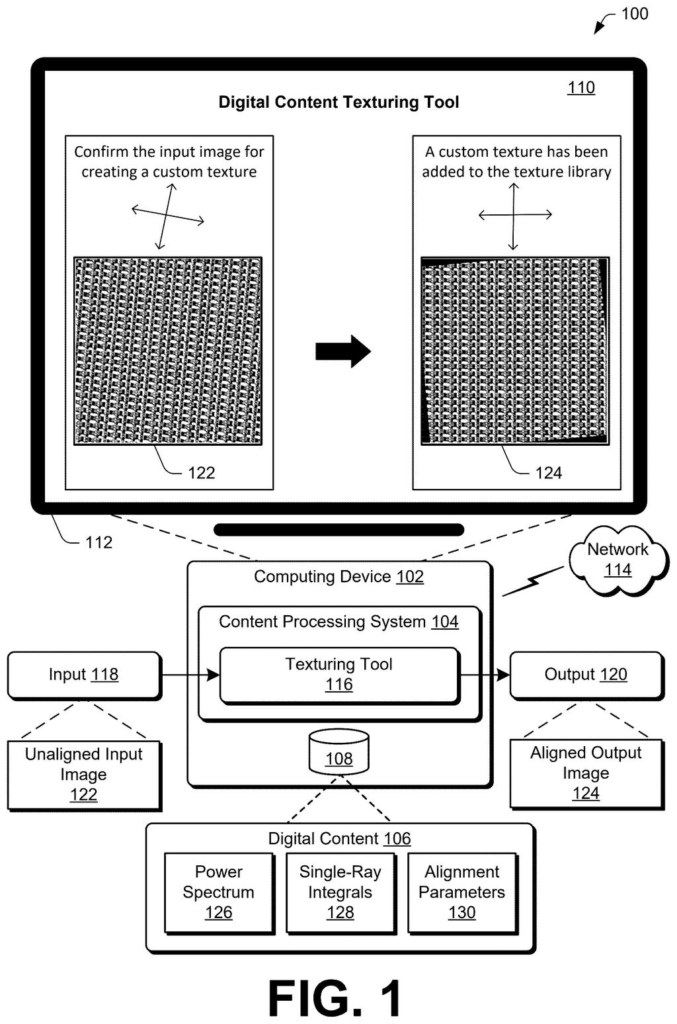
What Adobe's pattern-straightening tool does
Ever photographed a plaid shirt or a herringbone floor, then noticed the lines sit a little off square? That small tilt becomes a big headache when you wrap the picture around a 3D object, because the crooked pattern repeats everywhere.
Adobe's filing describes a tool that fixes the tilt for you. You hand it a photo of a repeating pattern, and it works out how far the pattern is rotated and how much it is slanted sideways (picture pushing the top of a stack of cards over). Then it straightens the image, with no hand adjusting.
The corrected image shows up as a ready-to-use texture, so a designer can drop it onto a virtual dress, a building model or a game level and the pattern lines up cleanly.
… determining, by the at least one processing device, at least one alignment parameter based on integral calculations performed on the power spectrum across multiple angles; …
Translation: The software figures out how much to rotate the fabric design by analyzing it at various angles.
How the tool reads a pattern's hidden grid
The tool starts with a photo of a structured texture, meaning a repeating pattern such as checks, polka dots, plaid, hexagons, herringbone or woven fabric. It cuts out a square crop from the center and turns it into a power spectrum (a map of how often, and in which directions, the pattern repeats, made with a standard math tool called a Fast Fourier Transform). On that map, a regular pattern becomes a tidy grid of bright dots, which is much easier to measure than the original picture.
Next, the tool adds up brightness values along straight lines that fan out from the center of the map, at many angles from 0 to 180 degrees. Adding values along a line is an integral calculation. The angle with the biggest total points along the pattern's main direction, and that sets the rotation angle. Two more rounds of the same check find the shear axis and shear angle, which describe how much the pattern is slanted and in which direction.
Older methods used a full Radon transform (adding up values along every parallel line at every angle) or Hough line detection (a line-finding technique that mainly handles rotation). Adobe's version uses only the lines through the center, and it builds the map once for both fixes. The description says this needs no special hardware or machine learning.
Finally, the tool rotates and slants the original image back into place, stores it, and can show it in the interface as a selectable texture.
… produce an aligned output image of the structured texture by modifying the unaligned input image based on the at least one alignment parameter.
Translation: It then straightens out the pattern so it looks neat and ready to be wrapped around a 3D model.
Why tidy textures matter to 3D designers
If you make 3D scenes, games or product mockups, crooked patterns are a constant chore. A plaid that tilts a few degrees looks fine in the photo and wrong on a sofa model. Adobe's filing describes a tool that fixes this on its own, and the description says it should run fast enough to show results as you work.
The description names texturing tools and graphic plugins as places the idea could live, and it lists uses from virtual clothing to building models and game environments. For now it is a patent application, and the examiner's first review rejected the claims as filed, which is routine at this stage and usually followed by amendments.
Adobe's 214th filing in our Adobe coverage since May adds to a run that includes relighting a photo after the shot and turning a surface photo into 3D.
Claim 1 is wider than the headline idea suggests. It asks for five steps: crop the image, build the power spectrum, add up values along lines at several angles, pick at least one correction setting, then fix the image and save it for texturing. It never mentions rotation or slant, and it never limits the pattern to a particular type, so any repeating texture photo that goes through that crop-and-add-up route falls inside it.
The narrow part is the route. Claim 1 names the power spectrum and the angle-by-angle sums as the way to find the fix. A tool that straightens patterns another way, such as hunting for lines straight in the picture, would sit outside those words. The speed shortcut of using only lines through the center, which the description sells hardest, appears only in later claims, so claim 1 does not depend on it.
It is a practical, modest filing for people who build 3D scenes, and a clear one: the claim reads like a recipe anyone could follow.
Get our take in your Top Stories
Liked this breakdown? Add Patentlyze as a preferred source on Google, and our plain-English take shows up more often in your Top Stories the next time Adobe patent news breaks.
There are more where this came from
We read every patent application Big Tech publishes and send you the ones worth knowing. Plain English, free, every week.
The drawings
7 drawing sheets from US 2026/0330743 A1 · click any drawing to enlarge


Want this weekly breakdown for a company we don't cover? Patentlyze Pro →
Be the first to weigh in