
Microsoft Files Patent to Sort Spreadsheet Reviews by Asking AI About Only a Few
Asking an AI to label every row of a huge spreadsheet column is slow and expensive, so Microsoft's patent application has it label only a handful and lets similarity do the rest.
What Microsoft's spreadsheet labeling shortcut does
Ever tried to make sense of a few thousand restaurant reviews pasted into one spreadsheet column? You either read every one yourself or pay an AI to read every one, just to learn which are happy and which are furious.
Microsoft's patent application takes a shortcut. First, it turns each review into a string of numbers that captures its meaning, so reviews that say similar things end up close together. Then it picks a small handful that cover the whole range, from glowing raves to angry rants, and asks an AI language model (the technology behind chatbots) to label only those.
Every other review simply borrows the label of the labeled review it most resembles. You get a new column next to your text, such as positive, negative or neutral. The filing says this cuts cost by roughly a hundredfold compared with asking the AI about every row.
… apply a selection algorithm to the embeddings to identify a diverse subset of the textual entries; send the diverse subset to a language model to obtain labels for the textual entries in the diverse subset; …
Translation: The system picks a varied sample of text entries and asks an AI to label only those.
How Microsoft picks a sample and copies labels
The claims describe a three-stage pipeline for a column of text in a table, such as a spreadsheet:
- Embed and sample. Each entry becomes an embedding (a list of numbers where similar meanings sit close together). A selection algorithm picks a diverse subset covering the range of meaning in the column, using methods such as clustering or principal component analysis (finding the main directions entries differ in and taking the extremes).
- Label the sample. Only that subset goes to a language model, which returns labels.
- Spread the labels. Each remaining entry takes the label of its closest labeled matches, found with methods such as cosine similarity (how closely two lists of numbers point the same way) or nearest-neighbor matching.
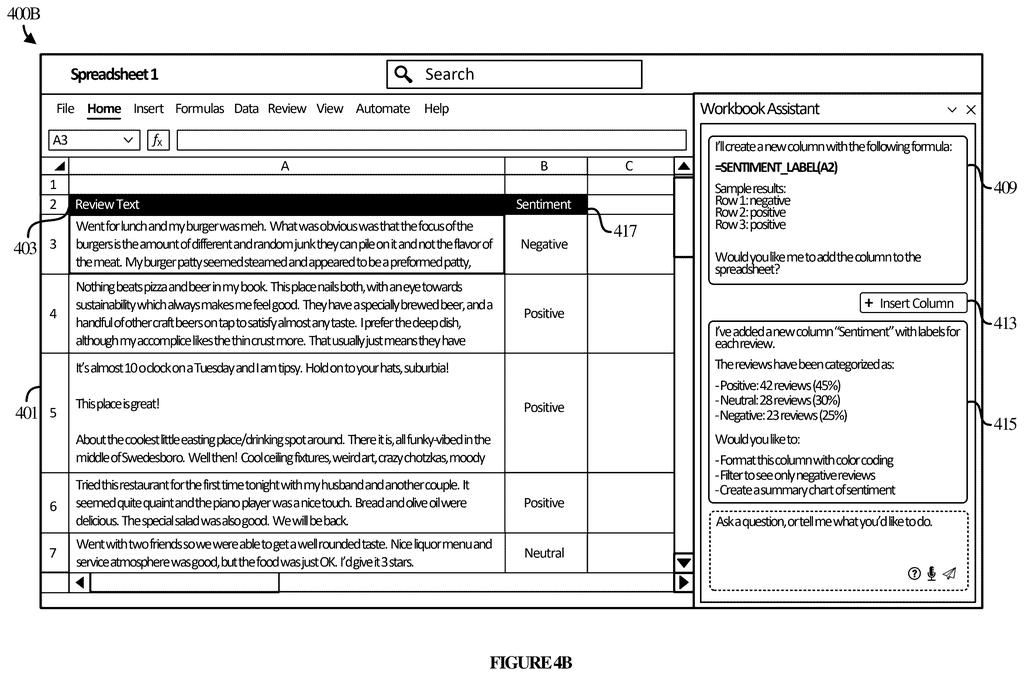
Dependent claims add writing the labels into a new spreadsheet column and letting you edit the sample's labels before they spread. The description also describes a mode that notices you labeling the first few rows by hand and continues the pattern.
The filing says this cuts cost by about two orders of magnitude (roughly 100 times) with comparable accuracy.
Why cheaper AI labeling matters for your spreadsheets
For you, the payoff would be a spreadsheet assistant that can tag a long column without making an AI read every single row. The filing's example turns restaurant reviews into positive, neutral and negative labels, then reports the split (45%, 30% and 25%) so you can filter, color-code or chart the results.
For Microsoft, the appeal is cost and consistency. Each AI call takes money and time, so fewer calls matter most on big datasets. The filing also says labels stay more uniform than when data is sent to the model in batches, which can drift in wording. Because labels are copied by similarity, unusual rows can be misjudged, which is why the filing adds a review step and confidence scores.
This is the 54th Microsoft filing we've tracked in our Enterprise AI coverage since May, joining earlier work like one on rewriting speech in recorded video and one on splitting AI work with devices.
You would notice this the first time you ask a spreadsheet to tag a long column and the answer shows up quickly, without an AI grinding through every row. Labeling a few examples and copying them to similar rows is an idea most people can grasp, and it suits the sentiment tags and topic buckets most of us actually ask for.
The risk sits in the odd rows. A sarcastic one-liner that sounds like its neighbors could inherit a neighbor's label and land in the wrong bucket. The filing answers this by letting you edit the sample labels first and by flagging low-confidence rows, which gives you a chance to catch mistakes before they spread.
Our verdict: a practical, modest upgrade. Most people will see a new column appear fast, with the same label wording all the way down.
Get our take in your Top Stories
Liked this breakdown? Add Patentlyze as a preferred source on Google, and our plain-English take shows up more often in your Top Stories the next time Microsoft patent news breaks.
There are more where this came from
We read every patent application Big Tech publishes and send you the ones worth knowing. Plain English, free, every week.
The drawings
8 drawing sheets from US 2026/0340435 A1 · click any drawing to enlarge


Want this weekly breakdown for a company we don't cover? Patentlyze Pro →
Be the first to weigh in