
Adobe Patents an ML System That Auto-Arranges Your Document Layouts
Adobe is patenting a machine learning system that takes your images, text, and a target document size — and figures out where everything should go, automatically. No manual dragging, no grid fiddling.
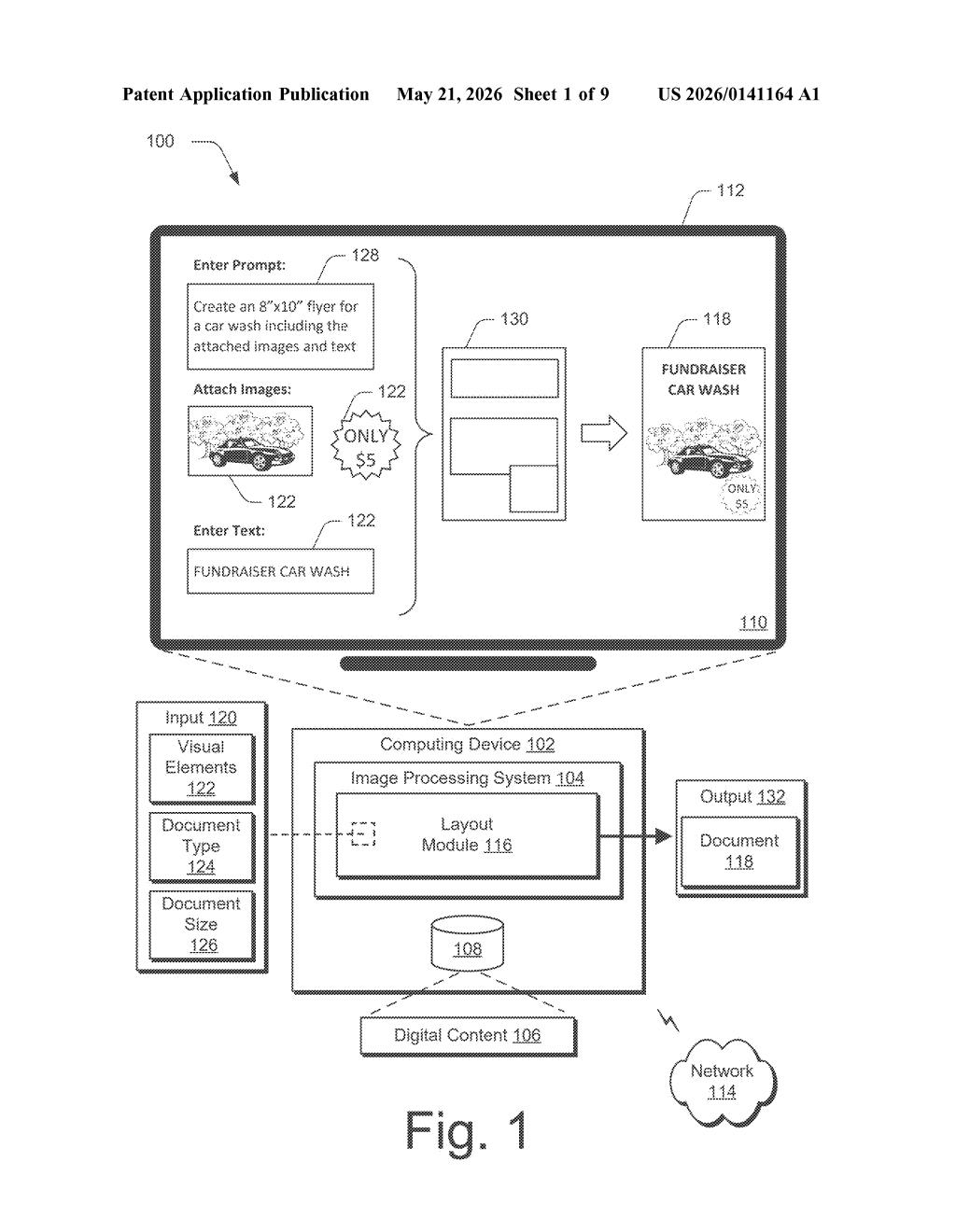
What Adobe's automatic layout system actually does
Imagine you need to make a flyer for a fundraiser car wash. You've got a couple of photos, some text, and you know it needs to be 8×10 inches. Right now, you'd open something like InDesign or Illustrator and manually position everything — nudging elements around until it looks decent. That's the tedious part this patent wants to eliminate.
Adobe's system takes your visual elements (images, text blocks), a document type (flyer, poster, brochure), and a target size, then uses a machine learning model to figure out where everything should go. It outputs precise coordinates for each element's position on the page.
The result is a fully composed document, ready to view in a design interface — without you having to place a single element by hand. Think of it as an AI layout director that understands both what kind of document you're making and how big it needs to be.
How the model places elements inside bounding boxes
The patent describes a pipeline with three main steps driven by a single machine learning model.
First, the system ingests an input bundle: one or more visual elements (images, graphics, text), a declared document type (e.g., flyer, report, social media card), and a target document size. The document type and size together act as context signals that steer how the model thinks about composition — a square Instagram post gets different layout logic than a tall event poster.
Second, the ML model determines a layout for those elements — essentially a compositional plan that respects the document's purpose and dimensions. Then it goes further and computes bounding box coordinates (the x/y position and width/height rectangle) for each individual element. Bounding boxes are the standard design-world way to say "this element lives exactly here, and takes up exactly this much space."
Finally, the system generates the document by slotting each visual element into its assigned bounding box and renders it in a user interface. The patent's diagram shows a chat-style prompt — "Create an 8×10" flyer... including the attached images and text" — suggesting this could plug into a conversational or prompt-driven workflow inside Adobe's tools.
What this means for Adobe's design tools
For Adobe, this is table stakes in the generative AI design race. Competitors like Canva already offer AI layout suggestions, and startups are building full document-generation pipelines. A patent here signals Adobe is formalizing its own approach to constraint-aware layout generation — where the ML model respects both content type and canvas dimensions, not just aesthetics.
For you as a user, the practical upside is obvious: faster first drafts. If this lands in Express, InDesign, or Firefly, it could mean dropping assets into a prompt and getting a layout-complete document back in seconds — one you refine rather than build from scratch.
This is a solid, narrowly scoped patent covering something Adobe clearly needs to own as generative design tools mature. The core idea — ML model takes elements plus document context, outputs bounding box coordinates — is straightforward, and that's fine. It's not trying to solve a hard research problem; it's trying to lock in a workflow patent for a feature that's going to ship in consumer tools. Worth noting, but don't expect this to be a moat against Canva.
Get our take in your Top Stories
Liked this breakdown? Add Patentlyze as a preferred source on Google, and our plain-English take shows up more often in your Top Stories the next time Adobe patent news breaks.
There are more where this came from
We read every patent application Big Tech publishes and send you the ones worth knowing. Plain English, free, every week.
Want this weekly breakdown for a company we don't cover? Patentlyze Pro →