
Meta · Filed Jul 8, 2026 · Published Nov 5, 2026

Meta Patents a Headset Menu Bar That Detaches From Your Floating Screens

In a headset, your menu bar can be glued to one floating screen or free to float on its own. This Meta filing covers switching between the two when you change how your windows are laid out.
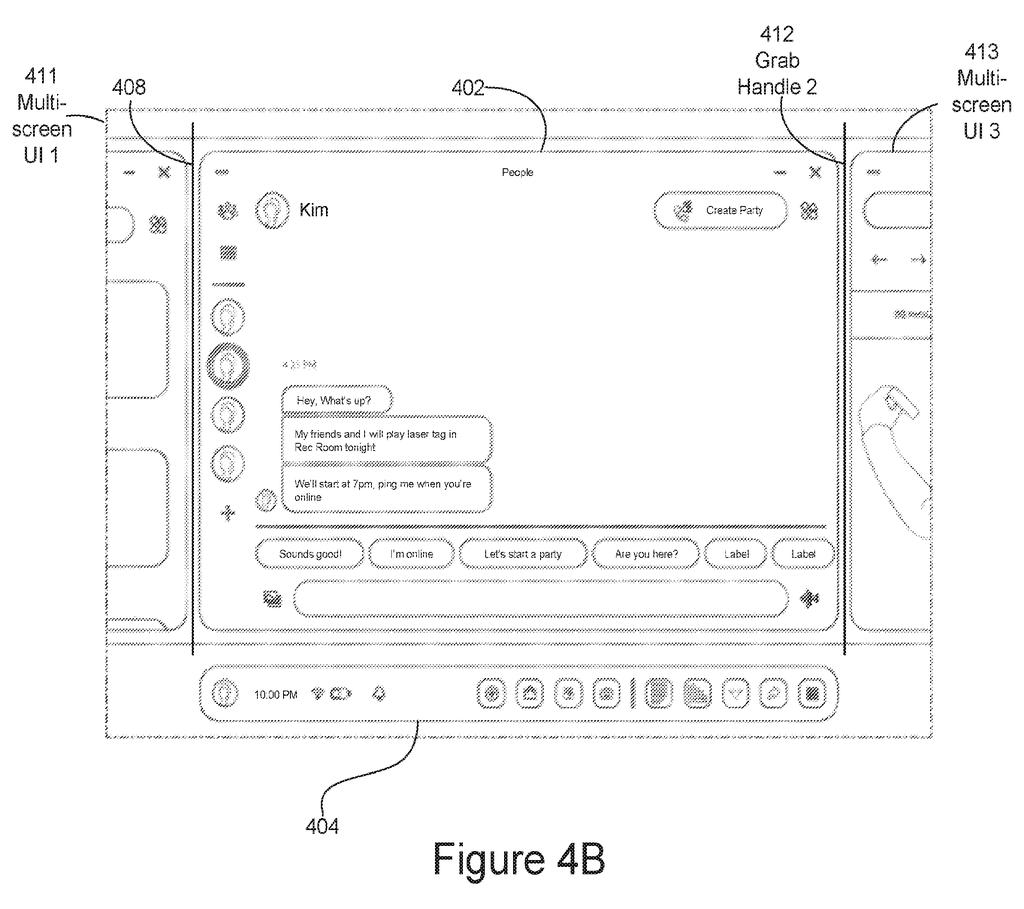
A headset display keeps a menu bar anchored beneath open apps while letting a wearer rearrange chatting and calling screens. Drawing from patent filing US 2026/0349579 A1.
A headset display keeps a menu bar anchored beneath open apps while letting a wearer rearrange chatting and calling screens.
See all 30 drawings from this filing ↓
Publication number US 2026/0349579 A1 US20260349579A1
Applicant Meta Platforms Technologies, LLC
Filing date Jul 8, 2026
Publication date Nov 5, 2026
Inventors Anastasia Victor-Faichney, Qi Xiong, Jennifer Morrow, Miguel Angel MAYA HERNÁNDEZ, John Nicholas Jitkoff, Ahad Habib Basravi, Irvi Stefo
US classification 345/419
Status when we published Waiting for an examiner (Jul 29, 2026)
Parent application is a Continuation of 18435799 (filed 2024-02-07)
Document 20 claims

What Meta's detachable headset menu bar does

Ever had so many windows open that the toolbar stuck to one of them started to feel like clutter? Now put that problem in a VR headset, where your windows float in the room around you.

Meta's filing describes a floating control bar that holds system buttons (your avatar, for example) alongside buttons for the app you are in. When you use a single tablet-style panel, the bar sits attached along its bottom edge. Switch to a mode that spreads several panels side by side, and the bar detaches and floats on its own.

Open a virtual keyboard in that spread-out mode and it takes the bar's spot. Switch back, and the bar returns to the panel with the keyboard underneath. Grabbing a handle on the panel can be what triggers the change.

From the filing · THE ABSTRACT
… upon determining that the representation of the hand of the user has moved within a direct-touch threshold distance of the user interface, ceasing to display the focus selector within the user interface and allowing the representation of the hand of the user to interact directly with the selectable user interface element.

Translation: When your hand gets close enough, the virtual cursor disappears so you can just reach out and touch the buttons directly.

How the menu bar snaps on and off a panel

Claim 1 covers two linked pieces of interface in an artificial-reality headset (a VR headset or AR glasses). The first is a bar of system-level controls (buttons that belong to the headset itself) plus controls for whatever app you are in. The second is a panel showing parts of that app.

In a first display mode, the panel is attached to the bar. The filing's example is a tablet mode, where the panel is placed by the position of your hand or a handheld controller and the bar sits along its bottom edge. A widescreen version does not scroll vertically, while a portrait version does.

When something requests a second display mode, the panel detaches from the bar. The example is a multi-screen mode, with several panels in a connected row. The request can come from your hand grabbing a grab handle (a small edge control for moving panels). In the first mode your virtual hand can touch the panel directly; in the second it cannot.

In the second mode, asking for a virtual keyboard hides the bar and puts the keyboard where the bar was. Switch back and the bar re-attaches to the panel, with the keyboard below it.

Why a menu bar that moves matters in a headset

If you have used a VR headset, you know how fiddly menus can get. This filing is about keeping the control bar useful whether you work with one tablet-style panel or a wide row of windows. The bar stays attached when that makes sense and gets out of your way when you spread out.

The background section says handheld controllers can be bulky and tedious, and can contribute to repetitive strain, so the broader family leans on hand-based input. The examples here include an active call bar and a keyboard that appears under your windows. Nothing in the filing names a product, and it is a continuation of an application filed in 2024, so it builds on earlier work.

Meta's 79th filing we've tracked in the AR glasses race since May follows earlier work on a tiny vibrating mirror and tiny built-in display processors.

Editorial take

Read the title and you expect a patent about hand tracking and pointing dots. Claim 1 covers something simpler: a bar of controls and a panel, where the panel starts attached to the bar and detaches when a different display mode is requested.

That is a wide claim. It does not require a hand, a tablet shape, a grab handle or a keyboard. Those appear only in the dependent claims, along with the row of connected panels. What claim 1 does require is a bar holding both system controls and app-specific controls, and a panel that goes from attached to detached.

If granted, that wording would reach any headset interface where a control bar lets go of a panel when the display mode changes, whatever it looks like. The idea itself is everyday window housekeeping, and the breadth of the claim is where its value sits.

Get our take in your Top Stories

Liked this breakdown? Add Patentlyze as a preferred source on Google, and our plain-English take shows up more often in your Top Stories the next time Meta patent news breaks.

There are more where this came from

We read every patent application Big Tech publishes and send you the ones worth knowing. Plain English, free, every week.

The drawings

30 drawing sheets from US 2026/0349579 A1 · click any drawing to enlarge

Viewing a virtual screen through smart glasses, drawing sheet 1 from US 2026/0349579 A1
Sheet 1 Viewing a virtual screen through smart glasses
Raising a hand reveals an interactive border, drawing sheet 2 from US 2026/0349579 A1
Sheet 2 Raising a hand reveals an interactive border
Dragging the border moves the floating window downward, drawing sheet 3 from US 2026/0349579 A1
Sheet 3 Dragging the border moves the floating window downward
Pinching the frame resizes and rotates the screen, drawing sheet 4 from US 2026/0349579 A1
Sheet 4 Pinching the frame resizes and rotates the screen
Releasing the frame hides borders until touched again, drawing sheet 5 from US 2026/0349579 A1
Sheet 5 Releasing the frame hides borders until touched again
Aiming from far away points directly at buttons, drawing sheet 6 from US 2026/0349579 A1
Sheet 6 Aiming from far away points directly at buttons
Walking closer shortens the pointing beam, drawing sheet 7 from US 2026/0349579 A1
Sheet 7 Walking closer shortens the pointing beam
Stepping near switches from pointing to fingertip taps, drawing sheet 8 from US 2026/0349579 A1
Sheet 8 Stepping near switches from pointing to fingertip taps
Show the other 22 sheets
Switching between touching buttons and pointing from afar, drawing sheet 9 from US 2026/0349579 A1
Sheet 9 Switching between touching buttons and pointing from afar
Pinching your fingers to pick a menu setting, drawing sheet 10 from US 2026/0349579 A1
Sheet 10 Pinching your fingers to pick a menu setting
Grabbing a screen frame from across the room, drawing sheet 11 from US 2026/0349579 A1
Sheet 11 Grabbing a screen frame from across the room
Docking a menu bar beneath a floating app window, drawing sheet 12 from US 2026/0349579 A1
Sheet 12 Docking a menu bar beneath a floating app window
Anchoring extra side panels beside the main screen, drawing sheet 13 from US 2026/0349579 A1
Sheet 13 Anchoring extra side panels beside the main screen
Detaching the control bar when new panels appear, drawing sheet 14 from US 2026/0349579 A1
Sheet 14 Detaching the control bar when new panels appear
Bringing up a virtual keyboard below your docked menu, drawing sheet 15 from US 2026/0349579 A1
Sheet 15 Bringing up a virtual keyboard below your docked menu
Tapping the menu bar on a vertical phone-style screen, drawing sheet 16 from US 2026/0349579 A1
Sheet 16 Tapping the menu bar on a vertical phone-style screen
Moving your hand near a window brings up an outline, drawing sheet 17 from US 2026/0349579 A1
Sheet 17 Moving your hand near a window brings up an outline
Touching the glowing corner wraps an outline around the screen, drawing sheet 18 from US 2026/0349579 A1
Sheet 18 Touching the glowing corner wraps an outline around the screen
Pushing a virtual button highlights its edges to confirm touch, drawing sheet 19 from US 2026/0349579 A1
Sheet 19 Pushing a virtual button highlights its edges to confirm touch
How the headset reveals and expands a screen border, drawing sheet 20 from US 2026/0349579 A1
Sheet 20 How the headset reveals and expands a screen border
Detaching the menu bar in different screen view modes, drawing sheet 21 from US 2026/0349579 A1
Sheet 21 Detaching the menu bar in different screen view modes
Switching from pointing at a distance to direct finger taps, drawing sheet 22 from US 2026/0349579 A1
Sheet 22 Switching from pointing at a distance to direct finger taps
Smartwatches Meta could use to track your hand gestures, drawing sheet 23 from US 2026/0349579 A1
Sheet 23 Smartwatches Meta could use to track your hand gestures
Looking at square and round watch sensor faces from above, drawing sheet 24 from US 2026/0349579 A1
Sheet 24 Looking at square and round watch sensor faces from above
Parts inside a smartwatch that tracks your gestures, drawing sheet 25 from US 2026/0349579 A1
Sheet 25 Parts inside a smartwatch that tracks your gestures
A sensor band made of linked segments for your wrist, drawing sheet 26 from US 2026/0349579 A1
Sheet 26 A sensor band made of linked segments for your wrist
Muscle sensing contacts arranged along a flat watchband, drawing sheet 27 from US 2026/0349579 A1
Sheet 27 Muscle sensing contacts arranged along a flat watchband
Smart glasses and a VR headset with outward cameras, drawing sheet 28 from US 2026/0349579 A1
Sheet 28 Smart glasses and a VR headset with outward cameras
How wearable gear links to phones and computers nearby, drawing sheet 29 from US 2026/0349579 A1
Sheet 29 How wearable gear links to phones and computers nearby
Electronics packed inside the headset frame and display, drawing sheet 30 from US 2026/0349579 A1
Sheet 30 Electronics packed inside the headset frame and display
Browse all the drawings 30 drawing sheets
Patent filing page

Source. Full patent text and figures from the official USPTO publication PDF.
Reader comments

Be the first to weigh in

Start the discussion

Real name or a handle, either is fine. Comments are read by a person before they appear, so allow a little time. Keep it about the filing.