
Adobe Files Patent for Rotating Objects in a Photo to Show Their Other Side
Adobe has described a way to take one flat photo, spin the object in it around, and show the side the camera never saw. The trick is to build a rough 3D version first and let an image AI paint over it.
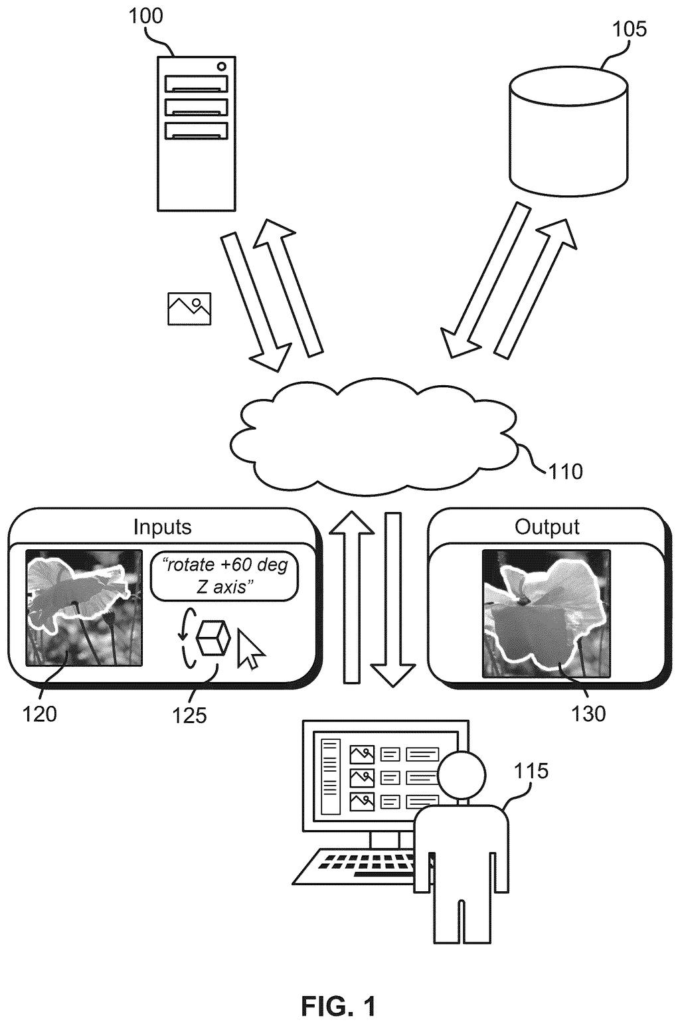
What Adobe's turn-an-object-in-a-photo idea does
You took a great photo of a bird, but it's facing slightly away and you wish it were looking at you. Today, fixing that means painstaking manual retouching, or an AI tool that often mangles the animal into something unrecognizable.
Adobe's patent application describes a different route. The software first builds a rough 3D version of the object in your photo, including the parts the camera never saw. It turns that 3D shape the way you asked, then hands the result to an image AI that paints in realistic detail, lighting and shadows so the object still looks like itself.
The AI was taught using video clips, where real objects naturally move and show their other sides. That gives it a sense of what a turned bird or cat should look like.
… generating, using a 3D modelling network, a 3D model of the object based on the input image; transforming the 3D model based on the edit command to obtain a modified 3D model; and generating, using an image generation model, a synthetic image based on the modified 3D model, …
Translation: The software builds a 3D version of the object, twists it around, and draws a brand new picture based on those changes.
How the 3D guide image steers the AI painter
The system starts with a photo and an edit command, such as 'rotate 45 degrees' or 'rotate the cup to show its handle.' The filing says you could give the command by typing, dragging, or using sliders. The object can be picked by you or found automatically.
Next, a 3D modelling network (an AI that guesses a 3D shape from a flat picture) builds a model of the object, including parts the photo never showed. The model can be a point cloud (a cloud of dots), a mesh (a net of connected surfaces), or voxels (tiny 3D blocks). The shape is then rotated, moved or resized using a transformation matrix (a grid of numbers describing the move).
The turned shape is flattened back onto the photo as a 3D guidance image, a rough preview, along with a mask. The mask marks three zones: the hole where the object used to be, the area the new shape covers, and the untouched background.
Finally, an image generation model (a diffusion model, which builds pictures by gradually cleaning up noise) combines the preview, the mask and the original photo to produce the finished image. It was fine-tuned from a video AI and trained on pairs of video frames showing the same object in two poses.
The synthetic image depicts the transformation applied to the object and preserves an identity of the object from the input image.
Translation: The final picture shows the object turned around while keeping its original look and details intact.
What this means for fixing awkward photo angles
If you edit photos, the pain point is familiar: the angle you shot is not the angle you need. Product shots, pet photos and design mockups all run into it. A tool built this way would let you turn an object after the fact and still have it look like itself, which today often takes a reshoot or hours of manual retouching.
The filing criticizes some earlier 3D editing methods as slow, since they run heavy calculations every time you make an edit, and presents this design as an alternative. It gives no speed numbers, though. The examiner's first review rejected the claims as filed, which is routine at this stage and usually followed by amendments, so treat this as an early-stage idea.
Adobe's 57th filing we've tracked in our AI photo editing race since May adds to a run that includes stable AI people on camera moves and faster AI photo cleanup.
The big tradeoff is guessing. A single photo never shows the back of a cup or the far side of a bird, so the system has to invent those parts, first in the 3D shape and again when the painting AI fills in detail.
The design also swaps one AI for a two-step pipeline, which adds moving parts and places for errors to slip in. In return you get precise control: ask for a specific turn and you get that turn, something text-only commands struggle to deliver.
That trade reads as worth making. The filing's own comparison shows another approach distorting a cat beyond recognition, and a rough 3D guide is a cheap way to head that off. Expect believable backsides, and accept that the further you turn an object, the more of it is invented.
Get our take in your Top Stories
Liked this breakdown? Add Patentlyze as a preferred source on Google, and our plain-English take shows up more often in your Top Stories the next time Adobe patent news breaks.
There are more where this came from
We read every patent application Big Tech publishes and send you the ones worth knowing. Plain English, free, every week.
The drawings
16 drawing sheets from US 2026/0350944 A1 · click any drawing to enlarge


Show the other 8 sheets


Want this weekly breakdown for a company we don't cover? Patentlyze Pro →
Be the first to weigh in