
Sony Patents Phone Icons That Show Which of Your Two SIM Cards Is Online
If your phone has two SIMs, it usually can't tell you which one is actually handling your download. Sony's patent application puts that answer right in the status bar.
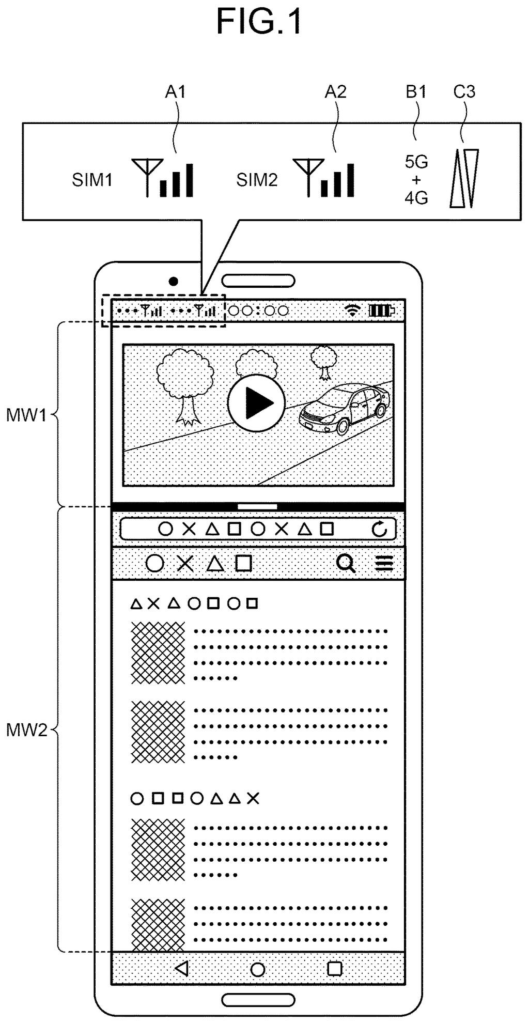
What Sony's dual-SIM status icons actually show
Today, your phone's status bar can tell you that you're on mobile data, but not whether that data is flowing through your work SIM or your personal one. As phones start to use two SIMs for data at the same time, that blind spot gets bigger.
Sony's patent application gives each SIM its own signal indicator, with small arrow icons beside it that show whether it is uploading or downloading. It can also show which apps are riding on which SIM, and a label like 5G+4G when both are working together.
The filing also describes a pop-up that lets you pick the SIM for a big download, or set SIMs by time of day or calendar event, so you don't burn through the wrong plan by accident.
… cause a screen of the communication apparatus to display a first indicator of a communication state of the first radio communication under an operational condition in which the first radio communication is active …
Translation: The phone shows an icon on the display to indicate when the first SIM card is currently active.
How the status bar tracks each SIM's activity
The claims cover a phone or tablet that runs two SIMs (physical cards or eSIMs, the downloadable kind) and shows a separate indicator for each one while it is active. In practice that is a signal-strength reading for each SIM in the status bar, the strip at the top of the screen.
The dependent claims add layers on top of that:
- Direction icons next to each SIM's indicator that show uploading or downloading, or the type of network in use, such as 4G or 5G.
- Highlighting for a SIM that is actively moving data, compared with one that is switched on but idle.
- App icons beside each SIM, showing which running apps use that SIM for data.
There is also a control side. When a large download or upload starts (above a size threshold), a pop-up can list your SIMs so you pick one or several. Long-pressing an app icon can bring up the same list, and in split-screen each window can be assigned its own SIM.
One claim ties SIM choice to a time zone or a calendar event. The description gives examples like switching SIMs during crowded hours, or using a business SIM at work and a private one otherwise.
Why knowing which SIM is busy matters to you
If you carry a work SIM and a personal SIM, or a home SIM and a travel one, this is about avoiding surprises. Knowing which plan is carrying a big upload, or being able to choose in the moment, could keep you from eating into a capped data allowance. The filing describes smartphones and tablets, and covers eSIMs too.
For Sony, it is a user-interface filing aimed at a phone feature that is still maturing. The description says current dual-SIM phones are built mainly for a call on one SIM while data runs on the other, and that two SIMs moving data together is expected later. If that arrives, phones will need a way to show it, and this patent application sketches one.
Sony's 679th filing in our Sony coverage since May adds to a camera thread that includes lensless camera tuning and motion direction in images.
The problem is small but familiar to anyone who carries two SIMs. You have a work plan and a personal plan, a big download starts, and nothing on screen says which one is paying for it. The filing itself says people can end up on the wrong SIM by accident, and that kind of mistake lands on a phone bill.
Icons and a pop-up fit a problem of this size. They are cheap to build and easy to understand, and the calendar-based SIM schedule goes a step further by choosing for you at busy hours.
Still, this is a routine interface filing. Status bar icons are a modest thing to claim, and the whole idea matters only once two SIMs moving data at once becomes common on phones.
Get our take in your Top Stories
Liked this breakdown? Add Patentlyze as a preferred source on Google, and our plain-English take shows up more often in your Top Stories the next time Sony patent news breaks.
There are more where this came from
We read every patent application Big Tech publishes and send you the ones worth knowing. Plain English, free, every week.
The drawings
14 drawing sheets from US 2026/0352757 A1 · click any drawing to enlarge


Show the other 6 sheets


Want this weekly breakdown for a company we don't cover? Patentlyze Pro →
Be the first to weigh in