
Google Files Patent to Let You Build Home Routines by Picking From Menus
Google's patent filing would let you build your own "when this happens, do that" rules for home gadgets by tapping through menus, with a built-in test before you save.
What Google's pick-from-a-menu home routines do
You're walking up to your front door after dark, fumbling with your keys, and the hall light is off. Wouldn't it be nice if unlocking the door simply turned the light on for you? Plenty of connected-home apps can handle simple versions of that, but most only offer a short list of preset tricks.
Google's filing describes a builder for custom rules like this one. You pick a trigger (the front door lock being unlocked) and the device that notices it. Then you pick an action (turn on) and the device that carries it out (the entryway light). Every choice comes from a menu of what your own devices can actually do, so you don't have to remember technical names or type commands.
You can also add conditions, such as "only between sunset and sunrise," and the tool can check your routine for errors before it goes live.
presenting a starter input, the starter input comprising: a trigger menu including at least one trigger detectable by one of a plurality of detecting devices available within the device management system; and a detecting device menu including at least one of the plurality of detecting devices; …
Translation: The system shows menus where you pick a starting event and the device that will notice it.
How the trigger and action menus fit together
The claims cover a builder with two steps. First comes a starter input: a menu of triggers (things a device can notice, like a lock being unlocked, a voice command, a recognized or unrecognized face, or a temperature) plus a menu of detecting devices (the gadgets that do the noticing).
Second comes an action input: a menu of actions (turning a light on, changing its brightness or color, zooming a camera, playing media) plus a menu of action devices (the gadgets that carry them out). The system then links the two, so when the chosen device detects the trigger, the chosen device performs the action.
The filing says these menus draw from a database that fills in automatically as you add devices. The claims and examples also describe a few helpers:
- Pick a trigger and the device list narrows to gadgets that can detect it.
- Start typing part of a device name and the list filters to matches.
- Add a state (for example, the lock is unlocked) or a condition such as a time window.
- Run a validation step that simulates the routine and flags errors before it goes live.
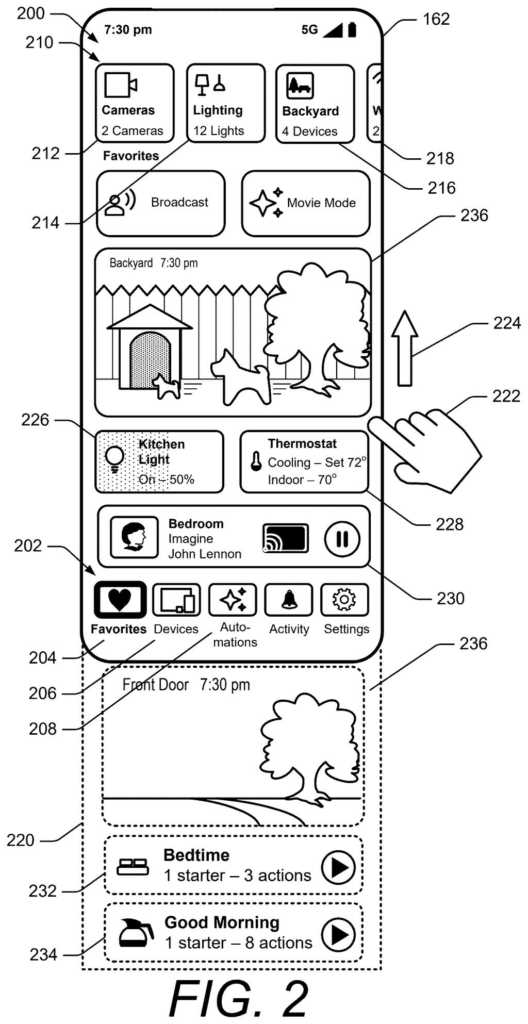
The same document also describes a customizable favorites screen and a camera-footage timeline, but the claims focus on this automation builder.
The device management system also presents an action input having an action menu and an action device menu. The device management system receives user input indicative of a selected action and a selected action device.
Translation: You then use another menu to choose what response should happen and which gadget will do it.
Why your own home routines beat the presets
If you own a handful of connected lights, locks, cameras and speakers, this is about getting them to work together your way. Instead of choosing from whatever routines an app ships with, you could build one that fits your day, like an entryway light that greets you when the front door unlocks after dark.
The filing's examples use gear many homes already have, including a thermostat, doorbell camera, smart speaker and smart lock. The menu approach matters most as your device count grows, because a long list of gadgets and settings is hard to manage from memory. Letting the app show you only what each device can do keeps your routines simple to build.
This is the 58th Google filing we've tracked since May in our AI agents acting for you, following one on sketch to cloud app plan and one on building a custom screen on demand.
If you've ever opened a home app and found only a handful of canned routines, this is the fix you would feel. You get to say "when this happens, do that" using your own devices, and the menus keep you from guessing at names or settings.
The biggest everyday win is the check-before-you-save step. A routine that fails is worse than having none, because you find out at 11 p.m. when the porch light stays dark. Testing it first catches the mistake while you're still holding your phone.
The core idea of "if this, then that" will feel familiar to anyone who has used a home app, so the value here comes down to how polished the menus are. The filing's own examples show raw labels like device.state.Lock.Unlock, which suggests tinkerers would get the first benefit, while everyone else waits for friendlier wording.
Get our take in your Top Stories
Liked this breakdown? Add Patentlyze as a preferred source on Google, and our plain-English take shows up more often in your Top Stories the next time Google patent news breaks.
There are more where this came from
We read every patent application Big Tech publishes and send you the ones worth knowing. Plain English, free, every week.
The drawings
51 drawing sheets from US 2026/0342608 A1 · click any drawing to enlarge


Show the other 43 sheets


Want this weekly breakdown for a company we don't cover? Patentlyze Pro →
Be the first to weigh in