
A New Adobe Patent Has AI Skim Most Words and Study Only the Tricky Ones
Adobe's filing describes an AI that skims most of your text and spends its real effort on only the handful of words that need it. A built-in selector decides which ones.
What Adobe's skim-then-focus AI reading does
A paralegal gets a 300-page contract an hour before a meeting. She skims most of it and slows down only for the clauses that depend on something said 200 pages earlier. Adobe's new patent application teaches an AI to read that way.
Today's chatbots usually compare every word with every word that came before it. That works well, but the effort balloons as your document gets longer, which is why summarizing a huge file can be slow and costly. The filing describes a model that makes a quick, cheap pass over everything first, then uses a built-in checker to flag the few words worth a closer look.
Only those flagged words get the full, expensive treatment. For you, that could mean a summary of a long PDF or email thread arriving sooner, from a model that needs less computing power.
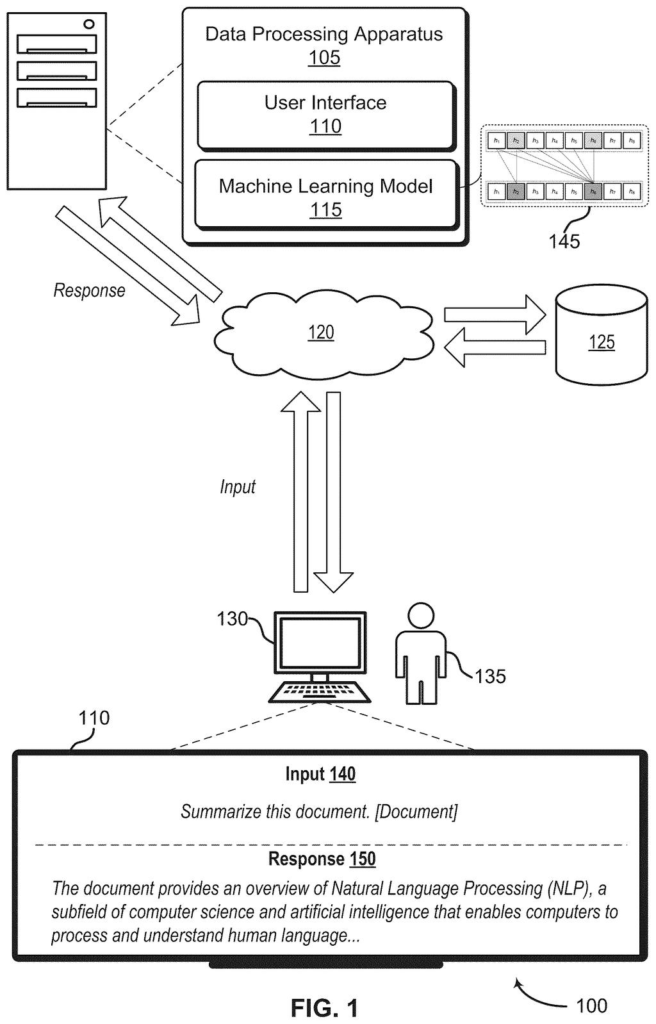
… performing a gating process on the sequence of hidden representation tokens to determine a selected token from the sequence of hidden representation tokens, …
Translation: It filters out the easy words to focus only on the complex parts.
How the gate picks which words get a close read
The system stacks three stages together.
- Linear attention: a fast way of letting each word take in context from earlier words, where the cost grows in a straight line with length. It reads the whole prompt. The filing says this layer can be a Mamba-2 block, a type of state-space model (a model that keeps a running summary of what it has read).
- Gating: a small network scores every word and builds a binary mask (a row of ones and zeros). Words marked with a one are the selected ones.
- Causal self-attention: the standard method in modern chatbots, where a word compares itself with every earlier word. It runs only on the selected words. This method's cost grows with the square of the length, so using it sparingly matters.
Each selected word's upgraded version is blended with its original, weighted by the gate's score, so useful earlier information is kept. The filing also describes pairing this with a sliding window (each word looks only at nearby words), which leaves room for a longer window of 2048 words. The three stages can repeat several times in a row.
During training, the model gets an attention budget, a target fraction of words allowed the expensive treatment. One illustrated example uses 0.3, or 30 percent.
Why long-document AI could get cheaper to run
If you ask an AI to summarize a long PDF, email thread or spreadsheet, the cost depends on how much it has to read. You feel that as waiting time, and the company running the tool feels it as a bill. The filing's own example is exactly that job, and it claims the model keeps its memory use flat no matter how long the document gets.
In the company's tests, the design beat a plain Mamba-2 model (a faster, simpler type of model) and a hybrid that gave every word both treatments, on a task of finding details buried in the input. It also showed the lowest delay among the models tested. Those are the filers' own comparisons, and the text gives no figures, so treat them as a claim.
Adobe's 35th filing in the language AI work we've tracked since May adds to a set that includes one on highlighting answer sources and one on plain English to campaign rules.
You will probably never see this feature. What you would notice is a wait: the pause after you drop a long report into an AI assistant and ask for a summary. A model that spends its effort only where it counts could shrink that pause.
The failure it targets is the one that makes cheap AI frustrating. Fast, lightweight models tend to blur details buried in the middle of a long file, so the summary misses the clause or number you needed. Giving a close read to the few words that depend on faraway context aims at that miss directly.
Whether you feel the difference depends on the filing's test results holding up in a real product, and the text gives no numbers. As a design idea it is sensible and easy to picture: skim the easy parts, slow down on the hard ones, the way you read your own mail.
Get our take in your Top Stories
Liked this breakdown? Add Patentlyze as a preferred source on Google, and our plain-English take shows up more often in your Top Stories the next time Adobe patent news breaks.
There are more where this came from
We read every patent application Big Tech publishes and send you the ones worth knowing. Plain English, free, every week.
The drawings
11 drawing sheets from US 2026/0330139 A1 · click any drawing to enlarge


Show the other 3 sheets


Want this weekly breakdown for a company we don't cover? Patentlyze Pro →
Be the first to weigh in