
Adobe Files Patent to Paste Objects Into Photos With Matching Light and Shadows
Pasting an object into a photo usually means fixing the light, color, edges and shadow by hand. Adobe's patent application describes an AI that does all of it in one pass, even turning the object to face the right way.
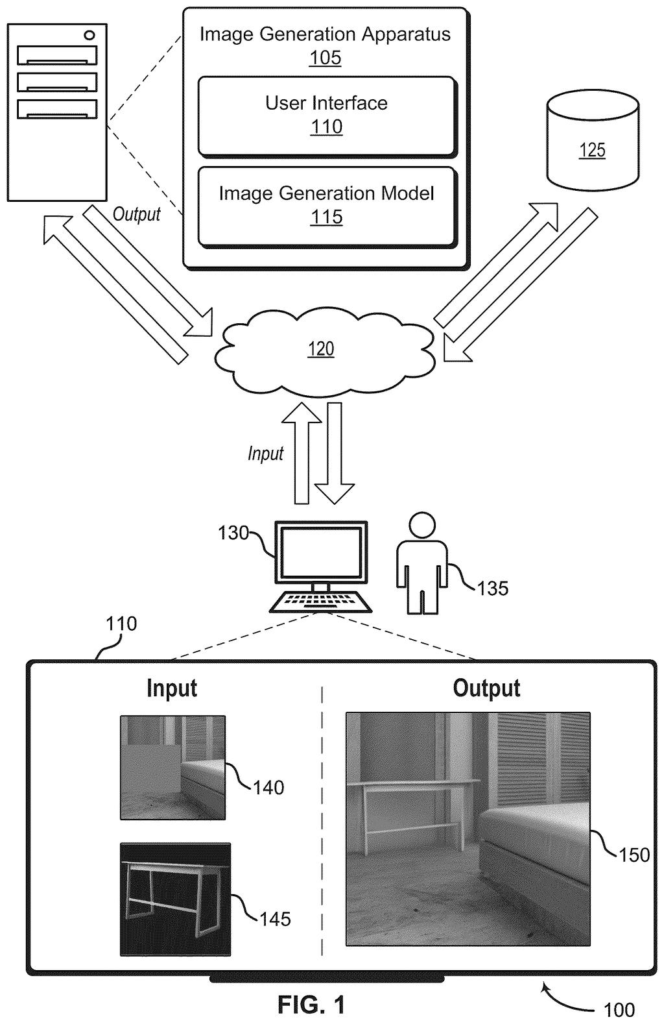
What Adobe's drop-in-object patent actually does
Ever pasted a photo of a kettle into a picture of a dining room and watched it look like a sticker? The light is wrong, there's no shadow, and the angle is off. Fixing it by hand takes a pile of separate editing steps.
Adobe's patent application describes an AI model that does the blending for you. You give it the scene and a photo of the object, and you can mark where it should go. The AI then generates a new image in which the object is re-lit, re-colored, resized and turned to fit, with a shadow that suits the room.
The trick is that the AI reads the object photo in two ways. One reading captures what the thing is in general terms, so the AI knows how it should sit. The other captures what this particular object looks like, so your kettle stays your kettle.
… encoding the reference image to obtain a harmonization embedding and an identity embedding, wherein the harmonization embedding represents semantic information about the object and the identity embedding represents an identity of the object; …
Translation: The system analyzes the object's appearance and how it should fit into the new lighting.
How two 'fingerprints' of the object guide the AI
The filing covers a way to build a picture from up to three ingredients: a scene photo (the input image), a photo of an object (the reference image), and a mask (a marked-off region showing where the object should land). Two separate encoders (programs that turn a picture into numbers a model can work with) read the reference photo.
- Harmonization embedding: comes from an image encoder trained alongside a text encoder, so it captures the object's meaning, roughly how you'd describe it in words. That guides things like how a jacket should hang on a person.
- Identity embedding: comes from a vision transformer (an image-reading model that studies small patches of a picture) trained on unlabeled images. It keeps the details that make the object recognizable under any lighting or pose.
A diffusion model (an image generator that starts from random noise and cleans it up step by step) then draws the result, steered by both sets of numbers through cross-attention (a way for the picture in progress to consult the guidance). One claim names a diffusion transformer as the model.
It works in two modes. With a complete scene, only the object's pixels are new, so a road stripe under a bike survives. With a masked scene, the model also invents fresh background, which suits virtual try-on. Training uses randomized mask shapes, and the identity encoder can be fine-tuned on larger images (448 by 448 instead of 224 by 224) so label text like "250 ML" stays accurate.
… generating a synthetic image based on the input image, the harmonization embedding, and the identity embedding, where the synthetic image depicts the object from the reference image in the scene from the input image and preserves the identity of the object.
Translation: It then combines everything to output a final picture where the pasted item looks naturally placed.
Why this matters for everyday photo editing
For you, the most direct payoff is photo edits that take fewer steps. The filing shows examples such as trying clothes and accessories on a person, swapping a gray sky for a cloudy one, changing a leather couch to fabric, and placing a kettle in a dining room, all from a reference photo and a selected area.
For Adobe, it points toward editing where you describe a change with a picture instead of a stack of manual adjustments. Because the model keeps the object's identity, a product in a shop photo or an ad could look like itself in a new setting. The filing describes a technique and names no product, so treat it as a direction rather than a promise.
Adobe's new application is the 50th we've tracked since May in the AI photo editing race, a list that includes filings like changing light after shooting and moving video graphics to new footage.
Making a pasted object look like it belongs in a photo is one of the oldest chores in photo editing, and it still eats real time. You have to match the light, fix the color, soften the edges and paint in a shadow, and each fix can throw off the others. For designers, shop owners and anyone building a mockup, that is a daily annoyance.
The approach fits the size of the problem. Instead of automating each chore on its own, the model produces the finished picture in one pass, and it can turn the object to face the right way, which the filing says today's tools can't do.
The hardest part is keeping the object itself intact. The filing's own example, a label whose "250 ML" text stays readable, shows why: a brand would spot a garbled label right away. Whether the method holds up on real photos is something a patent filing can't tell us.
Get our take in your Top Stories
Liked this breakdown? Add Patentlyze as a preferred source on Google, and our plain-English take shows up more often in your Top Stories the next time Adobe patent news breaks.
There are more where this came from
We read every patent application Big Tech publishes and send you the ones worth knowing. Plain English, free, every week.
The drawings
25 drawing sheets from US 2026/0330703 A1 · click any drawing to enlarge


Show the other 17 sheets


Want this weekly breakdown for a company we don't cover? Patentlyze Pro →
Be the first to weigh in