
Adobe Patents a System That Maps Every Screen a User Taps Through in an App
Adobe has filed a patent for a tool that watches how real users move through an app and then draws a map of every screen they visited and how those screens connect to each other.
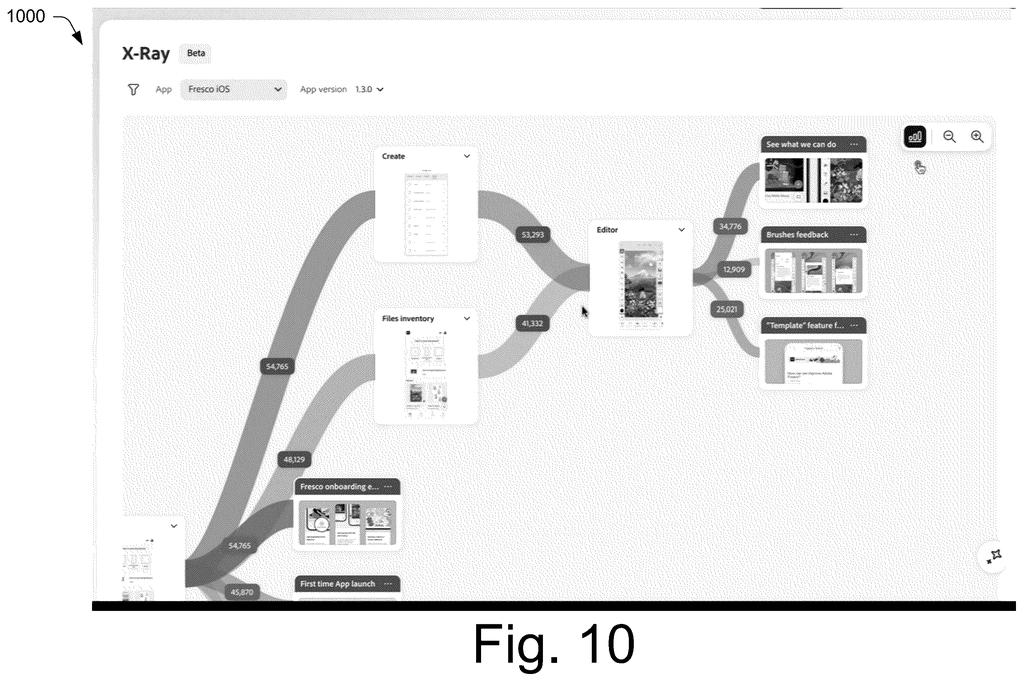
What Adobe's app session mapping actually records
Most app developers have no easy way to see, in one picture, which screens their users actually navigate through and in what order. They might have raw logs or click counts, but turning those into a clear picture of the app's real-world flow usually requires a lot of manual work.
Adobe's patent describes a system that fixes that by recording live user sessions and automatically building a visual map of the app. The system connects to a small monitoring tool running on the user's device, collects data about every screen that appeared and how the user moved between them, and then arranges those screens into a tree-like diagram that shows the full navigation path.
The result is a kind of blueprint of the app as it was actually used, not as the developers assumed it would be used. That distinction matters a lot when a team is trying to figure out where users get confused or drop off.
… receiving, by the processing device, interaction data describing the monitored user interaction as a plurality of events, the plurality of events including, respectively, a capture of a respective user interface of a plurality of user interfaces involved in the monitored user interaction and navigational relationships of the user interfaces to each other …
Translation: The system collects screenshots and button taps to figure out how screens connect to each other.
How the blueprint system builds its screen hierarchy
The system works in three stages.
- Monitoring: A lightweight agent running on the user's device watches every screen (called a "user interface" in the patent) that appears during a session and logs each one as a separate event.
- Relationship capture: Along with each screen snapshot, the agent records how that screen connects to the ones before and after it. These connections are the "navigational relationships" the patent describes, essentially arrows showing which screen leads to which.
- Visualization: The blueprint analysis system takes all those events and assembles them into an element hierarchy, a tree structure where parent screens sit above the child screens they lead to. The actual screenshots of each screen are embedded in the diagram, so the analyst sees real visuals, not just boxes with labels.
The finished diagram is displayed inside an analysis user interface, a dashboard where a product team can inspect the full session map. The claim covers the method broadly: establishing the monitoring connection, receiving the event data, forming the hierarchy, and presenting it. It does not require any specific app platform, operating system, or type of device, which makes the scope fairly wide.
The blueprint analysis system forms an element visualization having an element hierarchy based on the navigational relationships and including the captures of the respective user interfaces.
Translation: The software builds a visual map showing the exact order of screens users encounter in the app.
What this means for app designers and analytics tools
For product and UX teams, having a single tool that automatically produces a navigable screen map from real sessions could cut hours of manual analysis. Right now, piecing together how users actually move through an app often means cross-referencing analytics dashboards, session recordings, and hand-drawn flows. A system that does it automatically and displays actual screenshots in context would meaningfully speed up the feedback loop between shipping a feature and understanding whether it works.
For Adobe, this fits squarely in its push to make Adobe Experience Platform and related analytics products more useful for mobile and web product teams. The filing is part of the broader wave of UX-analytics tooling covered among the latest Big Tech patents, where software companies are racing to give product teams richer, more automatic insight into what users actually do inside their apps.
That makes this Adobe's 126th filing in our Adobe coverage since May, adding to work like turning designs into code and smarter document search.
Claim 1 covers the full chain: watch how someone uses an app, collect screenshots at each step, record how those screens connect to each other, and then build a structured map that shows the whole journey. Nothing in the claim limits this to a particular type of app, device, or industry. That breadth matters because the claim would apply to any tool that does those four things together, which describes a lot of software used by product and design teams today.
The real question is whether assembling screen captures into a navigational hierarchy is different enough from simply recording clicks or drawing flowcharts to deserve protection. The patent office will need to see that the specific combination claimed here goes beyond what any team building a user-research tool would reach on their own.
Get our take in your Top Stories
Liked this breakdown? Add Patentlyze as a preferred source on Google, and our plain-English take shows up more often in your Top Stories the next time Adobe patent news breaks.
There are more where this came from
We read every patent application Big Tech publishes and send you the ones worth knowing. Plain English, free, every week.
The drawings
16 drawing sheets from US 2026/0252463 A1 · click any drawing to enlarge


Want this weekly breakdown for a company we don't cover? Patentlyze Pro →
Be the first to weigh in