
Adobe Patents a System That Turns UI Designs Into Reusable Code Automatically
Every time a designer finishes a screen in a tool like Figma, a developer has to manually translate it into code. Adobe's new patent describes a system that does that translation automatically, breaking a design into reusable pieces a codebase can actually use.
How Adobe separates design from code for developers
Ever handed a designer mockup to a developer and watched the project stall for days? That gap between what a design looks like and what a developer can ship is one of the most persistent headaches in software teams.
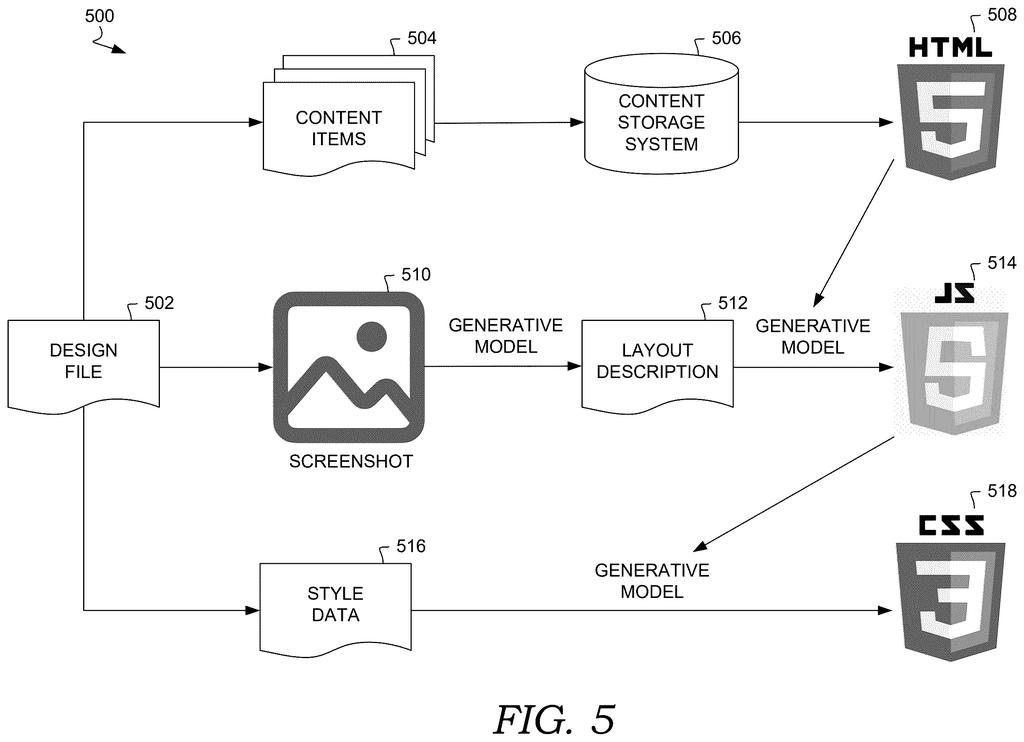
Adobe's patent describes a system that reads a UI design file and a screenshot of the finished design, then separates three things that are normally tangled together: the content (the actual text and images), the structure (how elements are arranged on screen), and the style (colors, fonts, spacing). Each of those gets turned into its own block of code.
Those code blocks get stored as ready-to-use components, so a developer doesn't start from scratch. Instead of re-typing what a designer already figured out, they pull in a component that already reflects the design's intent.
extracting content from a user interface (UI) design file for a UI design generated using an interface design application; inferring structure data from a screenshot of the UI design; extracting style data from the UI design file; generating structure code using the structure data; generating styling code using the style data …
Translation: The system pulls text from design files, analyzes layout screenshots, and builds separate code for structure and style.
How Adobe splits content, structure, and style into separate code
The system takes two inputs for any given UI design: the raw design file (the kind exported from tools like Figma or Adobe XD) and a screenshot of what the design looks like rendered on screen.
From the design file, the system pulls out two things separately: content data (text labels, image references, and other copy that lives inside the UI) and style data (visual properties like color values, font sizes, padding, and borders). From the screenshot, it uses visual inference to determine structure data (essentially, which elements are containers, which are children, and how they relate spatially, similar to how an HTML document has nested divs).
Each extracted piece feeds a separate code-generation step:
- Structure code is generated from the inferred layout hierarchy
- Styling code is generated from the extracted visual properties
- Both are stored together in a code repository as paired, reusable components
The key technical move is treating a screenshot, not just the design file, as a structural input. This lets the system reason about visual layout even when the design file's internal data doesn't perfectly encode element relationships.
code components by disentangling content, structure, and style. In accordance with some aspects, content is extracted from a UI design file for a UI design generated using an interface design application. Structure data is inferred from a screenshot of the UI design. Additionally, style data is extracted from the UI design file.
Translation: It automatically separates a design into its text, layout, and visual styling to create reusable code.
What this means for designer-to-developer handoff
The designer-to-developer handoff is a well-documented bottleneck. Developers spend real time re-creating layout logic and styling that designers already worked out, and any change to the design can mean redoing that work manually. A system that produces versioned, structured code components directly from a design file could cut that cycle significantly, especially for teams iterating quickly.
Adobe already owns two of the most widely used design tools (Photoshop and XD) and has been building toward tighter integration with development workflows. This patent fits that direction: it's less about AI generating novel UI and more about eliminating the translation layer between design and code. Among the new tech patents covering design-to-code automation, Adobe's framing around separating structure from style reflects an approach with real engineering discipline behind it.
This is the 125th Adobe filing in our Adobe coverage since May, adding to work like query intent AI and customer pattern spotting.
The problem this patent attacks is real and costs teams money. Designers and developers working in parallel often duplicate effort because the handoff between a finished design and a working codebase has no automatic bridge. That friction compounds on every design iteration, every new screen, every rebrand.
What's interesting here is that Adobe pulls structural information from a screenshot rather than relying entirely on what the design file encodes. Design files don't always cleanly represent visual hierarchy, so using the rendered image as a secondary source of layout truth is a practical call, not just a theoretical one.
The scope of the claim is modest: generate structure code, generate styling code, store both. It doesn't claim to produce fully functional application logic or handle interactivity. That restraint probably reflects where AI-assisted code generation is actually reliable today, and it makes this a believable, buildable system rather than an overpromised one.
Get our take in your Top Stories
Liked this breakdown? Add Patentlyze as a preferred source on Google, and our plain-English take shows up more often in your Top Stories the next time Adobe patent news breaks.
There are more where this came from
We read every patent application Big Tech publishes and send you the ones worth knowing. Plain English, free, every week.
The drawings
8 drawing sheets from US 2026/0252788 A1 · click any drawing to enlarge


Want this weekly breakdown for a company we don't cover? Patentlyze Pro →
Be the first to weigh in