
Adobe Patents Automatic Even-Spacing of Objects Along Any Curved Path
Spacing a row of icons or decorations evenly along a wavy or circular path is one of those tasks that sounds simple but turns into a tedious manual guessing game. Adobe has filed a patent for a system that handles the math automatically.
What Adobe's curved-path object spacing actually does
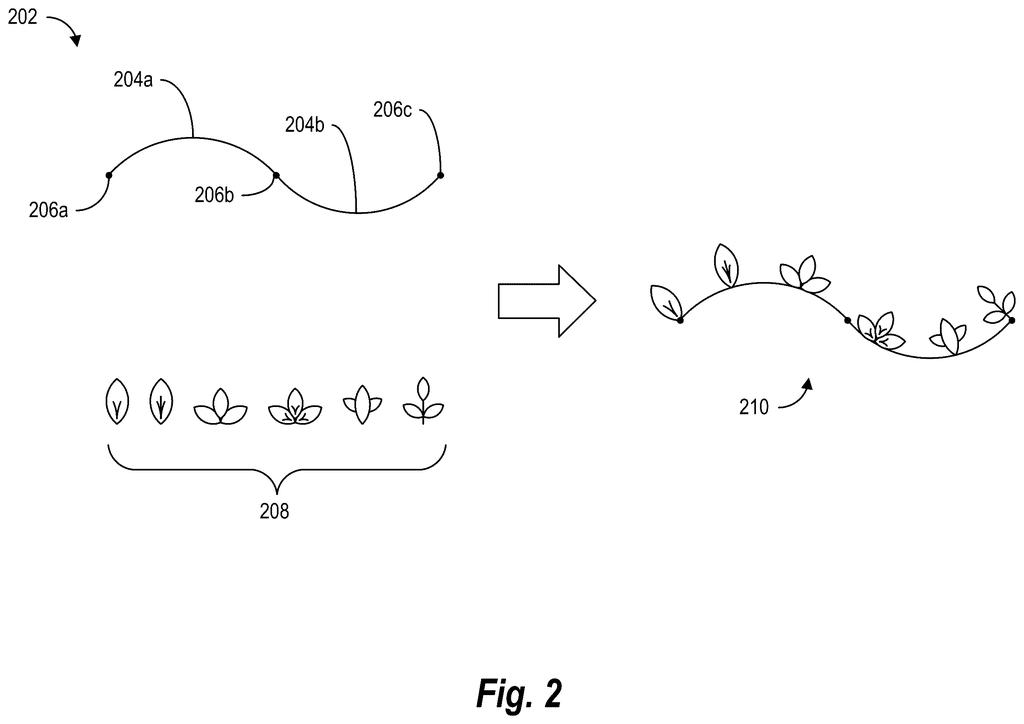
Imagine you're designing a party invitation and you want five little flower icons spaced perfectly along a swooping curved banner. In most design tools today, you'd have to move each one by hand, eyeball the gaps, move them again, and repeat until it looks right.
Adobe's new patent describes a system that takes over that job. You pick a curved line (called a spline in design software) and tell the tool how many objects you want along it. The system measures the full length of the curve, breaks it into segments, figures out exactly how far apart each object should sit, and then places all of them in one step.
The result is perfect, even spacing along any curve, whether it's a gentle arc or a tight spiral, without you doing any of the math. It's the kind of small fix that saves a surprising amount of time across a full design project.
… generating, for the plurality of curve segments, an accumulated length repository comprising accumulated lengths of the plurality of curve segments along the vector spline …
Translation: The software calculates the exact length of every curved section so objects can be spaced evenly.
How Adobe measures curves to find exact placement spots
The patent describes a method for distributing design objects at equal intervals along a vector spline (a smooth curve defined mathematically, the kind you draw with a pen tool in Illustrator or similar apps).
Here's how the system works step by step:
- It divides the spline into small curve segments and measures the length of each one, building what the patent calls an accumulated length repository (essentially a running total of distances along the curve, like mile markers on a road).
- The user specifies how many objects to place. The system divides the total curve length by that number to get a uniform distance between each object.
- It searches the accumulated lengths to find exactly which segment each object falls on, then calculates the precise coordinates within that segment.
- It places every object at those coordinates simultaneously, generating a finished layout in one action.
The same approach handles alignment as well as even distribution. Because the system stores segment lengths in advance, the search step is fast even on complex multi-segment paths. The patent also covers cases where objects need to be oriented to follow the curve's direction at each placement point.
… generate a plurality of placement locations along the selected curve segments based on the uniform distance …
Translation: The system figures out the exact spots where each design element should sit along the curve.
What this means for graphic designers using Illustrator or Express
For professional designers, this is genuinely useful quality-of-life work. Placing objects evenly along curves comes up constantly in logo design, typographic layouts, decorative borders, and data visualization. Right now it requires either manual nudging or clunky workarounds. A one-click solution built into a tool like Adobe Illustrator or Adobe Express would cut what can be a ten-minute fiddling session down to seconds.
Adobe keeps filing on precision layout and vector-editing tools, and this fits that pattern. For everyday users of Creative Cloud apps, a feature built from this patent would lower the skill floor for producing polished, professional-looking curved layouts without needing to know any geometry.
Adobe's 167th filing in our Adobe coverage since May adds to a run that includes the slide deck builder and the illustration rules syncer.
Spacing objects evenly along a curved path sounds like a small design task, but it defeats most tools because curves lie visually. Equal mathematical steps produce unequal-looking gaps, and correcting them by hand eats real time on real deadlines, often enough that designers simply stop trying.
Adobe's solution is to precompute and store the actual physical lengths of each segment along a curve, so the software can find the right placement points in a single lookup rather than forcing the designer to hunt for them manually. The problem has always been that the math required was slow and awkward to run on the fly; storing the lengths in advance sidesteps that entirely.
The result, if it ships and works as described, is that a routine task stops being a reason to cut corners. That is a narrow win, but layout designers, illustrators, and editorial artists hit this wall often enough that narrow wins accumulate into meaningful ones.
Get our take in your Top Stories
Liked this breakdown? Add Patentlyze as a preferred source on Google, and our plain-English take shows up more often in your Top Stories the next time Adobe patent news breaks.
There are more where this came from
We read every patent application Big Tech publishes and send you the ones worth knowing. Plain English, free, every week.
The drawings
12 drawing sheets from US 2026/0278870 A1 · click any drawing to enlarge


Show the other 4 sheets


Want this weekly breakdown for a company we don't cover? Patentlyze Pro →
Be the first to weigh in