
Adobe Files Patent to Edit One Piece of a PDF Without Downloading the Whole Thing
Fixing one line in a cloud PDF shouldn't mean hauling the whole file back and forth, and Adobe's new patent application is built around that idea.
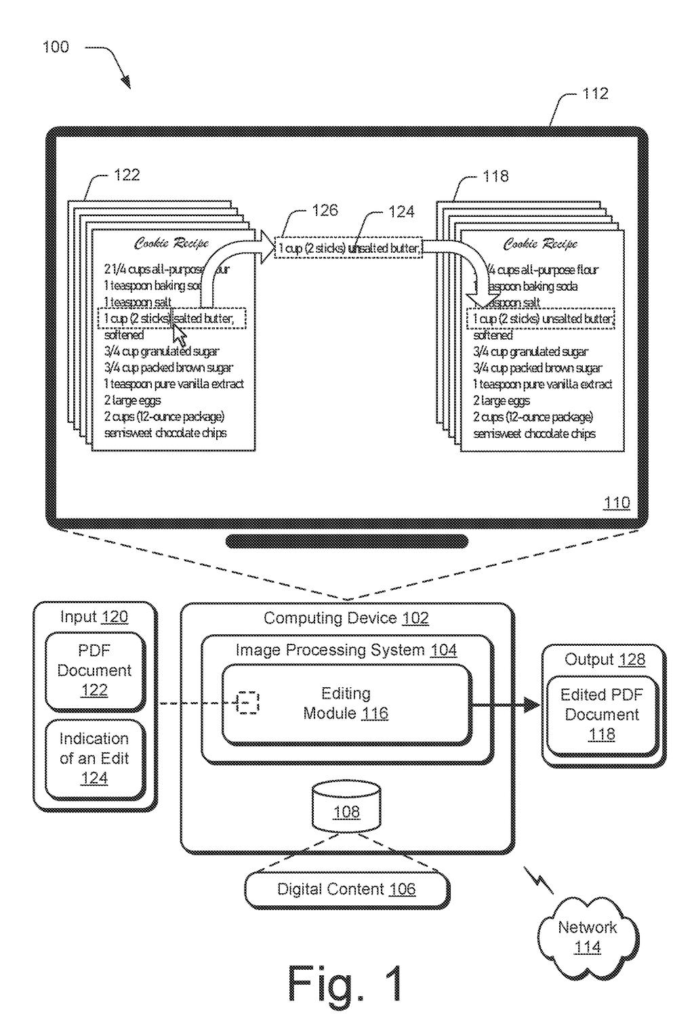
What Adobe's piece-by-piece PDF editing does
A four-page purchase agreement sits in cloud storage, and one blank line needs a date. Fixing that single line can mean pulling the entire file down to your device, changing it, and sending the entire file back up. That is slow for you, and it gets messy if a coworker is editing the same document.
Adobe's patent application describes a different approach. The software works out which small piece of the document your edit touches, such as one line of text or a single page, and downloads only that piece. You make your change, and only the changed piece goes back to storage.
Because two people working on different pages never touch each other's pieces, the filing says edits are less likely to overwrite one another. In its example, one person edits page 3 while another edits page 5, and neither has to wait on the whole file.
… downloading, by the processing device, the region of the document from storage; generating, by the processing device, an edited region of the document by performing the edit to the object in the region of the document …
Translation: The software downloads only the specific part you want to change instead of the whole file.
How Adobe finds and swaps one region of a PDF
The core idea is a short sequence of steps. The system receives a command to edit an object on a document (a line of text or a fill-in form field, for example), finds the region of the document that holds that object, downloads just that region from storage, applies the edit, and folds the edited region back into the document.
The filing describes a few ways to find regions. The software can divide a page into visually distinct areas, like a block of text or an image, by comparing visual attributes. It can use a machine learning model (a program trained on labeled examples to recognize text blocks, images, tables, and diagrams), or it can read the file's manifest (a list of the file's parts and details). A region can also be an entire page.
In the filing's main example, the PDF is converted to a cloud native PDF. This is a version stored as separate pieces with an index file, so a server can send just a slice of it on request. After editing, the file can be turned back into an ordinary single-file PDF.
- Edits can include changing text, filling forms, and adding, removing, rotating, or cropping pages.
- The steps can run in real time as you edit, with no visible extra steps on screen.
Why this matters for shared PDFs in the cloud
The practical payoff is speed. Opening and saving a big PDF in an online editor would move a few kilobytes of the part you changed instead of the whole file, which matters most on slow connections and phones. The filing also says this uses fewer computing resources than the full download and upload approach.
The second payoff is teamwork. If you and a colleague edit different pages of the same contract, each of you downloads and saves only your own page, so neither overwrites the other. The filing's screens show buttons for "edit PDF," "combine files," "organize pages," and "sign PDF," so the changes would mostly happen out of sight behind familiar controls.
Adobe's 226th filing in our Adobe coverage since May keeps building on ideas like AI grading AI answers and selective word study.
Claim 1 is short and wide. It asks for five steps: take an edit command for an object on a document, find the matching region, download that region from storage, edit it, and put it back. Nothing in it says the document must be a PDF, that it lives in the cloud, or that a machine learning model finds the regions.
Those limits appear only in later claims: PDF in claim 2, converting to a cloud native PDF in claim 3, uploading in claim 4. If granted as written, claim 1 would reach any program that edits a stored document by fetching only the piece you are working on, whatever the file type. That is a lot of ground for one idea.
Broad claims like this often get narrowed during review, so a final version could look closer to the PDF-specific claims. The everyday benefit holds either way: change one line, and move one line.
Get our take in your Top Stories
Liked this breakdown? Add Patentlyze as a preferred source on Google, and our plain-English take shows up more often in your Top Stories the next time Adobe patent news breaks.
There are more where this came from
We read every patent application Big Tech publishes and send you the ones worth knowing. Plain English, free, every week.
The drawings
11 drawing sheets from US 2026/0330129 A1 · click any drawing to enlarge


Show the other 3 sheets


Want this weekly breakdown for a company we don't cover? Patentlyze Pro →
Be the first to weigh in