
Adobe Patents a Single Slider Tool That Handles Both Dim and Blinding Light Levels
Editing a high-dynamic-range photo today often means guessing how bright highlights will look on screens that can't fully show them. Adobe has filed a patent for a tone curve that displays both standard and HDR brightness ranges side by side, so editors can see exactly what they're adjusting.
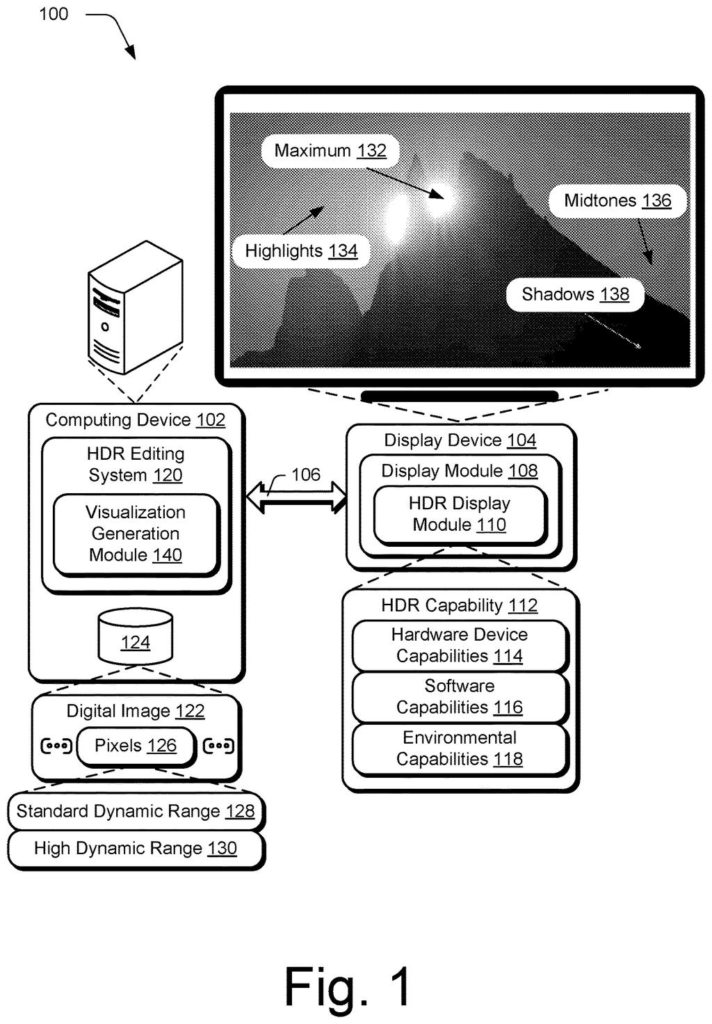
What Adobe's HDR tone curve tool actually does for editors
A photographer finishes shooting a sunset in HDR, then opens the file on a standard laptop monitor. The brightest parts of the sky are clipped to white, and there's no good way to tell which slider controls those lost details. That frustration is the problem Adobe is trying to address here.
Adobe's patent describes a set of editing tools built around a single visual curve that stretches across both the ordinary brightness range your monitor shows and the extended range that HDR screens and file formats can hold. You drag points on that curve to remap how bright each part of the image gets, and the interface shows you what the result looks like in both ranges at the same time.
The patent also covers a histogram that marks where your image's brightness values fall across that wider range, color-coded indicators showing which parts of the frame are in HDR territory, and a live preview that converts HDR pixels down to standard range so you can see the final result before exporting.
… generating, by the processing device, a point curve mapping between the detected luminance values from the digital image and output luminance values over a standard dynamic range and a high dynamic range …
Translation: The software creates a conversion graph that covers both standard and ultra bright lighting levels.
How the point curve maps luminance across two brightness ranges
The core of the patent is a point curve, a graph with a diagonal line that image editors have used for decades to control brightness and contrast. What Adobe is patenting here is a version of that curve extended to cover both standard dynamic range (SDR) and high dynamic range (HDR) on a single continuous axis.
The system works in a few connected steps:
- The software scans the image and detects its luminance values (how bright each pixel is, measured on a technical scale).
- It generates a curve that maps those detected values to output brightness levels, covering the full span from SDR to HDR.
- The curve appears in the editing interface where the user can drag control points to reshape the mapping, effectively deciding how bright each tonal region becomes in the final image.
The patent bundles several related visualizations around that curve. A histogram (a bar chart showing how many pixels sit at each brightness level) is drawn to cover the full HDR range, not just the SDR portion most editors currently show. Separate indicators call out the luminance ranges where HDR capability begins, so editors can see exactly which parts of their image are exploiting the wider range.
Finally, a preview mode converts HDR pixels down to standard range in real time, letting the editor judge how the image will look on a conventional screen without leaving the editing panel.
What this means for photographers editing HDR images today
For most people editing photos on standard monitors, HDR is still an abstract concept because the tools haven't caught up to the formats. Current editing software often forces you to switch views or rely on numeric readouts to understand what's happening in the brightest parts of an image. A curve that spans both ranges in one view would make that guesswork visible.
The practical stakes here are growing. Phone cameras now shoot HDR by default, streaming services deliver HDR video, and new monitors with high peak brightness are common in the mid-range. If Adobe ships something close to what this patent describes inside Lightroom or Photoshop, a growing pile of Adobe HDR editing filings could translate into tools that make HDR color grading accessible to photographers who currently find it confusing.
Adobe's 182nd filing in our Adobe coverage since May follows applications like the AI sales chat tool and AI object selection for artwork.
Claim 1 is broad in an interesting way. It covers any method that detects luminance values, generates a point curve mapping those values across both SDR and HDR ranges, and shows that curve in a UI where users can drag control points. That description fits a large slice of what any serious HDR editing interface would need to do.
The breadth cuts both ways. If granted as written, it could give Adobe leverage over any photo or video editing tool that shows a single interactive tone curve spanning both dynamic ranges, which is a fairly fundamental design choice, not a narrow trick. That is the kind of claim that tends to attract scrutiny during examination.
The underlying idea is practical, and the problem it solves is real. HDR editing is confusing today largely because visualizations haven't kept pace with the formats. Whether the patent survives in this broad form or gets narrowed to specific implementations, the engineering direction points at something editors genuinely need.
There are more where this came from
We read every patent application Big Tech publishes and send you the ones worth knowing. Plain English, free, every week.
The drawings
16 drawing sheets from US 2026/0289832 A1 · click any drawing to enlarge


Want this weekly breakdown for a company we don't cover? Patentlyze Pro →
Be the first to weigh in