
Adobe Files Patent for Turning Flat AI Images Into Layered, Editable Artwork
Ask an AI for a simple rocket and you get a flat picture with no parts you can move. Adobe's patent describes software that rebuilds that picture as separate outlines, fills and holes.
What Adobe's AI-to-editable-artwork patent does
Imagine you ask an AI tool for a simple yellow rocket with black outlines. It looks great, but when you open it in a design program, the black outline is chopped into dozens of loose pieces, and nothing moves as one object.
Adobe's patent describes a fix. The software looks at the flat picture and sorts each colored area into two kinds: outlines and filled areas. Then it matches each outline to the shape it surrounds, works out which pieces sit on top of which, and rebuilds the picture as editable vector artwork, a file made of shapes you can resize and recolor one at a time.
The payoff: the rocket's fin becomes its own object, with its outline and yellow fill linked together, so you can change one without wrecking the rest.
… classifying each region of the one or more regions as a stroke or a fill by determining a characteristic axis of the region; generating a spatial data structure representing the regions classified as strokes using a characteristic axis of each stroke; …
Translation: The system figures out whether parts of the image act as outlines or solid fills to map them out properly.
How Adobe tells outlines apart from fills
The process starts with a flat image, such as one made by a diffusion model (the type of AI that turns a text prompt into a picture). The filing names Adobe's Firefly as one example. The software splits the image into regions based on color boundaries.
Each region is then labeled a stroke (an outline) or a fill (a colored area). To decide, it finds the region's "characteristic axis," a thin backbone running through its middle, using a distance calculation (the filing's example is called optimal ridge detection, which produces a medial axis). A region whose backbone is open and hugs its centerline is a stroke. A region with a closed backbone or no clear centerline is a fill.
From there:
- Strokes go into an R-tree, a tree-shaped index that makes it fast to ask what sits near what.
- For each fill, nearby strokes are widened slightly and compared against the fill's edge with an exclusive OR check (a test that keeps only the differences). If nothing is left uncovered, the stroke fully wraps the fill and the two are linked.
- A stroke shared by two fills is copied. Layer order is set by comparing stroke width and color with the original picture.
- Leftover strokes are joined into smooth continuous lines and placed on top.
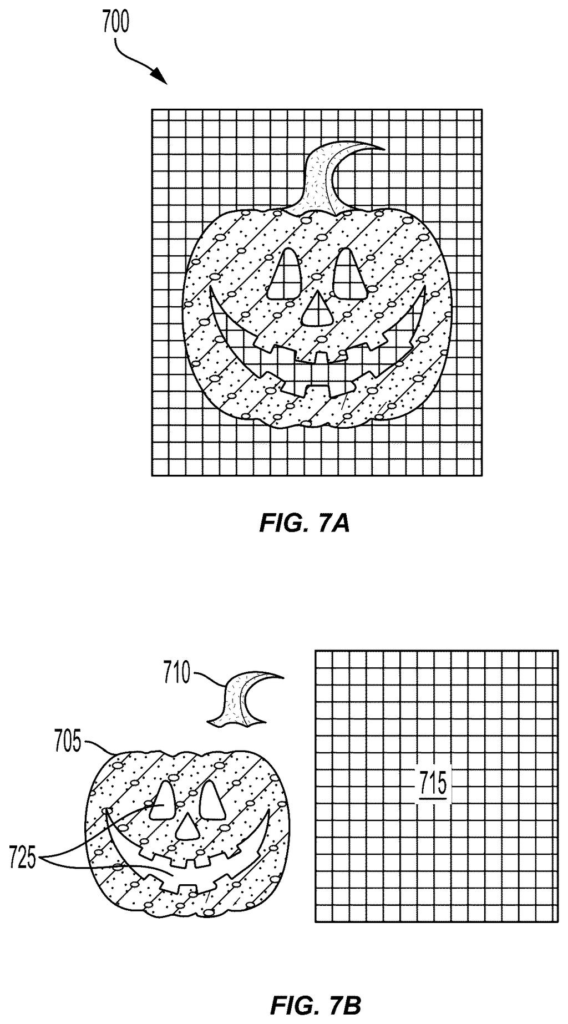
The filing also covers compound paths, shapes with see-through holes, like the eyes and mouth of a jack-o-lantern. The finished file can be saved as SVG, EPS, Adobe Illustrator or PDF.
Techniques for enhancing the editability of generated vector graphics are provided. In an example method, a processing device receives an image. The method further includes determining one or more regions of the image.
Translation: The patent describes a way to make computer generated images much easier for human artists to modify.
Why designers may care about this Adobe filing
If you've ever asked an AI tool for an icon or illustration, you know the catch: it looks finished, but it's a flat picture. A designer who wants to change one color or thicken one line has to redraw it. Adobe's filing aims at that gap, producing files where each outline and fill is its own object, saved in formats such as SVG or Adobe Illustrator.
The filing names Adobe's Firefly as one example source for the images, which hints at where this could land. Vector files are used across digital design, illustration and animation because they scale to any size. A tool that makes AI output usable there could move AI images from rough ideas toward finished work, according to the company's own pitch.
Adobe's 40th filing we've tracked for controllable AI images since May builds on earlier applications like moving objects in AI scenes and reposing people by description.
Every choice here trades a little fidelity for a lot of tidiness. When several strokes wrap one shape, the software shrinks them to the thinnest width and repaints them in the most common color, so a border that was slightly uneven in the AI's picture comes out uniform. That is a fair price for a clean outline you can recolor easily.
The bigger cost is guessing. A flat picture has no layers, so the software decides what sits on top using rules of thumb: wider lines win, and colors closest to the original win. A busy illustration with shaded, overlapping parts gives those rules more chances to guess wrong, and the filing's examples (a rocket, a hand, a jack-o-lantern) are all simple pieces of art.
Shared borders get copied, one copy per shape they touch, which adds duplicate lines to the file but keeps each piece separately editable. The trade is worth making. For a working designer, a tidy file that is slightly off from the picture beats a perfect picture that has to be rebuilt by hand.
Get our take in your Top Stories
Liked this breakdown? Add Patentlyze as a preferred source on Google, and our plain-English take shows up more often in your Top Stories the next time Adobe patent news breaks.
There are more where this came from
We read every patent application Big Tech publishes and send you the ones worth knowing. Plain English, free, every week.
The drawings
9 drawing sheets from US 2026/0350875 A1 · click any drawing to enlarge


Show the other 1 sheets

Want this weekly breakdown for a company we don't cover? Patentlyze Pro →
Be the first to weigh in