
Apple · Filed Jul 8, 2026 · Published Nov 5, 2026

Apple Files Patent for Floating Surfaces That Resize as You Drag Objects Around

Apple's filing describes a floating 3D surface that stretches or shrinks by itself as you drag objects onto, around and off it, so a group of items always looks neatly arranged.
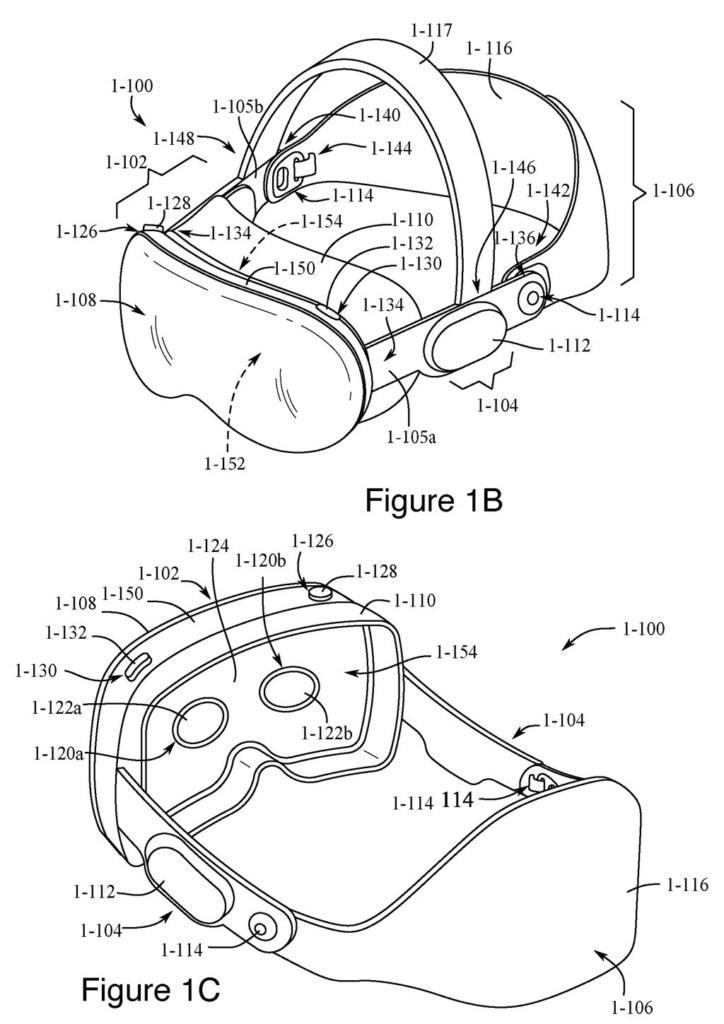
A headset viewed from the front and back, complete with viewing lenses, face padding, and an adjustable strap. Drawing from patent filing US 2026/0349578 A1.
A headset viewed from the front and back, complete with viewing lenses, face padding, and an adjustable strap.
See all 64 drawings from this filing ↓
Publication number US 2026/0349578 A1 US20260349578A1
Applicant Apple Inc.
Filing date Jul 8, 2026
Publication date Nov 5, 2026
Inventors Agatha Y. YU, Benjamin H. BOESEL, Stephen O. LEMAY, Matthew J. SUNDSTROM, Matan STAUBER, Evgenii KRIVORUCHKO, Zoey C. TAYLOR
US classification 345/419
Status when we published Waiting for an examiner (Jul 29, 2026)
Parent application is a Continuation of 18473155 (filed 2023-09-22)
Document 21 claims

What Apple's self-resizing 3D surface does

Imagine you're wearing a headset, and a handful of 3D objects sit lined up on a floating surface in the middle of your room. You grab one and drag it toward the edge. Instead of the object hanging off into thin air, the surface stretches to keep it on board.

Drag it out of the way entirely and the surface shrinks back, leaving the object on its own. Flick it quickly and the object simply goes where you threw it, with no resizing. While you drag, an outline of the surface appears so you can see its edges, then fades once you let go.

Apple's filing frames this as a way to keep a group of objects tidy without you adjusting anything by hand. There's also a resize control for the times you'd rather do it yourself.

From the filing · THE ABSTRACT
In some embodiments, a computer system automatically resizes virtual surfaces that contain objects.

Translation: The system changes the size of digital panels whenever items are moved on them.

How the surface decides when to grow or shrink

Claim 1 covers a computer system that shows a virtual surface in a 3D environment, holding at least two virtual objects. Each object has the same "spatial relationship" to the surface (think of it as belonging to the surface in the same way). The system detects an input aimed at one object, asking to move it to a new spot. The description says that input can be a hand pinch-and-drag gesture, with eye tracking used to pick the target.

If the new location meets certain criteria, the system moves the object and resizes the surface so the object keeps its relationship to it. The dependent claims fill in the rules:

  • Dropping the object at a spot meant for removal shrinks the surface, and the object no longer belongs to it.
  • Moving an object within the surface can grow the surface to fit.
  • Some moves, such as an object that started between two others, skip resizing.
  • A move faster than a speed threshold lets the object go without keeping its relationship to the surface.

The claims also cover feedback and extras. A visual outline of the surface's volume appears when the drag begins and becomes less prominent when it ends. Loose objects, objects from other surfaces, or objects from a content container can be dropped onto the surface. One whole surface can be moved onto another while each set of objects stays tied to its own surface. A selectable option lets you resize the surface manually. The description adds that visual effects can grow stronger as an object nears the surface's edge.

From the filing · CLAIM 1
… resizing the first virtual surface based on the third location of the second virtual object so that once the first virtual surface has been resized, the second virtual object has the respective spatial relationship relative to the first virtual surface.

Translation: The panel expands or shrinks to maintain the proper distance from the dragged item.

Why tidy 3D workspaces matter for headsets

If you wear a headset, you quickly end up with a lot of floating stuff, and arranging it by hand is a chore. This filing tries to make a group of objects behave like one tidy unit: add something and the surface grows, take something away and it shrinks.

The filing describes head-mounted devices that read your hand gestures and where you look, so the drag-and-release actions here would be pinches and glances rather than mouse clicks. The speed rule is a thoughtful touch, since a quick flick lets you toss an object aside without disturbing the rest of the group. The boundary outline is meant to help you understand what the device is doing, which matters when there is no mouse cursor to follow.

Apple's 122nd filing we've tracked since May on Apple's AR glasses work, it follows earlier applications on fixing warped hands and floating torso controls.

Editorial take

Claim 1 casts a wide net. It needs a floating surface holding at least two objects, an input that drags one of them, and a rule the claim calls only "one or more criteria" that triggers a resize so the dragged object keeps its place relative to the surface. The claim doesn't say what kind of input device, what shape the surface has, or what the criteria are.

Almost everything specific lives in the dependent claims: the speed cutoff, the gap between two objects that skips resizing, the fading outline, the manual resize option. If granted as written, claim 1 on its own would reach any 3D interface where a container grows or shrinks to follow a dragged item. Wording in a filing like this can change before anything is granted.

Verdict: a small, practical interface fix. It will not sell anyone a headset, but it takes a fussy chore off your plate and keeps a floating workspace tidy, which is a good place for a company to spend its patent effort.

Get our take in your Top Stories

Liked this breakdown? Add Patentlyze as a preferred source on Google, and our plain-English take shows up more often in your Top Stories the next time Apple patent news breaks.

There are more where this came from

We read every patent application Big Tech publishes and send you the ones worth knowing. Plain English, free, every week.

The drawings

64 drawing sheets from US 2026/0349578 A1 · click any drawing to enlarge

Viewing digital objects in a room with a handheld device, drawing sheet 1 from US 2026/0349578 A1
Sheet 1 Viewing digital objects in a room with a handheld device
Front and inner views of the mixed reality headset, drawing sheet 2 from US 2026/0349578 A1
Sheet 2 Front and inner views of the mixed reality headset
How the modular headset parts separate for cleaning and fit, drawing sheet 3 from US 2026/0349578 A1
Sheet 3 How the modular headset parts separate for cleaning and fit
Internal parts and screen assemblies inside the main frame, drawing sheet 4 from US 2026/0349578 A1
Sheet 4 Internal parts and screen assemblies inside the main frame
Detailed breakdown of the optical lenses and internal boards, drawing sheet 5 from US 2026/0349578 A1
Sheet 5 Detailed breakdown of the optical lenses and internal boards
Outermost curved cover glass and outward display layers, drawing sheet 6 from US 2026/0349578 A1
Sheet 6 Outermost curved cover glass and outward display layers
Sensor brackets positioned behind the outer glass, drawing sheet 7 from US 2026/0349578 A1
Sheet 7 Sensor brackets positioned behind the outer glass
Camera and sensor layouts mapped across the front visor, drawing sheet 8 from US 2026/0349578 A1
Sheet 8 Camera and sensor layouts mapped across the front visor
Show the other 52 sheets
Sensor and camera layouts inside the headset frame, drawing sheet 9 from US 2026/0349578 A1
Sheet 9 Sensor and camera layouts inside the headset frame
Internal motorized display assemblies and structural supports, drawing sheet 10 from US 2026/0349578 A1
Sheet 10 Internal motorized display assemblies and structural supports
How the lens ring holds the display layers, drawing sheet 11 from US 2026/0349578 A1
Sheet 11 How the lens ring holds the display layers
Main processor components that coordinate tracking and apps, drawing sheet 12 from US 2026/0349578 A1
Sheet 12 Main processor components that coordinate tracking and apps
Display unit hardware that renders virtual graphics, drawing sheet 13 from US 2026/0349578 A1
Sheet 13 Display unit hardware that renders virtual graphics
External camera tracking hand poses and finger joints, drawing sheet 14 from US 2026/0349578 A1
Sheet 14 External camera tracking hand poses and finger joints
Optical sensors tracking eye reflections to follow gaze, drawing sheet 15 from US 2026/0349578 A1
Sheet 15 Optical sensors tracking eye reflections to follow gaze
How the headset calculates your exact line of sight, drawing sheet 16 from US 2026/0349578 A1
Sheet 16 How the headset calculates your exact line of sight
Pointing between two floating surfaces in an augmented room, drawing sheet 17 from US 2026/0349578 A1
Sheet 17 Pointing between two floating surfaces in an augmented room
Moving virtual items across floating surfaces with hand gestures, drawing sheet 18 from US 2026/0349578 A1
Sheet 18 Moving virtual items across floating surfaces with hand gestures
Performing the same gesture controls while wearing a headset, drawing sheet 19 from US 2026/0349578 A1
Sheet 19 Performing the same gesture controls while wearing a headset
Dropping an item off a floating surface into open space, drawing sheet 20 from US 2026/0349578 A1
Sheet 20 Dropping an item off a floating surface into open space
Gathering detached virtual items onto a new flat surface, drawing sheet 21 from US 2026/0349578 A1
Sheet 21 Gathering detached virtual items onto a new flat surface
Angling the new floating surface to face the user, drawing sheet 22 from US 2026/0349578 A1
Sheet 22 Angling the new floating surface to face the user
Pulling an item back toward a main floating display, drawing sheet 23 from US 2026/0349578 A1
Sheet 23 Pulling an item back toward a main floating display
Reorganizing items onto a secondary angled shelf, drawing sheet 24 from US 2026/0349578 A1
Sheet 24 Reorganizing items onto a secondary angled shelf
Dismissing a floating surface with an on screen close button, drawing sheet 25 from US 2026/0349578 A1
Sheet 25 Dismissing a floating surface with an on screen close button
Dragging an item away opens a new floating window, drawing sheet 26 from US 2026/0349578 A1
Sheet 26 Dragging an item away opens a new floating window
Rules for aligning surfaces and casting item shadows, drawing sheet 27 from US 2026/0349578 A1
Sheet 27 Rules for aligning surfaces and casting item shadows
Fading in a window near its original source, drawing sheet 28 from US 2026/0349578 A1
Sheet 28 Fading in a window near its original source
Anchoring surfaces in physical space and vanishing them when empty, drawing sheet 29 from US 2026/0349578 A1
Sheet 29 Anchoring surfaces in physical space and vanishing them when empty
Deciding whether surfaces follow along when moving their source window, drawing sheet 30 from US 2026/0349578 A1
Sheet 30 Deciding whether surfaces follow along when moving their source window
Hiding and reopening surfaces together with their parent window, drawing sheet 31 from US 2026/0349578 A1
Sheet 31 Hiding and reopening surfaces together with their parent window
Returning objects to a container upon tapping a close button, drawing sheet 32 from US 2026/0349578 A1
Sheet 32 Returning objects to a container upon tapping a close button
Matching the tilt of virtual items to their floating surface, drawing sheet 33 from US 2026/0349578 A1
Sheet 33 Matching the tilt of virtual items to their floating surface
Moving a floating tray while keeping its front facing you, drawing sheet 34 from US 2026/0349578 A1
Sheet 34 Moving a floating tray while keeping its front facing you
Two virtual surfaces holding 3D items in mixed reality, drawing sheet 35 from US 2026/0349578 A1
Sheet 35 Two virtual surfaces holding 3D items in mixed reality
Highlighting a floating surface as you drag an object, drawing sheet 36 from US 2026/0349578 A1
Sheet 36 Highlighting a floating surface as you drag an object
Shrinking a virtual tray when an item shifts inside it, drawing sheet 37 from US 2026/0349578 A1
Sheet 37 Shrinking a virtual tray when an item shifts inside it
Expanding one tray and shrinking another as an item moves, drawing sheet 38 from US 2026/0349578 A1
Sheet 38 Expanding one tray and shrinking another as an item moves
Looking through a headset as floating trays resize, drawing sheet 39 from US 2026/0349578 A1
Sheet 39 Looking through a headset as floating trays resize
Settling an item onto its newly enlarged virtual shelf, drawing sheet 40 from US 2026/0349578 A1
Sheet 40 Settling an item onto its newly enlarged virtual shelf
Two virtual surfaces resize automatically to fit moved shapes, drawing sheet 41 from US 2026/0349578 A1
Sheet 41 Two virtual surfaces resize automatically to fit moved shapes
Moving an item further shrinks one surface while expanding another, drawing sheet 42 from US 2026/0349578 A1
Sheet 42 Moving an item further shrinks one surface while expanding another
Resizing a floating surface as you drag items inside it, drawing sheet 43 from US 2026/0349578 A1
Sheet 43 Resizing a floating surface as you drag items inside it
Shrinking a surface when an item gets pulled off, drawing sheet 44 from US 2026/0349578 A1
Sheet 44 Shrinking a surface when an item gets pulled off
Highlighting surface borders while dragging and hiding them after, drawing sheet 45 from US 2026/0349578 A1
Sheet 45 Highlighting surface borders while dragging and hiding them after
Deciding surface changes based on drag speed and direction, drawing sheet 46 from US 2026/0349578 A1
Sheet 46 Deciding surface changes based on drag speed and direction
Adding new items onto an existing floating surface, drawing sheet 47 from US 2026/0349578 A1
Sheet 47 Adding new items onto an existing floating surface
Merging floating surfaces and their contents together, drawing sheet 48 from US 2026/0349578 A1
Sheet 48 Merging floating surfaces and their contents together
Resizing the surface manually using an on-screen control, drawing sheet 49 from US 2026/0349578 A1
Sheet 49 Resizing the surface manually using an on-screen control
Selecting an object resting on a virtual surface, drawing sheet 50 from US 2026/0349578 A1
Sheet 50 Selecting an object resting on a virtual surface
Visual feedback appears as the object approaches the boundary, drawing sheet 51 from US 2026/0349578 A1
Sheet 51 Visual feedback appears as the object approaches the boundary
Warning cues intensify when moving the object back and forth, drawing sheet 52 from US 2026/0349578 A1
Sheet 52 Warning cues intensify when moving the object back and forth
Dragging past the edge prompts the surface to expand, drawing sheet 53 from US 2026/0349578 A1
Sheet 53 Dragging past the edge prompts the surface to expand
Pulling the item inward cancels the boundary expansion, drawing sheet 54 from US 2026/0349578 A1
Sheet 54 Pulling the item inward cancels the boundary expansion
Dropping an item off the surface shrinks it back down, drawing sheet 55 from US 2026/0349578 A1
Sheet 55 Dropping an item off the surface shrinks it back down
Headset view of an item being removed by pinch gesture, drawing sheet 56 from US 2026/0349578 A1
Sheet 56 Headset view of an item being removed by pinch gesture
Shading the border as an item nears the edge, drawing sheet 57 from US 2026/0349578 A1
Sheet 57 Shading the border as an item nears the edge
Shrinking the surface after an item is removed, drawing sheet 58 from US 2026/0349578 A1
Sheet 58 Shrinking the surface after an item is removed
How the headset shows an item leaving a surface, drawing sheet 59 from US 2026/0349578 A1
Sheet 59 How the headset shows an item leaving a surface
Fading the edge glow when dragging stops, drawing sheet 60 from US 2026/0349578 A1
Sheet 60 Fading the edge glow when dragging stops

Sheets 61 to 64 are in the full USPTO filing.

Browse all the drawings 64 drawing sheets
Patent filing page

Source. Full patent text and figures from the official USPTO publication PDF.
Reader comments

Be the first to weigh in

Start the discussion

Real name or a handle, either is fine. Comments are read by a person before they appear, so allow a little time. Keep it about the filing.