
Apple · Filed Jun 12, 2026 · Published Oct 29, 2026

Apple Files Patent to Fix Floating Windows That Clip Into Your Furniture

When you drag a floating window through a real wall or couch in a headset, the illusion breaks: the window seems to be in two places at once. Apple's filing describes a way to soften that moment, with the fix depending on how badly the window overlaps real stuff.
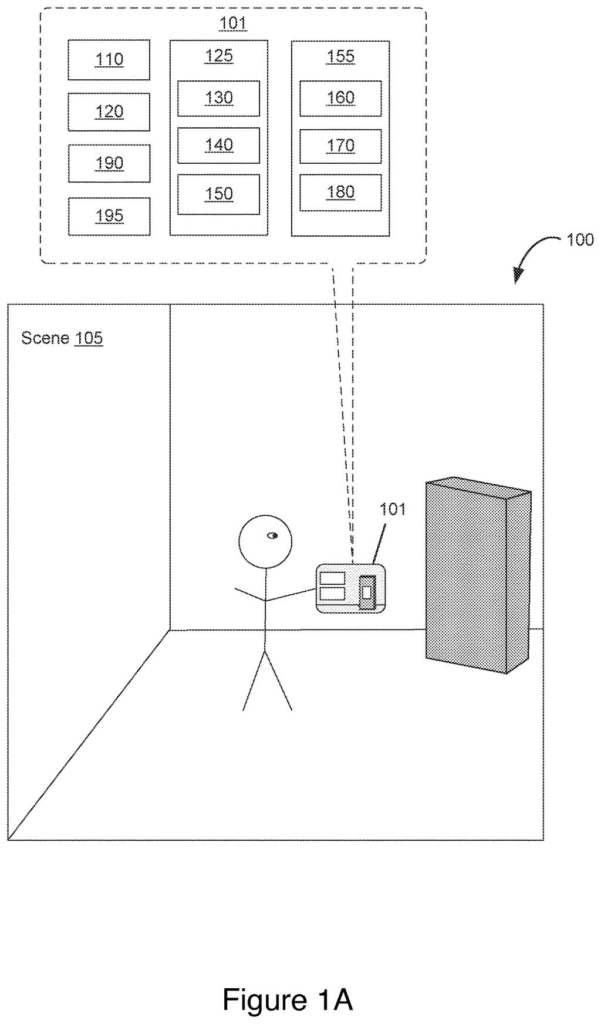
A person views digital display windows inside a physical room next to everyday furniture. Drawing from patent filing US 2026/0340960 A1.
A person views digital display windows inside a physical room next to everyday furniture.
See all 60 drawings from this filing ↓
Publication number US 2026/0340960 A1 US20260340960A1
Applicant Apple Inc.
Filing date Jun 12, 2026
Publication date Oct 29, 2026
Inventors Benjamin HYLAK, William A. SORRENTINO III, Christopher D. MCKENZIE, James J. OWEN, Zoey C. TAYLOR, Miquel ESTANY RODRIGUEZ
US classification 345/633
Status when we published Waiting for an examiner (Jul 21, 2026)
Parent application is a Continuation of 18467523 (filed 2023-09-14)
Document 16 claims

What Apple's headset window-clipping fix does

A man wearing a headset drags a floating window across his living room. The window slides right into the bookshelf, and half of it seems to sink into the wood. Your eyes know that can't be right, and it can feel odd or even uncomfortable.

Apple's filing describes a headset that notices when a virtual object, like an app window, overlaps a real object. It then changes how the window looks. A small overlap might get a light touch. A deeper one might get a stronger treatment, such as making the window more see-through or adding extra visual elements around it.

The response grows or shifts as you keep moving the window, or as you walk around it. The aim is to keep the window from looking like it is cutting through your furniture, without forcing you to stop and fix it by hand.

From the filing · THE ABSTRACT
… depth conflict mitigation for a virtual object that is in contact with one or more physical objects in a three-dimensional environment by changing visual properties of one or more portions of the virtual object.

Translation: The system prevents digital windows from disappearing into real furniture by altering how they look.

How the headset grades a window's overlap with real objects

The claims cover a method run by a computer system connected to a display and input devices (think a headset with hand or eye tracking). It shows a virtual object, such as a window, in a 3D scene, and lets you move it with an input. As it moves, the system checks for a depth conflict: a spot where the virtual object and a real object would appear to occupy the same space.

The key idea is that the response depends on the degree of conflict. At one level, the object gets one visual effect. At a different level, it gets a second effect with different visual properties. One dependent claim says the stronger effect can include a lower opacity (more see-through).

The dependent claims add the triggers that could set the degree:

  • How much of the object overlaps, compared with a threshold amount.
  • How far you moved it past the point where the overlap began.
  • How far the object sits from your viewpoint.
  • What type of physical object it is touching.

The effect can hit only the overlapping part of the object, or the whole object evenly. It can also add new virtual elements that were not shown before, with the object drawn over them. The effect keeps adjusting as you move the object again or move your head. The description also covers hiding the clash by showing a virtual environment that covers the real object.

From the filing · CLAIM 1
… in accordance with a determination that the first virtual object has a first degree of depth conflict with a respective portion of the three-dimensional environment, displaying the first virtual object with a first visual effect that mitigates the depth conflict …

Translation: Different levels of clipping trigger distinct visual adjustments to keep the virtual window visible.

Why Vision Pro-style headsets need this fix

If you wear a headset like Apple's Vision Pro, windows are meant to feel like real objects in your room. Walls, desks and couches are always in the way, and nothing stops you from shoving a window right through them. A cleaner way to handle that makes the whole device feel more believable and more comfortable.

It also shows how much polish this kind of product needs. The filing is a continuation of an earlier application, so Apple has been refining this idea for a while. Small touches like fading a window that has sunk into a wall are what make a headset feel finished, even though you may never consciously notice them.

This is the 109th Apple patent application we've tracked in Apple AR glasses ideas since May, adding to earlier filings like one on a bending frame and one with a pocket computer.

Editorial take

The problem here is small in size but constant in frequency. Anyone who wears a headset and moves windows around will eventually push one into a wall, and every time it happens the illusion of a window floating in your room cracks. A product built on that illusion has a good reason to care.

The approach fits the scale of the problem. Rather than blocking you from moving a window or snapping it back, the system lets you drag freely and reacts in proportion to how much trouble the overlap causes. A slight clip gets a gentle fix, and a deep clip gets a bolder one. That feels well judged.

It is a modest refinement, and you won't buy a headset for it. Still, it is an invisible fix that decides whether a headset feels comfortable after an hour of use.

Get our take in your Top Stories

Liked this breakdown? Add Patentlyze as a preferred source on Google, and our plain-English take shows up more often in your Top Stories the next time Apple patent news breaks.

There are more where this came from

We read every patent application Big Tech publishes and send you the ones worth knowing. Plain English, free, every week.

The drawings

60 drawing sheets from US 2026/0340960 A1 · click any drawing to enlarge

A handheld device mapping physical space around a user, drawing sheet 1 from US 2026/0340960 A1
Sheet 1 A handheld device mapping physical space around a user
Front and interior views of the mixed reality headset, drawing sheet 2 from US 2026/0340960 A1
Sheet 2 Front and interior views of the mixed reality headset
Detachable headband, light seal, and lenses of the headset, drawing sheet 3 from US 2026/0340960 A1
Sheet 3 Detachable headband, light seal, and lenses of the headset
Internal display and frame layers packed inside the visor, drawing sheet 4 from US 2026/0340960 A1
Sheet 4 Internal display and frame layers packed inside the visor
Exploded hardware stack showing optical pods and internal wiring, drawing sheet 5 from US 2026/0340960 A1
Sheet 5 Exploded hardware stack showing optical pods and internal wiring
Outward-facing screen assembly that reveals the wearer eyes, drawing sheet 6 from US 2026/0340960 A1
Sheet 6 Outward-facing screen assembly that reveals the wearer eyes
Alternative internal layout for the display and sensor assemblies, drawing sheet 7 from US 2026/0340960 A1
Sheet 7 Alternative internal layout for the display and sensor assemblies
Tracking cameras and depth sensors arranged across the front glass, drawing sheet 8 from US 2026/0340960 A1
Sheet 8 Tracking cameras and depth sensors arranged across the front glass
Show the other 52 sheets
Sensor positions along the frame of the headset, drawing sheet 9 from US 2026/0340960 A1
Sheet 9 Sensor positions along the frame of the headset
Internal motorized mounts that adjust the lenses for your eyes, drawing sheet 10 from US 2026/0340960 A1
Sheet 10 Internal motorized mounts that adjust the lenses for your eyes
Lens assembly ring embedded with eye tracking lights, drawing sheet 11 from US 2026/0340960 A1
Sheet 11 Lens assembly ring embedded with eye tracking lights
Core processing units that coordinate hand and eye inputs, drawing sheet 12 from US 2026/0340960 A1
Sheet 12 Core processing units that coordinate hand and eye inputs
Display hardware and sensors that generate mixed reality scenes, drawing sheet 13 from US 2026/0340960 A1
Sheet 13 Display hardware and sensors that generate mixed reality scenes
Cameras mapping finger joints to recognize hand gestures, drawing sheet 14 from US 2026/0340960 A1
Sheet 14 Cameras mapping finger joints to recognize hand gestures
Infrared light bouncing off eyes tracks where you look, drawing sheet 15 from US 2026/0340960 A1
Sheet 15 Infrared light bouncing off eyes tracks where you look
How the headset calculates exactly where you are looking, drawing sheet 16 from US 2026/0340960 A1
Sheet 16 How the headset calculates exactly where you are looking
Looking at an app launch prompt in your room, drawing sheet 17 from US 2026/0340960 A1
Sheet 17 Looking at an app launch prompt in your room
Dragging an app window to place it in space, drawing sheet 18 from US 2026/0340960 A1
Sheet 18 Dragging an app window to place it in space
Marking where a floating window collides with a table, drawing sheet 19 from US 2026/0340960 A1
Sheet 19 Marking where a floating window collides with a table
Holding the window in place while the collision timer runs, drawing sheet 20 from US 2026/0340960 A1
Sheet 20 Holding the window in place while the collision timer runs
Moving the window further into real furniture, drawing sheet 21 from US 2026/0340960 A1
Sheet 21 Moving the window further into real furniture
Showing overlaps when a window touches multiple objects, drawing sheet 22 from US 2026/0340960 A1
Sheet 22 Showing overlaps when a window touches multiple objects
Experiencing the furniture overlap view through a headset, drawing sheet 23 from US 2026/0340960 A1
Sheet 23 Experiencing the furniture overlap view through a headset
Blurring the surrounding room to hide clipped furniture, drawing sheet 24 from US 2026/0340960 A1
Sheet 24 Blurring the surrounding room to hide clipped furniture
Growing a virtual scene to hide the real room, drawing sheet 25 from US 2026/0340960 A1
Sheet 25 Growing a virtual scene to hide the real room
Swiping to replace the room with digital scenery, drawing sheet 26 from US 2026/0340960 A1
Sheet 26 Swiping to replace the room with digital scenery
Pressing a hardware button begins dialing back the immersive scene, drawing sheet 27 from US 2026/0340960 A1
Sheet 27 Pressing a hardware button begins dialing back the immersive scene
Shrinking the digital background reveals the room, drawing sheet 28 from US 2026/0340960 A1
Sheet 28 Shrinking the digital background reveals the room
Returning fully to passthrough view shows the original room again, drawing sheet 29 from US 2026/0340960 A1
Sheet 29 Returning fully to passthrough view shows the original room again
Viewing a focus banner as a window hits furniture, drawing sheet 30 from US 2026/0340960 A1
Sheet 30 Viewing a focus banner as a window hits furniture
Dimming the entire room automatically when a window hits furniture, drawing sheet 31 from US 2026/0340960 A1
Sheet 31 Dimming the entire room automatically when a window hits furniture
Dragging a virtual umbrella in front of a floating window, drawing sheet 32 from US 2026/0340960 A1
Sheet 32 Dragging a virtual umbrella in front of a floating window
Rotating a virtual window when moved near an obstacle, drawing sheet 33 from US 2026/0340960 A1
Sheet 33 Rotating a virtual window when moved near an obstacle
Dimming virtual windows that intersect real objects, drawing sheet 34 from US 2026/0340960 A1
Sheet 34 Dimming virtual windows that intersect real objects
Restoring normal appearance once a window moves clear of furniture, drawing sheet 35 from US 2026/0340960 A1
Sheet 35 Restoring normal appearance once a window moves clear of furniture
Gradually returning window opacity after a user finishes moving it, drawing sheet 36 from US 2026/0340960 A1
Sheet 36 Gradually returning window opacity after a user finishes moving it
Fading a window while moving it relative to your view, drawing sheet 37 from US 2026/0340960 A1
Sheet 37 Fading a window while moving it relative to your view
Adjusting visual effects when you or windows move, drawing sheet 38 from US 2026/0340960 A1
Sheet 38 Adjusting visual effects when you or windows move
Handling overlaps with multiple physical obstacles at once, drawing sheet 39 from US 2026/0340960 A1
Sheet 39 Handling overlaps with multiple physical obstacles at once
Updating multiple clipping effects as a window shifts location, drawing sheet 40 from US 2026/0340960 A1
Sheet 40 Updating multiple clipping effects as a window shifts location
Restoring a normal window view inside an immersive background, drawing sheet 41 from US 2026/0340960 A1
Sheet 41 Restoring a normal window view inside an immersive background
Shifting visual focus between your room and a virtual window, drawing sheet 42 from US 2026/0340960 A1
Sheet 42 Shifting visual focus between your room and a virtual window
Restoring a window's altered look when returning to it, drawing sheet 43 from US 2026/0340960 A1
Sheet 43 Restoring a window's altered look when returning to it
Launching a virtual scene when a window collides with furniture, drawing sheet 44 from US 2026/0340960 A1
Sheet 44 Launching a virtual scene when a window collides with furniture
Hinting at a background scene while you drag a window, drawing sheet 45 from US 2026/0340960 A1
Sheet 45 Hinting at a background scene while you drag a window
Dimming room lighting as depth conflicts get worse, drawing sheet 46 from US 2026/0340960 A1
Sheet 46 Dimming room lighting as depth conflicts get worse
Previewing a translucent virtual scene before it fully opens, drawing sheet 47 from US 2026/0340960 A1
Sheet 47 Previewing a translucent virtual scene before it fully opens
Opening your preferred virtual scenery when you release a window, drawing sheet 48 from US 2026/0340960 A1
Sheet 48 Opening your preferred virtual scenery when you release a window
Clearing virtual scenery when pulling a window from furniture, drawing sheet 49 from US 2026/0340960 A1
Sheet 49 Clearing virtual scenery when pulling a window from furniture
Adjusting immersion levels while a virtual backdrop is displayed, drawing sheet 50 from US 2026/0340960 A1
Sheet 50 Adjusting immersion levels while a virtual backdrop is displayed
Changing a window appearance as it hits a virtual wall, drawing sheet 51 from US 2026/0340960 A1
Sheet 51 Changing a window appearance as it hits a virtual wall
Blurring parts of a window as immersion levels change, drawing sheet 52 from US 2026/0340960 A1
Sheet 52 Blurring parts of a window as immersion levels change
Opening a new window inside virtual surroundings to prevent clipping, drawing sheet 53 from US 2026/0340960 A1
Sheet 53 Opening a new window inside virtual surroundings to prevent clipping
Halting window movement when it meets different types of obstacles, drawing sheet 54 from US 2026/0340960 A1
Sheet 54 Halting window movement when it meets different types of obstacles
Swapping visual effects based on how deeply a window clips, drawing sheet 55 from US 2026/0340960 A1
Sheet 55 Swapping visual effects based on how deeply a window clips
Targeting visual fixes to specific colliding parts of a window, drawing sheet 56 from US 2026/0340960 A1
Sheet 56 Targeting visual fixes to specific colliding parts of a window
Adjusting visual effects when dragging an object away from furniture, drawing sheet 57 from US 2026/0340960 A1
Sheet 57 Adjusting visual effects when dragging an object away from furniture
Updating window effects as you move your head, drawing sheet 58 from US 2026/0340960 A1
Sheet 58 Updating window effects as you move your head
Measuring how deeply a window clips into a physical surface, drawing sheet 59 from US 2026/0340960 A1
Sheet 59 Measuring how deeply a window clips into a physical surface
Choosing visual fixes based on distance and furniture type, drawing sheet 60 from US 2026/0340960 A1
Sheet 60 Choosing visual fixes based on distance and furniture type
Browse all the drawings 60 drawing sheets
Patent filing page

Source. Full patent text and figures from the official USPTO publication PDF.
Reader comments

Be the first to weigh in

Start the discussion

Real name or a handle, either is fine. Comments are read by a person before they appear, so allow a little time. Keep it about the filing.