
Apple Files Patent for Flagging Sensitive Video Messages in Your Call Log
Miss a video call and the caller can leave you a video message. Apple's filing would put a warning label on any message that looks sensitive, so you decide before it plays.
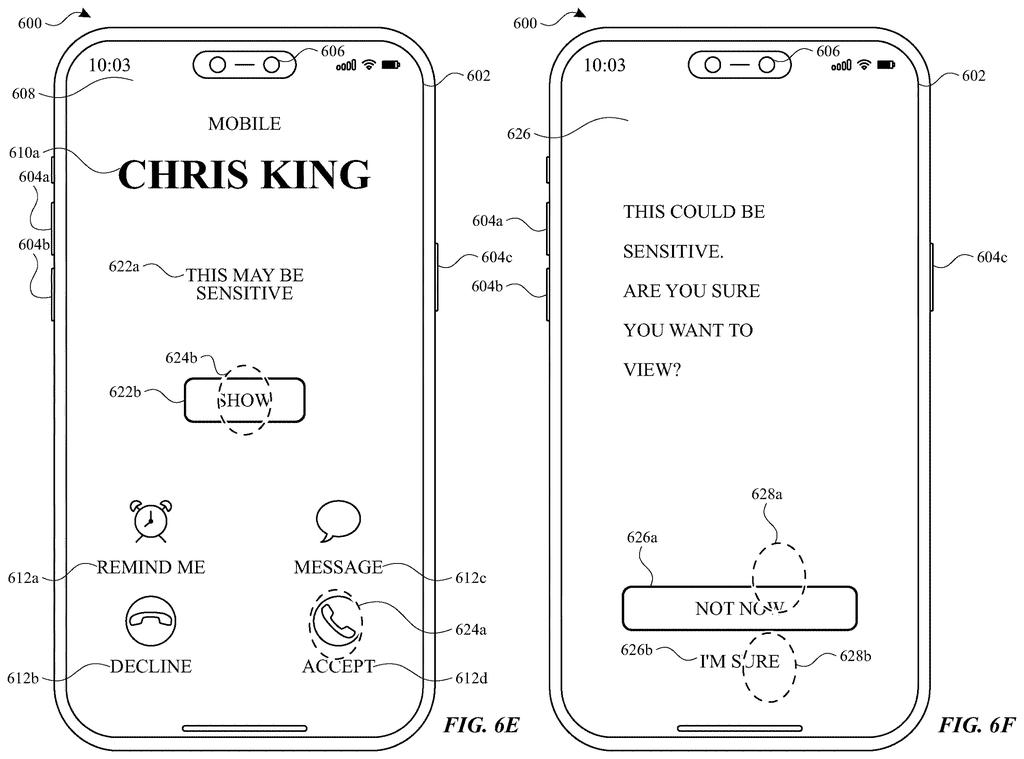
What Apple's flagged video messages look like
You miss a video call, and a 17-second video message is waiting in your call log from someone you barely know. Before you tap it, you'd like some warning if it's something upsetting.
Apple's filing describes exactly that. Your call log would list calls the usual way, and any video message flagged as potentially sensitive gets a small label. Messages that pass the check show up with no label at all. Tap a flagged one and the video does not start. You first get a screen that asks whether you want to view or decline it.
The same filing applies the idea to other moments. Incoming call requests and shared files can have their preview picture hidden, and some screens offer a shortcut to message a parent or guardian.
displaying, via the one or more display generation components, a call log user interface, including concurrently displaying: a representation of a first call; a representation of a second call different from the first call; and a representation of a first video message …
Translation: The system shows a call history screen that lists regular calls alongside video messages.
How the call log hides a flagged video
The patent application centers on the call log, the list of recent calls in a phone app. Claim 1 describes a call log that shows at least two calls plus a video message (a clip left by someone who called). If the message meets a set of sensitive content criteria (rules for spotting potentially upsetting or inappropriate material), it gets a label. If not, it appears with no label.
Other claims fill in the rows of that list:
- Whether a call was missed, incoming or outgoing
- Video call versus audio-only call
- The date and time of each call
Tap a flagged message and, according to claim 7, you land on a confirmation screen that does not play the video. It offers view and decline buttons. An unflagged message goes straight to playback. Playback screens can also include a button to call the sender back or open a text thread with them.
The description adds that flagging can come from machine learning models (software trained to recognize patterns). The same idea applies to incoming call requests and shared files, where the preview image is hidden. Extra screens can offer to message a preset contact such as a parent or guardian, and the option to view may be withheld from users under an age threshold.
The present disclosure generally relates to managing receipt and/or transmission of content.
Translation: Apple is patenting a method for handling how media files are sent and received.
Why this matters for kids and unwanted videos
If you've ever opened a message from a stranger and wished you'd had a warning, this is the idea. The filing puts a label in the list where you already see missed calls and video messages, so you can decide whether to watch before anything plays. For younger users, related screens describe a shortcut to a preset contact such as a parent or guardian, and an age threshold that can remove the view button.
The filing shows these screens on a phone like an iPhone, but it gives no hint about whether or when anything ships. Treat it as a look at how Apple thinks about unwanted video reaching your phone: hide first, ask second, and make you confirm. Whether the detection works well enough to trust is something a patent can't tell you.
That makes this Apple's 17th filing we've tracked since July on our on-device AI privacy push watchlist, adding to earlier applications on location without a name and shared docs without your identity.
Claim 1, the part that defines what Apple wants covered, is built around a single screen: a call log with two calls and a video message, where the message carries a label only if it meets "sensitive content criteria." The claim never says how a message gets judged, so the detection method is left wide open and only the spot where the warning appears is pinned down.
Claim 1 also asks for a label and nothing more. Hiding the video, the confirmation screen and the view and decline buttons all arrive later, in claim 7.
If granted, the first claim would reach any call list that marks some video messages and leaves others plain. That is a small, specific slice of the phone app, and a sensible one. For you, the useful part is a pause before a surprise video plays.
Get our take in your Top Stories
Liked this breakdown? Add Patentlyze as a preferred source on Google, and our plain-English take shows up more often in your Top Stories the next time Apple patent news breaks.
There are more where this came from
We read every patent application Big Tech publishes and send you the ones worth knowing. Plain English, free, every week.
The drawings
20 drawing sheets from US 2026/0342906 A1 · click any drawing to enlarge


Show the other 12 sheets


Want this weekly breakdown for a company we don't cover? Patentlyze Pro →
Be the first to weigh in