
Apple Patents a Sound Library Search That Ranks Clips by How Bright They Sound
Tap a "Bright" filter in a music app, and this Apple patent application ranks every matching sound by how bright it actually is, with a 0.7 sorting ahead of a 0.6.
What Apple's sound-sorting patent does for you
Every time you search a huge sound library for the right drum loop, you end up scrolling through hundreds of results that all technically match. Nothing tells you which ones match best.
Apple's filing tackles this for a music-making app on a touch screen. Each sound clip carries a tag saying where it falls between two opposites, such as bright and dark or simple and complex, scored from 0 to 1. When you tap Bright, the app keeps the bright sounds and puts the brightest ones first, so a clip scored 0.7 lands above one scored 0.6.
The filing also describes a row of suggested filters that reshuffles after every tap. It puts first the filters that would cut your list roughly in half, and it leans on the choices you have made before.
ranking the second list of results in a ranked order, wherein in the ranked order the first result is ranked higher than the second result; and displaying the second list of results in the ranked order.
Translation: The system sorts the sound clips based on where they fall along a continuous scale of audio qualities.
How each clip gets a place on a bright-to-dark scale
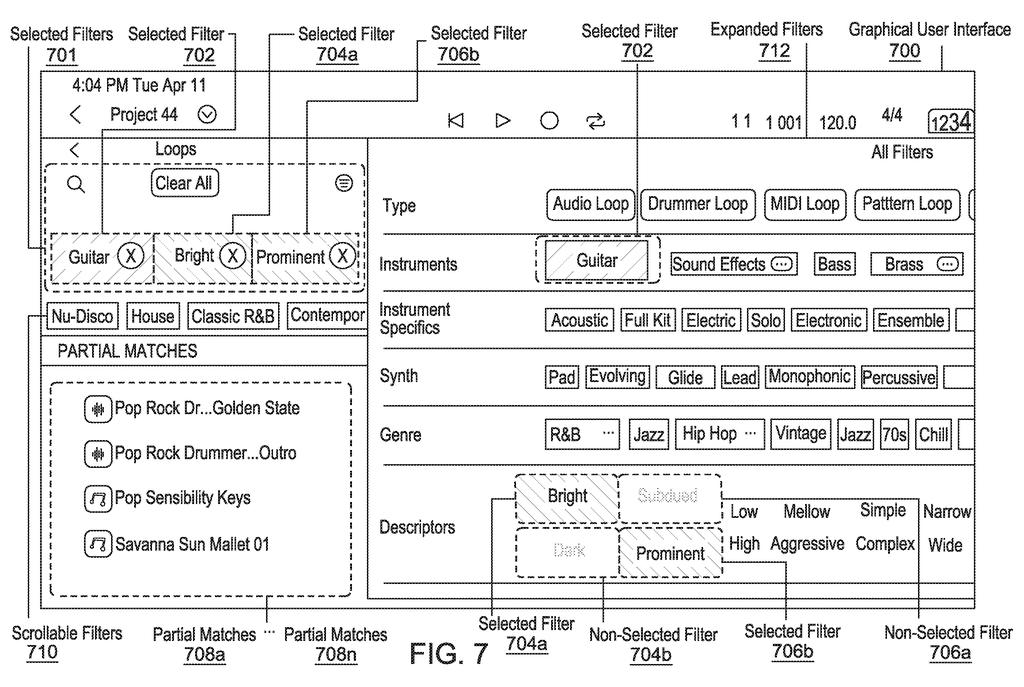
Claim 1 covers an app screen that shows a list of results and a row of filters at the same time. One of the filters is tied to a non-Boolean attribute (an attribute that is not a simple yes or no, but a sliding scale between two opposites, such as bright and dark).
Every result carries a tag giving its position on that scale. In the filing's example, a fully bright sound scores 1, a fully dark one scores 0, and a sound in between scores something like 0.6 or 0.7. Tap the filter and the list updates, then ranks the results so the ones closer to the chosen end come first. Experts tagged the sound samples by hand, and the filing says a machine learning model (software trained on the expert-tagged examples) could tag new ones.
The claims and description add several details:
- Opposite filters are paired: picking "Tonal" grays out "Non-Tonal."
- A filter with sub-filters, such as "Woodwinds," shows a number (for example "2") for how many sub-filters you picked.
- Several scales can combine, and you can add ordinary filters like "Guitar" without losing the ranking.
Separately, the abstract and description describe reshuffling the remaining filters after each tap, so the ones that would split your results roughly in half come first, weighted by your past picks. In the example, thousands of samples get narrowed to under one hundred.
A filter that would result in selection of half of the content would be ranked higher than another filter that would result in selection of one-fourth or three-fourth of the content.
Translation: Search filters are automatically rearranged to help users narrow down their choices more efficiently.
Why this matters for finding the right sound fast
Anyone who has made music on a phone or tablet knows the pain: libraries with thousands of loops and presets, and a small screen to browse them on. Ranking by degree gives you a list with the best candidates already at the top, and the suggested filters shrink the pile with fewer taps.
The filing never names a product, but it talks about loops, instrument patches and plug-in presets, the contents of a music-making app. It also says the same approach applies to visual media, and claim 10 covers search results in general, so the idea could reach well beyond audio.
Apple's 637th filing in our Apple coverage since May adds to a run that includes a brightness-aware photo patent and warped hands in headsets.
Claim 1 says almost nothing about audio. It asks for a list of results, a row of filters, a filter tied to an attribute that has an opposite, and a ranking that puts the result closer to the selected end first. Music only shows up in the description, and claim 10 widens the list to "media samples or search results."
That wording is broad. Touch screens appear only in claim 7, and the abstract's headline idea of reshuffling filters to split results evenly appears nowhere in the claims. If granted, the claim as written would describe any search screen that tags items on a spectrum and sorts by closeness to one end.
Sorting by degree is a simple, useful idea, and a 0.7 bright sound ranking above a 0.6 is easy to grasp. The broad wording suggests Apple wants the idea to cover much more than one music app.
Get our take in your Top Stories
Liked this breakdown? Add Patentlyze as a preferred source on Google, and our plain-English take shows up more often in your Top Stories the next time Apple patent news breaks.
There are more where this came from
We read every patent application Big Tech publishes and send you the ones worth knowing. Plain English, free, every week.
The drawings
10 drawing sheets from US 2026/0350088 A1 · click any drawing to enlarge


Show the other 2 sheets


Want this weekly breakdown for a company we don't cover? Patentlyze Pro →
Be the first to weigh in