
Adobe Files Patent to Show Editors How Bright Photos Will Look on Ordinary Screens
Your photo can look stunning on your screen and flat on someone else's. Adobe's patent application adds a preview and color-coded warnings so editors can see the difference before they hit send.
What Adobe's HDR-to-standard preview does
You're editing a sunset photo on a fancy new monitor. The sun blazes, the clouds glow, and every detail pops. Then you send it to a friend, and on their older laptop the sky looks flat and the sun is a washed-out blob.
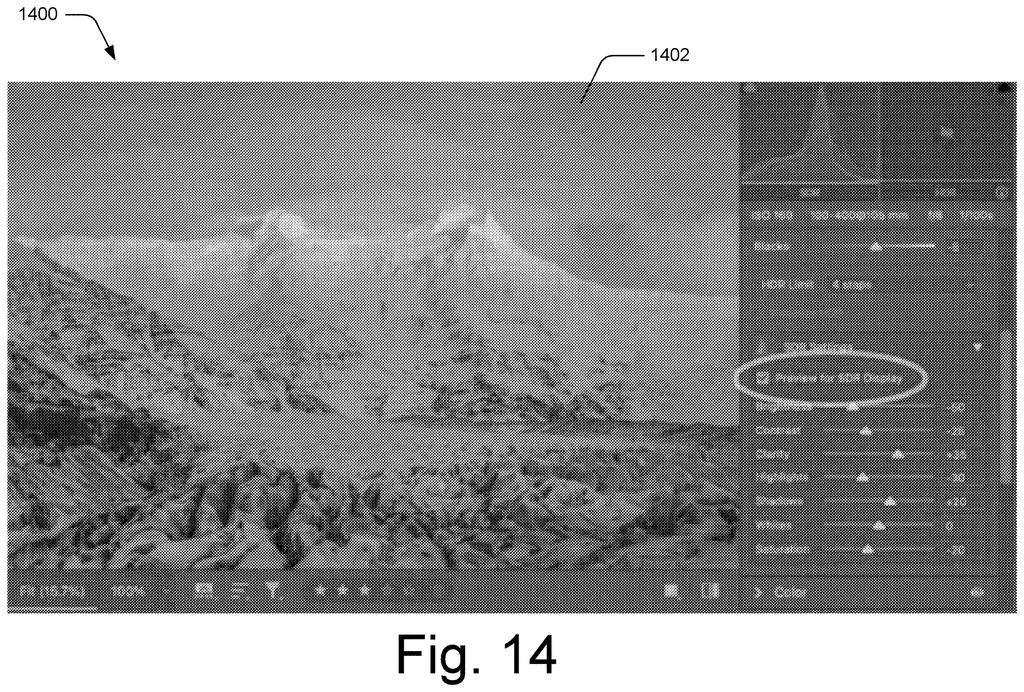
That gap is what this Adobe patent application goes after. HDR images hold brightness levels that ordinary screens can't show. Adobe's editing software would let you click a preview button to see the photo the way a standard screen displays it, then flip back to the full-brightness version.
It would also paint the extra-bright pixels in color, so you can see exactly which parts of the photo push past what a screen can handle. The room matters too: a brightly lit room leaves a screen less brightness to spare than a dark one.
… converting, by the processing device, luminance values in the digital image in the high dynamic range into the standard dynamic range; and previewing, by the processing device, display of the digital image in the user interface as having the converted luminance values in the standard dynamic range.
Translation: The software translates ultra bright image data so you can see how it appears on normal displays.
How the histogram and color overlays work
The claims center on a preview. An editor shows a photo using both standard dynamic range (SDR, the normal brightness range used for menus and text) and high dynamic range (HDR, extra brightness beyond that). On a click, the software converts the HDR pixels down into the standard range and shows the result. Pixels already in the standard range are left alone, and a toggle flips between the two views.
The filing describes several visual aids around that. A histogram (a bar chart of how many pixels sit at each brightness level) stretches across both ranges, with a marker for SDR white, the brightest level a normal screen shows. Above that marker, the chart is split into four f-stops (a photography term where each step doubles the brightness).
- Supported or not: pixels the target screen can display are tinted yellow, and pixels beyond it are tinted red.
- Brightness bands: bright pixels are colored from cyan to magenta, based on how many stops above SDR white they sit.
- Point curve: a draggable line that maps original brightness to output brightness across both ranges.
How much brightness a screen can spare depends on its hardware, its software and the lighting in the room. The editor can also type in a target device's capabilities. Sliders cover brightness, contrast, clarity, highlights, shadows, whites and saturation.
A high dynamic range editing system is configured to generate visualizations to aide digital image editing in both high dynamic ranges and standard dynamic ranges.
Translation: The editing tools create visual guides to help people edit photos across both standard and bright display formats.
Why HDR photos need a standard-screen check
If you edit photos, this is about avoiding surprises. HDR screens are spreading across phones and monitors, but they differ in how bright they can get, and a bright room cuts that further. A one-click preview and a map of the problem spots help an editor decide what to adjust before a photo goes out.
For Adobe, the filing describes a feature for editing software with no new hardware involved. The sliders in the claims (highlights, shadows, whites) match controls photo editors already use, so this extends familiar tools into HDR territory.
Adobe's 217th filing we've tracked since May in our Adobe coverage adds to a run that includes learning a dog from photos and fluid motion for still objects.
This one sits close to shippable. It needs no new hardware. The whole thing is software that reads each pixel's brightness and draws a chart or a color overlay. The screen has to support HDR, and many recent phones and monitors already do.
The shortest route to a product is a menu option like "Preview for SDR Display" plus a few color overlays in an editing app. The filing describes exactly that, down to the sliders and the yellow and red colors, so very little has to exist first.
The idea itself is simple: show a normal-screen version of a bright photo. Its value will come from execution, meaning how fast the preview flips and how clearly the colors read. For anyone who has sent a gorgeous photo to a dull screen, that is a practical fix.
Get our take in your Top Stories
Liked this breakdown? Add Patentlyze as a preferred source on Google, and our plain-English take shows up more often in your Top Stories the next time Adobe patent news breaks.
There are more where this came from
We read every patent application Big Tech publishes and send you the ones worth knowing. Plain English, free, every week.
The drawings
16 drawing sheets from US 2026/0330711 A1 · click any drawing to enlarge


Show the other 8 sheets


Want this weekly breakdown for a company we don't cover? Patentlyze Pro →
Be the first to weigh in