
Google Patents a Phone Interface That Shows Different Controls Based on What You're Doing
Google is patenting a phone interface that watches what you're doing, figures out the context, and then pops up the most relevant controls the moment you gesture at a sensor. Think of it as a shortcut menu that actually knows what shortcut you need.
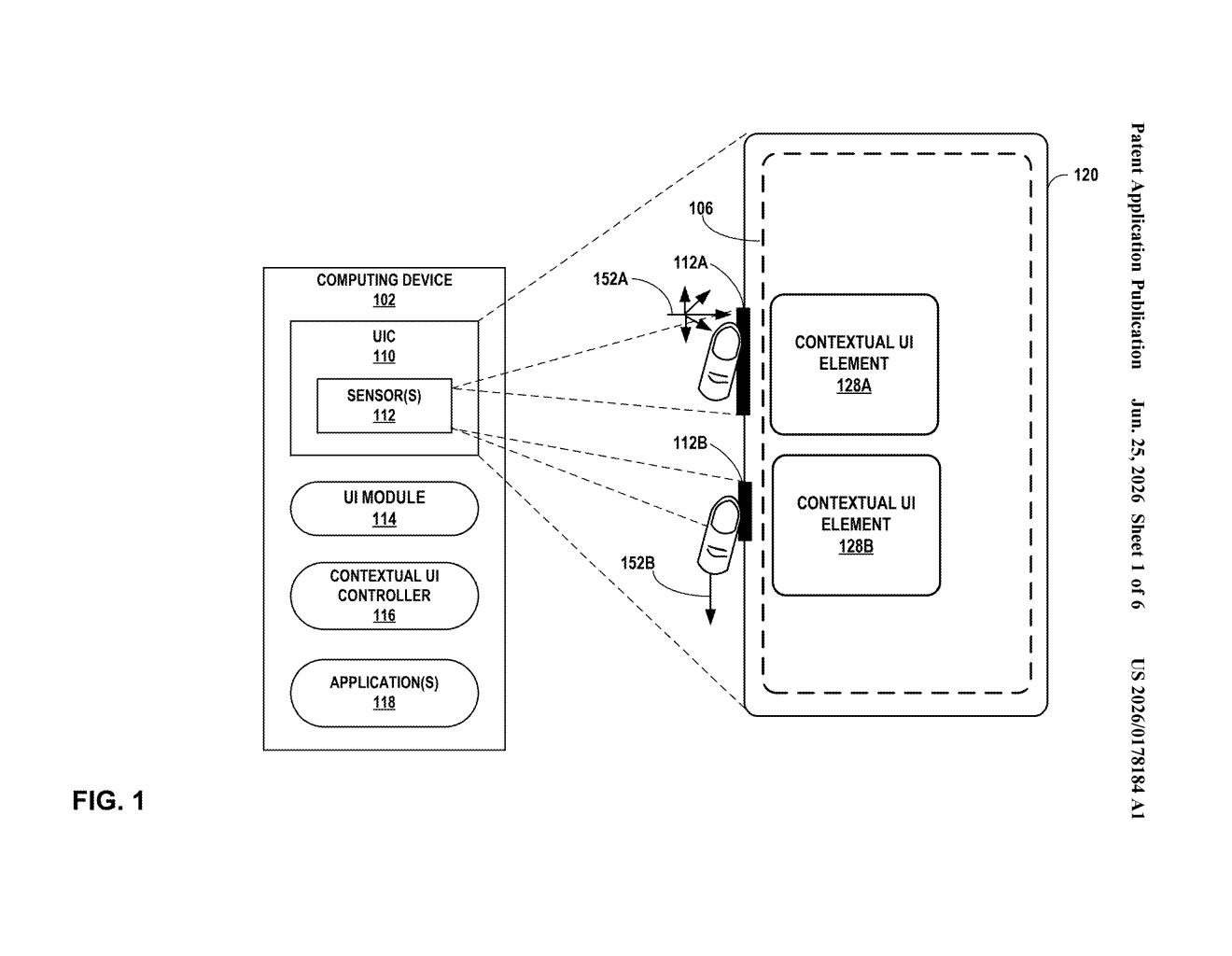
What Google's context-aware gesture UI actually does
Imagine you're listening to music on your phone and you reach toward the screen's edge: instead of a generic menu, the phone notices you're playing audio and shows you a volume slider or a skip button. That's the basic idea here.
Google's patent describes a system where a device collects several clues about what you're currently doing, like which app is open, the time of day, or how you're holding the phone, and uses those clues to decide which controls to show you. When a sensor picks up a gesture, a small interface panel appears in the part of the screen nearest to that sensor, already loaded with the controls most likely to be useful.
The goal is to cut down the taps and swipes needed to do common things. Rather than hunting through menus, the right tool shows up before you even know you need it.
How the device picks the right control at the right moment
The patent describes a method with three core steps:
- Context detection: The device reads a set of "contextual signals" (data points about the current situation, such as the active app, sensor readings, recent activity, or location) and assembles those into a single understood "context."
- Control selection: Based on that context, the system picks one user interface control from a library of possible controls. So a navigation app might surface a mute button, while a camera app might surface a shutter shortcut.
- Gesture-triggered display: When a sensor, likely a proximity or touch sensor on the device's edge or corner, detects a gesture, the device draws a small contextual panel in the portion of the screen physically near that sensor, already configured with the chosen control.
The design is intentionally local: the panel appears where your hand already is, not in a fixed spot at the top or bottom of the screen. That proximity-to-sensor placement is explicitly called out as a core feature of the claim, not just a cosmetic choice.
The patent covers the general approach broadly, meaning it could apply to phones, tablets, or any device with a display and sensors.
What this means for Android and Pixel interaction design
For everyday Android users, this could mean fewer taps to reach the controls you use most. Instead of a one-size-fits-all quick-settings panel, you'd get a small, targeted shortcut that changes depending on context. That kind of adaptive interface has been a recurring goal in mobile design for years, and Google framing it as a gesture-plus-sensor interaction suggests it could tie into edge sensors or the corner squeeze features already present on some Pixel models.
For Google's broader platform strategy, the patent puts a formal stake in the ground around context-aware UI as a distinct capability. As Android devices add more sensors and AI inference on-device gets faster, the ability to predict and surface the right control before you ask for it becomes a genuine differentiator.
This is a solid, pragmatic idea wrapped in deliberately broad patent language. The core concept, showing different controls based on context, is not new in principle, but Google is claiming a specific combination of gesture detection, sensor proximity, and real-time context reading. Whether it ever ships as a visible feature or just becomes part of Android's internal logic is the real question.
There are more where this came from
We read every patent application Big Tech publishes and send you the ones worth knowing. Plain English, free, every week.
Want this weekly breakdown for a company we don't cover? Patentlyze Pro →