
Google Files Patent for Search That Learns From Your Circled Photo Corrections
Circle the wrong thing in a photo and today's search may happily look up the wrong thing. Google's patent describes a model that shows its guess, lets you fix it, and learns from the fix.
What Google's circle-and-correct search does
Imagine you snap a photo of a patio and circle a plant, but what you really want to know about is the planter it sits in. A basic tool might grab whatever falls inside your circle and search for that, so you get plant results instead.
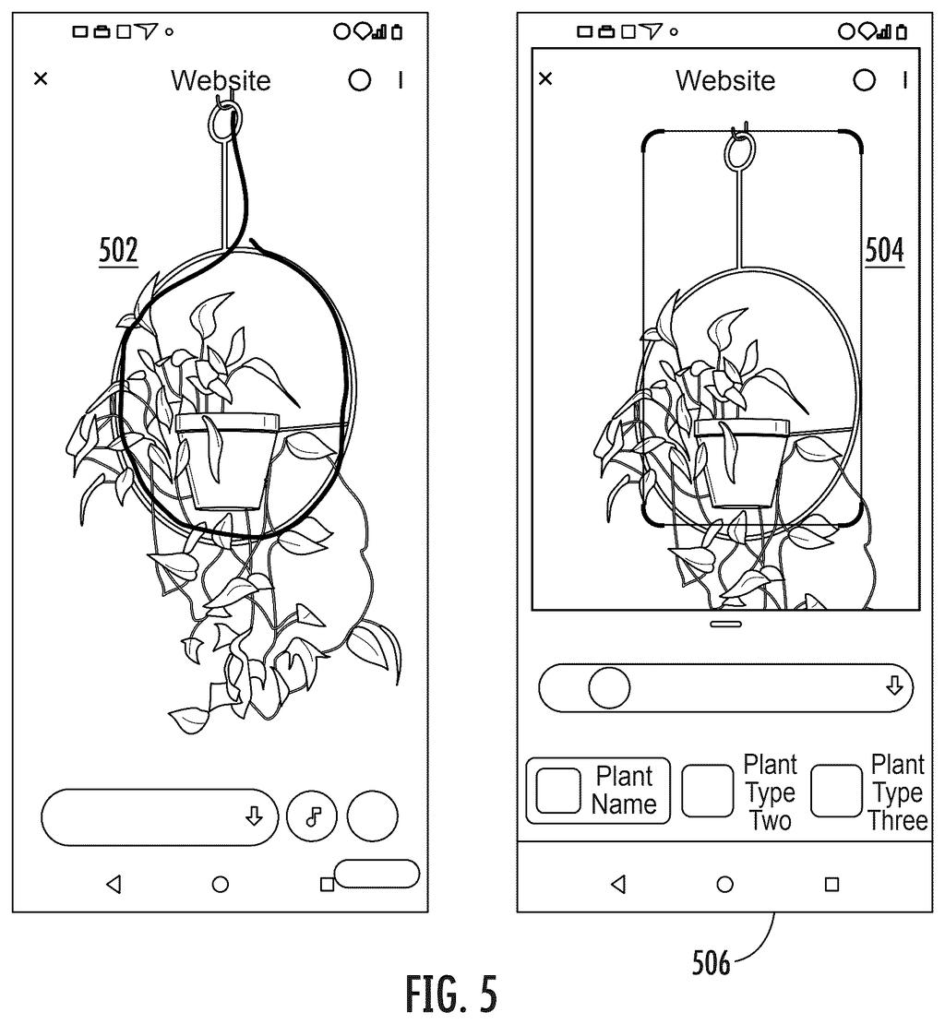
Google's patent describes a model that tries to work out which object you meant, whether you circled it, scribbled over it or tapped it a few times. It shows a highlight over your photo so you can see its guess, and you can drag the outline to fix it. Every fix becomes a lesson for the next search.
The model also still sees the whole photo instead of a cropped piece, so it keeps the surrounding clues. The highlighted part just counts for more.
… obtaining, by the computing system, one or more correction inputs descriptive of one or more augmentations to the one or more region-of-interest visualizations, wherein the one or more correction inputs are descriptive of a correction of a region-of-interest associated with the image data and the one or more gesture inputs …
Translation: The system records user edits when the initial selection misses the intended part of the image.
How the model learns from your outline fixes
You give the system a photo (or a screenshot, or a camera view) plus a gesture: a circle, a scribble, a rectangle, several taps, or an irregular outline. A query formulation model (the piece that turns your gesture into a search request) works out which objects in the picture your gesture points at, using both the picture's contents and the gesture's shape, size and position.
Its output is an attention map (a grid of numbers that gives extra weight to the pixels in the region you meant). The map travels downstream with the full image, so the search engine or the AI answering you can focus on one area without losing the rest of the scene. The filing says this avoids cutting out a segment, which can drop useful context.
Training uses two feedback sources:
- Corrections: the interface overlays a tint or box on the photo, you adjust its size, shape or position, and a loss function (a score of how wrong the guess was, with bigger penalties for bigger corrections) nudges the model's settings.
- Click logs: the system stores the image, gesture, region and which search result you tapped, then tunes the model toward regions that match that result.
The filing also describes using a large language model to write practice queries as extra training labels, turning the image and region into embeddings (number fingerprints used for matching) for search, and a vision language model that writes an answer beside the results. One claim adds an AI that decides when to call outside tools.
The query formulation model can be trained on logged interaction data associated with region-of-interest corrections and click data logs.
Translation: The AI learns how to interpret future image selections by studying past user corrections.
What this means for searching with a circle
If you search with a circle, the most annoying outcome is a result that matches the wrong thing. A system that learns from your corrections and taps could land on your intended object more often, and because it keeps the whole photo in view, a circled sleeve can still be understood as part of a dress. The filing describes this working on phone screenshots, camera views and smart glasses.
The patent office has approved this application, and once Google pays the final fee it should be issued as a granted patent. Until then it is still a filing, and it does not say any product will ship.
Google's 117th filing in our Language AI coverage since May follows erasing text from photos and spotting glare on scans, extending a run of patents we've tracked on reading and cleaning visual text.
This one needs no new hardware at all. It is software that sits between your gesture and the search engine, and the filing describes it running on phones, screenshots and smart glasses cameras.
The shortest route to a product is retraining an existing circle-and-search tool on its own users' taps. The pieces are all described already: a highlight overlay, a place to drag corrections, and logs of which result people chose. What has to exist first is a large pool of those logged examples.
Most people will not bother dragging an outline handle, so the tap data will likely do most of the teaching. If the highlight is right the first time, you never notice this invention at all, which is how a good search fix should feel.
Get our take in your Top Stories
Liked this breakdown? Add Patentlyze as a preferred source on Google, and our plain-English take shows up more often in your Top Stories the next time Google patent news breaks.
There are more where this came from
We read every patent application Big Tech publishes and send you the ones worth knowing. Plain English, free, every week.
The drawings
11 drawing sheets from US 2026/0350087 A1 · click any drawing to enlarge


Show the other 3 sheets


Want this weekly breakdown for a company we don't cover? Patentlyze Pro →
Be the first to weigh in