
Google Patent Reveals Smart Home Controls That Prioritize Your Nearest Device
Google is working on a phone feature that watches how close you are to each smart device in your home and automatically shows you the right controls when you walk up to one. No hunting through menus, no asking a voice assistant by name.
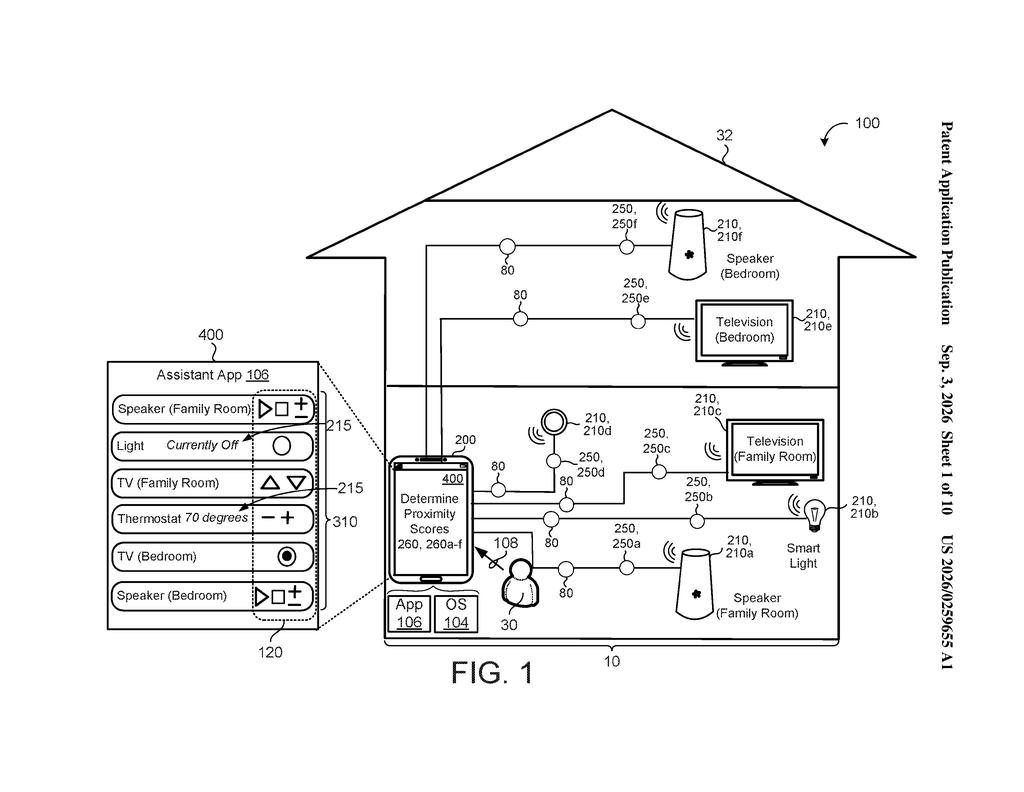
What Google's proximity-based device controls actually do
A TV sits across the living room while a smart thermostat hangs in the hallway. You probably want different controls depending on which one you're standing next to. Right now, your phone doesn't know that.
Google's patent describes a system where your phone continuously tracks how far away each Google Assistant-enabled device is, and when you get close enough to one, the right controls pop up on screen automatically. Walk toward the speaker in the kitchen and the speaker controls appear. Step into the bedroom near the TV and the TV controls take over.
The system ranks all the devices in your home by how close they are to you and shows the most relevant one first. You don't have to say anything or tap anything; the phone does the noticing for you.
… automatically detecting the assistant-enabled device as a target assistant-enabled device that the user wants to control …
Translation: Your phone figures out which gadget you are closest to and assumes you want to use it.
How the phone detects distance and ranks nearby devices
The patent describes a method running on a user device (a phone or tablet) that continuously collects proximity information for every Assistant-enabled device detected in the same environment. Proximity information here means distance estimates, likely pulled from signals like Bluetooth signal strength, Wi-Fi triangulation, or ultrasound, though the patent doesn't lock in a single method.
For each nearby device, the system calculates a proximity score that represents how far away that device is relative to the phone. Those scores feed into a ranked list of candidate devices, ordered from closest to farthest.
As the user physically moves around, the distance calculations update in real time. When a device crosses a maximum distance threshold (meaning you're close enough), the phone automatically flags it as the target device and pushes a tailored set of controls for that device onto the screen. The controls shown are specific to what that particular device can do, so a smart light gets brightness and color options while a speaker gets playback buttons.
The whole loop is automatic. No voice command, no app-switching, no manual selection is required on the user's part.
… generating, using the proximity scores determined for the assistant-enabled devices, a ranked list of candidate assistant-enabled devices …
Translation: The system sorts all nearby smart devices by how close they are to your phone.
What this means for smart home and Google Assistant
For anyone with more than a handful of smart home devices, the current experience of hunting through an app or saying a device's full name to a voice assistant is a daily friction point. This patent describes a way to make physical location do that navigation work for you, which is a more natural interaction than any menu.
Google's run of Assistant-driven ambient computing filings suggests the company wants Assistant to fade into the background of everyday spaces rather than be something you actively summon. A feature like this would push that further, turning your phone into something closer to a universal remote that already knows what you're pointing at.
Google's 653rd filing we've tracked since May continues its AI push, building on work like gesture-based image editing and self-fixing code.
The shortest path to shipping this runs almost entirely through software. The proximity sensing described here works from radio signals that phones already pick up from nearby Bluetooth and Wi-Fi devices, so no new hardware is required.
The harder problem is accuracy. Signal strength is a rough measure of distance, easily confused by walls, furniture, or several devices sitting close together, and if the wrong controls appear regularly, people stop trusting the feature entirely.
The pieces Google would need already exist across its assistant and device ecosystem, which means the real question is confidence, not capability: whether the proximity guesses are reliable enough that the feature feels helpful rather than random.
Get our take in your Top Stories
Liked this breakdown? Add Patentlyze as a preferred source on Google, and our plain-English take shows up more often in your Top Stories the next time Google patent news breaks.
There are more where this came from
We read every patent application Big Tech publishes and send you the ones worth knowing. Plain English, free, every week.
The drawings
10 drawing sheets from US 2026/0259655 A1 · click any drawing to enlarge


Show the other 2 sheets


Want this weekly breakdown for a company we don't cover? Patentlyze Pro →
Be the first to weigh in