
Google Patents a Way to Refine Image Searches by Adding a Text Description
You snap a photo of a lamp you love, search for it online, and get dozens of results that are close but not quite right. Google is now patenting a way to let you type what's missing, so the search engine uses both your picture and your words at the same time.
How Google's combined image-plus-text search would work
A shopper takes a photo of a couch they spotted at a friend's house and drops it into Google Search. The results come back with similar sofas, but none in the right color. That small gap between "sort of right" and "exactly right" is the problem this patent targets.
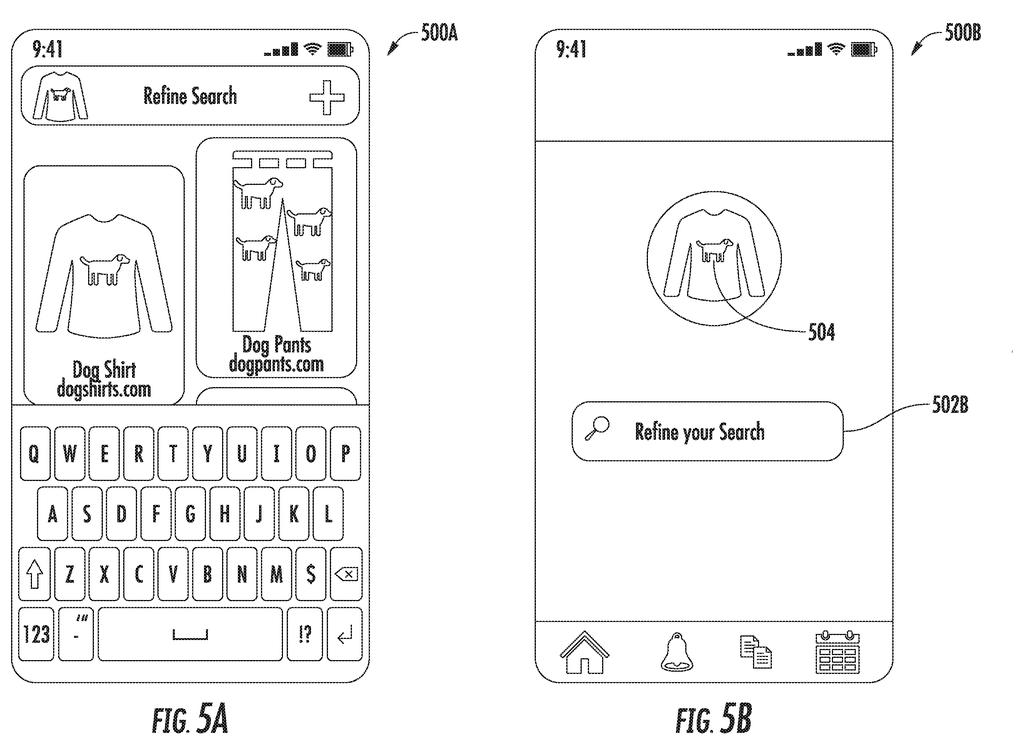
The system Google is describing would show you the image results and, right alongside them, a small preview of the photo you uploaded and a text box asking you to add more detail. You type something like "in dark green velvet" and hit search. The system combines your original photo with those extra words and runs a new, combined search.
The result is a multimodal search query, meaning it uses more than one type of input at once. Instead of forcing you to start over or try different keywords from scratch, the interface keeps your image in the loop and layers your words on top of it.
… appending, by the computing system, the textual data to the visual search query to obtain a multimodal search query …
Translation: The system combines your typed words with your picture to make a combined search.
How the system appends text to a visual query
The patent covers a computer-implemented method that handles search in two stages.
In the first stage, a user uploads or captures one or more images. The system runs a visual search operation (finding similar-looking content by analyzing the image itself, rather than keywords) and returns a set of result images. So far, this is standard reverse-image search.
The second stage is where the patent's specific contribution lives. The results interface includes two things the user sees at the same time:
- A preview element: a thumbnail of the original query image, so you remember exactly what you searched with.
- A textual input field: a prompt asking you to refine the search in words.
When the user types something into that field, the system appends (attaches) that text directly to the original image query. The combined object, called a multimodal search query, is then sent off to retrieve a new, narrowed set of results.
The claim is precise about the interface layout: showing results and a refinement prompt at the same time, rather than making the user navigate to a separate screen. That design choice keeps the visual context visible while the user formulates their text refinement.
… providing a search interface for display to the user, the search interface comprising one or more result images responsive to the one or more query images and an interface element indicative of a request to the user to refine the visual search query …
Translation: The screen shows your initial picture results along with a spot to type extra details.
What this means for everyday reverse-image searching
Reverse image search has always had a ceiling: you can find things that look like your photo, but you cannot tell the search engine that you only want the blue ones, or the cheap ones, or the ones made of wood. That gap pushes users into a frustrating loop of opening results, going back, trying different keywords, and losing their original image context.
If this system ships in a consumer product, it could make image search far more useful for shopping, travel research, or identifying objects. The design also reflects a broader pattern in how Google's run of multimodal search filings is shaping up: the company keeps finding ways to combine different input types rather than treating text and images as separate search modes. For everyday users, the payoff would be fewer dead-end searches.
Google's 97th filing in the Language AI work we've tracked since May adds to a run that includes one on session-based search training and one on image text style copying.
Uploading a photo to find a product and then watching the results drift into useless territory is a daily frustration for millions of shoppers. Retailers lose sales at exactly that moment, when a customer knows what they want but cannot communicate it to the search engine.
Photo searches fail because people cannot adjust them mid-stream without starting over. Keeping the original image in view while someone types a clarification sounds minor, but it closes a real gap between what a person sees in their head and what a search engine can retrieve.
A fix does not have to be complicated to matter at scale. When friction is this common and lost sales this measurable, a small structural improvement compounds quickly across millions of searches a day.
There are more where this came from
We read every patent application Big Tech publishes and send you the ones worth knowing. Plain English, free, every week.
The drawings
12 drawing sheets from US 2026/0300380 A1 · click any drawing to enlarge


Want this weekly breakdown for a company we don't cover? Patentlyze Pro →
Be the first to weigh in