
Google Files Patent for Fixing Blurry Phone Photos With Less Battery Drain
Google's filing describes a way to fix blurry photos by cleaning up only the fine texture, with a small thumbnail as a guide, so the work fits on a phone.
What Google's texture-first photo fix does
The AI tools that can rescue a blurry or grainy photo are hungry for computing power, and your phone has a small battery and limited memory to spare. That is the problem Google's filing sets out to ease.
Its idea is to split a photo into two pieces: a small, low-resolution copy (a thumbnail) that holds the overall shapes and colors, and a separate layer that holds only the fine texture, like the grain of a stone wall or the ripples on water. The AI then does its cleanup work on that texture layer, using the thumbnail as a guide so it knows what the picture is supposed to look like.
Because texture carries less information than a full photo, the filing says the AI needs fewer passes to reach a good result. The same approach could sharpen a picture, remove blur or grain, or fill in missing parts.
… decomposing, by the computing system, the input image into a texture image and a reduced-size version of the input image; compressing, by the computing system, the texture image using an encoder portion of an autoencoder to obtain a latent space representation of the texture image …
Translation: The system splits the blurry photo into a smaller image and a texture map, then shrinks the texture map to save space.
How the thumbnail guides the texture cleanup
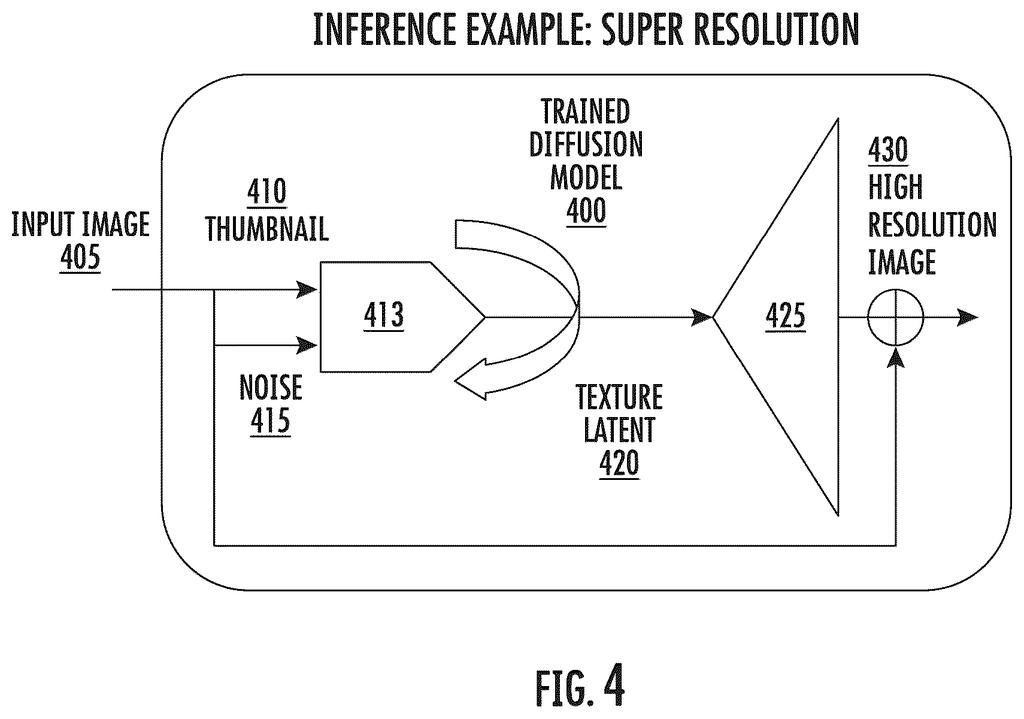
The filing covers both training the AI and using it. First, a photo is decomposed (split) into a texture image and a reduced-size copy. In one example, the texture image is 1080p while the thumbnail is 480p. One described way to pull out the texture is a difference of Gaussian filter, which subtracts a more-blurred copy of the photo from a less-blurred one so that edges and fine detail are left behind.
Next, an autoencoder (a pair of AI models, one that squeezes data into a compact code and one that expands it back out) compresses the texture image into a texture latent, the compact code for that texture. A diffusion model (an AI that learns to remove noise step by step) then works directly on that code instead of on full pixels.
When the system fixes a photo, it follows these steps:
- It starts from a noisy texture latent.
- A separate network encodes the thumbnail and feeds it in through cross-attention (a way of letting one input steer another), so the cleanup follows the photo's real shapes and colors.
- The noise is removed over several rounds, each one starting from the last result.
- The decoder turns the cleaned code back into a texture image, which is combined with the thumbnail to make the final picture.
The claims say the output can be a denoised, deblurred, higher-resolution, inpainted (filled-in) or outpainted (extended) version of the original. During training, a loss function (a score of how far off the model was) guides the adjustments.
… the denoising diffusion model is configured to operate (e.g., perform denoising) in a latent space that corresponds to texture imagery.
Translation: The AI fixes the blur by focusing only on the texture details instead of the whole picture.
Why this matters for photos on your phone
If you shoot photos in dim light or with shaky hands, this is aimed at your pictures. The filing lists fixes such as removing blur, grain and poor lighting, boosting resolution, and filling in or extending parts of an image. The pitch is that it can do this on devices with limited power, and it names smartphones and augmented reality devices specifically.
The savings come from two places: texture carries less information than a full photo, and the thumbnail is a strong guide to what that texture should look like. Fewer cleanup rounds means less battery use, less memory and less waiting. The filing does not say whether this would run on your phone or on a server, and it describes both setups.
Google's 80th filing we've tracked since May in our AI photo editing work follows earlier applications on spotting glare in scans and placing products in lifestyle scenes.
Blurry, grainy photos are one of the most common frustrations of owning a phone camera. Low light and shaky hands ruin more shots than almost anything else, so the problem is big. The cost is real too: the AI tools that fix these photos use so much computing power that running them on a phone drains the battery.
Google's answer fits that second problem well. Cleaning up only the fine texture, with a small thumbnail as a guide, goes straight at the expensive part, and the filing says it needs fewer cleanup rounds.
The filing gives no speed or battery numbers, so you cannot tell how big the savings are. If they are large, you get better photos without waiting or watching your battery. If they are small, this is a tidy engineering tweak.
Get our take in your Top Stories
Liked this breakdown? Add Patentlyze as a preferred source on Google, and our plain-English take shows up more often in your Top Stories the next time Google patent news breaks.
There are more where this came from
We read every patent application Big Tech publishes and send you the ones worth knowing. Plain English, free, every week.
The drawings
9 drawing sheets from US 2026/0350752 A1 · click any drawing to enlarge


Show the other 1 sheets

Want this weekly breakdown for a company we don't cover? Patentlyze Pro →
Be the first to weigh in