
Microsoft's New Patent Lets You Hide Certain Windows from AI Screen Recorders
Microsoft wants to give you a way to mark certain app windows as off-limits to AI tools that record your screen — so your banking app or private messages stay invisible even while everything else gets captured and indexed.
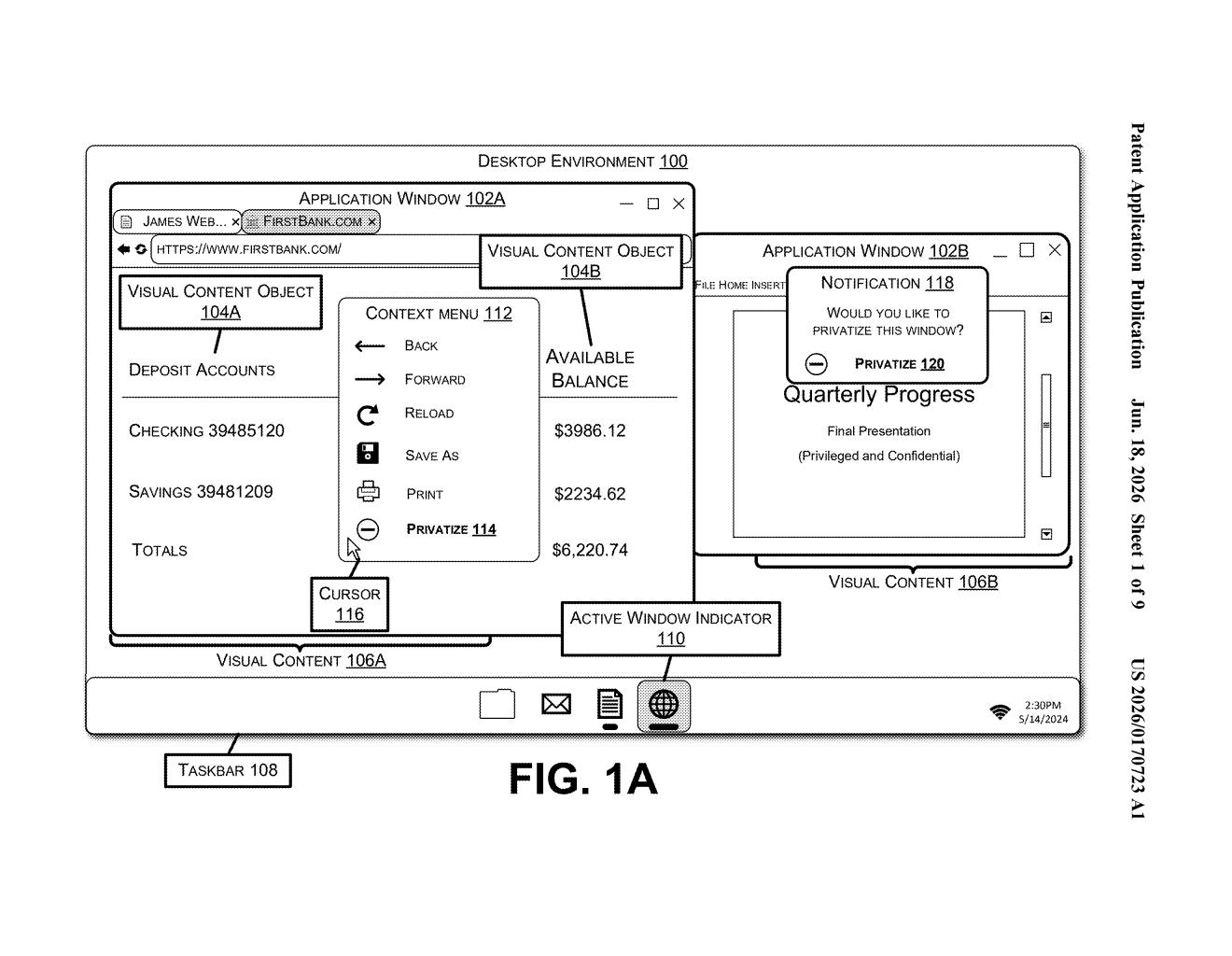
What Microsoft's per-window AI privacy shield actually does
Imagine your computer is quietly taking screenshots every few seconds so an AI assistant can help you find things you looked at earlier — a feature Microsoft has been building into Windows. That's useful, but it also means the AI potentially sees everything on your screen: your bank balance, a private chat, a medical record.
Microsoft's patent describes a fix: a privacy toggle you can apply to individual app windows. When you mark a window as private, the system blanks it out or hides specific elements before the screenshot ever reaches the AI. The rest of your screen gets captured and indexed as normal — only the apps you've flagged go dark.
The key detail is that this happens at the moment the screenshot is assembled. Your screen is composited — stitched together from each app's visual output — and any window carrying the privacy flag gets swapped for a blank before the AI ever processes it. The AI learns nothing about what was in that window.
How the compositing step hides content before the AI sees it
The patent describes a method for generating a content capture (essentially a screenshot of the full desktop) while selectively redacting certain windows before any AI model can analyze the image.
When a capture is triggered, the system queries each open application window for its current visual contents. It then checks whether a content privacy setting has been applied to any of those windows. For windows marked private, the system has two redaction options:
- Blank window rendering — the entire window is replaced with an empty rectangle, removing all visible content.
- Selective object obscuring — specific visual elements inside the window (think: a text field or image) are hidden while the rest of the window frame may remain.
Once each window's content is processed, the system composites (assembles into a single image) the full desktop view — with redacted regions already baked in — and hands that final image to the AI. The AI never receives the original, unredacted pixel data from private windows. The privacy decision is enforced before the data reaches the model, not after.
What this means for Windows Recall and AI-powered productivity tools
This patent is a direct response to the backlash Microsoft faced when it announced Windows Recall — an AI feature that takes continuous screenshots so you can search your activity history. Critics immediately pointed out that Recall would capture everything: passwords, private messages, financial data. Microsoft delayed the rollout partly because of those concerns.
This patent suggests Microsoft is building a more granular privacy layer into that system. Rather than forcing users to choose between the convenience of AI-powered recall and the privacy of sensitive apps, per-window redaction lets you have both. If it ships as described, you decide which apps the AI gets to see — and which ones it doesn't.
This is genuinely useful engineering, and it addresses a real criticism of Windows Recall head-on. A per-window privacy toggle is the kind of specific, user-controlled safeguard that could actually rebuild some trust — provided Microsoft ships it clearly and makes it easy to find, rather than burying it in settings.
There are more where this came from
We read every patent application Big Tech publishes and send you the ones worth knowing. Plain English, free, every week.
Want this weekly breakdown for a company we don't cover? Patentlyze Pro →