
Microsoft Files Patent for AI Flashcards That Talk Back When You Get Stuck
Microsoft's patent application turns the humble flashcard into a conversation: ask for a hint, an example or a tangent, and an AI tutor adjusts to how well it thinks you understand.
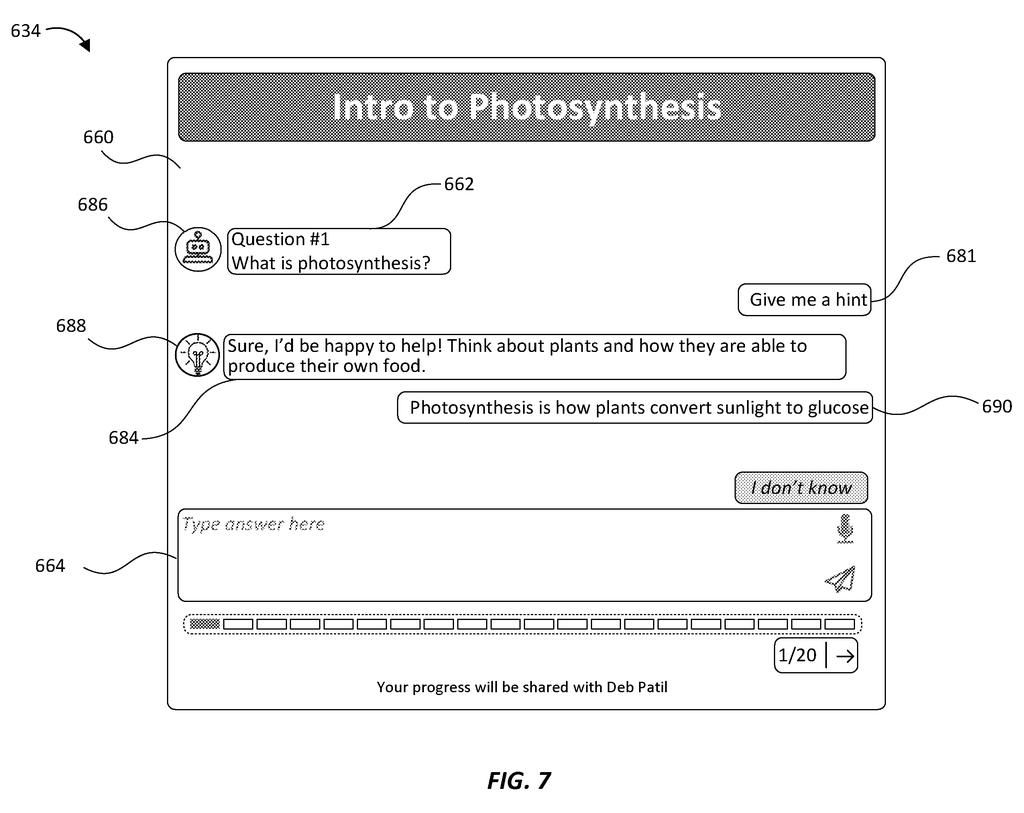
What Microsoft's talking flashcards actually do
A student flips a flashcard that asks, 'What is photosynthesis?' She isn't sure. The card can't help. It shows the answer on the back and waits for her to flip the next one. If you've studied this way, you know how little a card tells you about whether you understood anything.
Microsoft's patent application describes a chat-style version of that card. The questions come from your own material, such as a textbook or class notes. You can type or speak an answer, ask for a hint, or ask for an example. An AI tutor replies, scores how well you seem to understand, and changes its next message to match.
You move on to the next card when the system decides you've got it. Teachers can also see a summary of how each student and the whole class did, so they know what to teach again.
… generate, by a chat card engine comprising a machine learning model, a chat card comprising a prompt configured to elicit a response from a user based on the subject matter …
Translation: An AI engine creates interactive flashcards that ask questions to test what you know.
How the engine scores what you understand
The system starts with a source document, such as a textbook or syllabus. A chat card engine (software built around a machine learning model, often a large language model, meaning an AI trained on huge amounts of text) splits the topic into subtopics and makes one card for each. Each card opens with a question.
When you reply, the engine produces an understanding score based on your answer and your interaction history. The filing's example scale runs from 1 (doesn't understand) to 3 (understands), with 2 meaning it needs more information. The next message is built from that score. The claims say the system can change the difficulty, scope or format of the prompt.
The engine also sorts what you say into types:
- Hint request: you get a nudge that doesn't give away the answer.
- Example request: you get a worked example.
- Off-topic reply: you get a polite redirect. The filing's example answers a request for a joke with a joke, then returns to the question.
- Exploratory question: you get extra context to think about.
If the answer isn't in your source document, the engine can search outside sources and attach a citation. In the description, answers from unverified sources carry a caution tag. Before any message reaches you, a checking step screens it for formatting problems and inappropriate content.
What this means for study apps and classrooms
If you've used flashcards, this patent application tries to fix their biggest weakness: they can't tell whether you understand something. Here, you can ask for a hint, an example or a tangent, and the system uses how you do to decide what comes next. The filing says it can work for self-study with your own notes, with no teacher involved.
Teachers get a view too. The filing shows reports with accuracy for each student and each exercise, plus a list of cards a student should revisit. The description also says the system can save generated cards and hints so it doesn't rebuild them for every student in a class, which may cut computing needs. It's a patent application describing a design, not a product announcement.
Microsoft's 44th filing in Enterprise AI we've tracked since May follows teaching AI from a few words and role-aware meeting replays.
Claim 1 is written far more broadly than the flashcard story suggests. As worded, it describes taking content on any subject, having an AI write a question, scoring your understanding from your answer and your past interactions, and rewriting the next card to match.
Nothing in that claim mentions school, hints or even a textbook. Those details sit in the later claims: the hint and example requests, the off-topic redirects, the citations and the safety checks. The core claim describes an AI tutoring loop that adjusts as you go, and its wording reaches well beyond a biology class.
Adapting a lesson to a learner's answers is an old teaching idea, so the claim's weight rests on the AI scoring step and the rewrite it triggers. Whether that is enough is for the patent office to decide.
Get our take in your Top Stories
Liked this breakdown? Add Patentlyze as a preferred source on Google, and our plain-English take shows up more often in your Top Stories the next time Microsoft patent news breaks.
There are more where this came from
We read every patent application Big Tech publishes and send you the ones worth knowing. Plain English, free, every week.
The drawings
16 drawing sheets from US 2026/0321151 A1 · click any drawing to enlarge


Show the other 8 sheets


Want this weekly breakdown for a company we don't cover? Patentlyze Pro →
Be the first to weigh in