
Microsoft Files Patent for AI Design Tool That Puts Art Where You Ask
Ask an AI for a cat on the left and a dog on the right, and you may get the animals in all the wrong places. A new Microsoft patent application tries to fix that for design work by hiding a map of colored static inside the request.
What Microsoft's AI design-tool patent actually does
A designer asks an AI image tool for a cat on the left, a dog on the right and a tree in the middle. Back comes a cat sitting in the tree and a dog floating nearby. Microsoft's filing starts from that problem: image generators are good at what to draw and shaky on where to put it.
The fix is to stop relying on words alone. You lay out your own text and pictures, then choose where the AI should add decoration (say, the top edge), which colors to use, and how crowded it should look on a scale of 1 to 20. The tool builds a hidden guide: a blank page with gray blobs placed away from your text.
It dusts those blobs with random colored speckles and hands the result to the AI, along with a style description like flat illustration. The AI turns the speckles into artwork, and your original content goes back on top.
… a mask generator stored in the memory that, when executed by the processing system, creates a content mask that masks areas of the user-provided image that include the user-provided design elements; …
Translation: The system isolates your original artwork so the AI knows which parts of the picture to leave alone.
How colored static steers the image generator
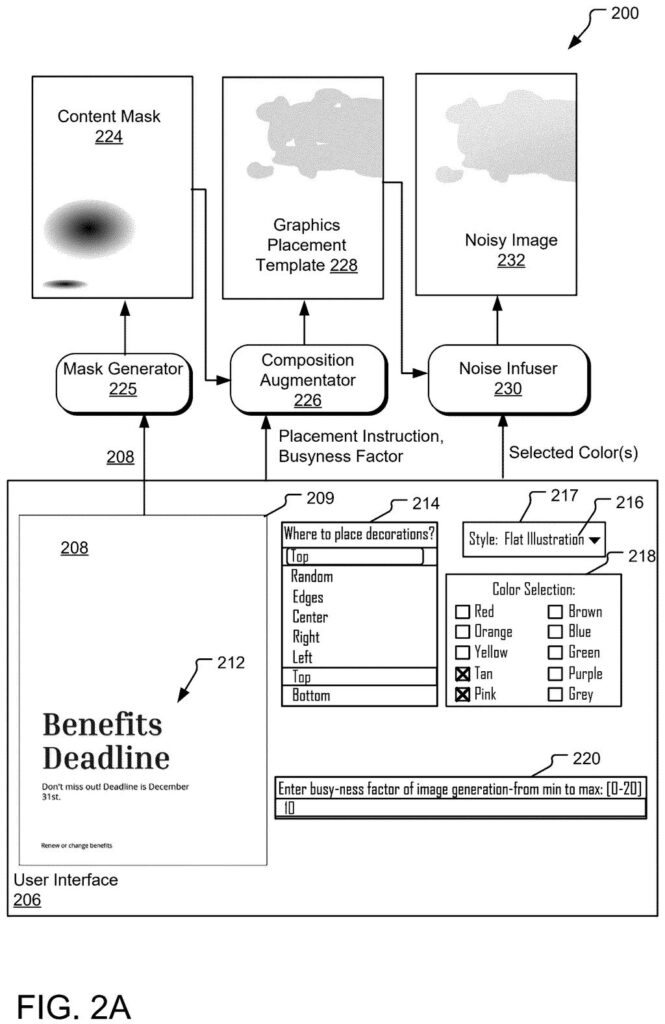
The system works as a chain, and each step feeds the next. First, a mask generator studies your image and builds a content mask, a same-sized map showing where your text and graphics sit. It can be plain black and white, or a greyscale version that fades with distance from your content, so the AI may lightly touch the area around your text and the backdrop blends in.
Next, a composition augmenter builds a graphics placement template: a blank frame filled with gray abstract shapes placed at random, steered away from your content and into any region you picked. A busyness setting controls how many shapes appear. In one example, a setting of 17 on a 0 to 20 scale draws the shape count from 1 through 17.
A noise infuser then adds Gaussian noise (random speckle, like TV static) over the shapes only, in colors sampled from your chosen palette. The result is the noisy image. A prompt generator also writes a text instruction from your style choice.
The diffusion model (an AI that builds pictures step by step by turning noise into structure) receives three things:
- The noisy image
- The content mask
- The written instruction
A content synthesizer then merges the output with your original image.
… creating a noisy image by using an algorithm to add noise to the graphics placement template; …
Translation: The software scrambles a template of shapes with random static to give the AI engine a creative starting point.
Why designers could skip the template library
If you make flyers, invitations or newsletters, the practical change is control. Instead of scrolling through a library of premade backgrounds hoping one matches your mood, you would pick the area, the colors, the style and a busyness level, and the tool would build the decoration around your text.
For Microsoft, the filing also removes a cost. The current approach needs large numbers of premade background-and-mask pairs (the filing says thousands) that someone must design and store. Building the guide on demand makes that library unnecessary. The filing mentions shapes from sources like PowerPoint's abstract illustrations, but it does not name a product that would carry this.
Microsoft's tenth filing in the AI image and video work we've tracked since June follows earlier applications like one on sharpening game graphics and one on frequency-aware image training.
If you have ever asked an AI for a poster background and watched the decoration crash into your headline, you know the pain this targets. The patent gives you dials: where the art goes, how busy it gets, which colors it uses. Those are controls a person can understand without writing a clever prompt.
You would notice it first in color and placement. The filing says image AIs follow the colors in a starting picture better than colors named in text, so seeding the picture with your palette is a sensible trick. Your own text also stays largely off-limits to the AI, so your headline survives.
The benefit stays limited to decorative layouts like flyers and invitations, and results will still depend on the image AI underneath. Even so, swapping a scroll through hundreds of premade backgrounds for a few settings is a change anyone making a birthday invitation would feel.
Get our take in your Top Stories
Liked this breakdown? Add Patentlyze as a preferred source on Google, and our plain-English take shows up more often in your Top Stories the next time Microsoft patent news breaks.
There are more where this came from
We read every patent application Big Tech publishes and send you the ones worth knowing. Plain English, free, every week.
The drawings
5 drawing sheets from US 2026/0350874 A1 · click any drawing to enlarge


Want this weekly breakdown for a company we don't cover? Patentlyze Pro →
Be the first to weigh in