
New Microsoft Patent Predicts Your Next Move During Drag-and-Drop
The moment you pick up a file and start dragging it, Microsoft's new system wants to already know where you're headed. Instead of hunting for the right app or folder to drop into, a tray of suggested actions pops up automatically.
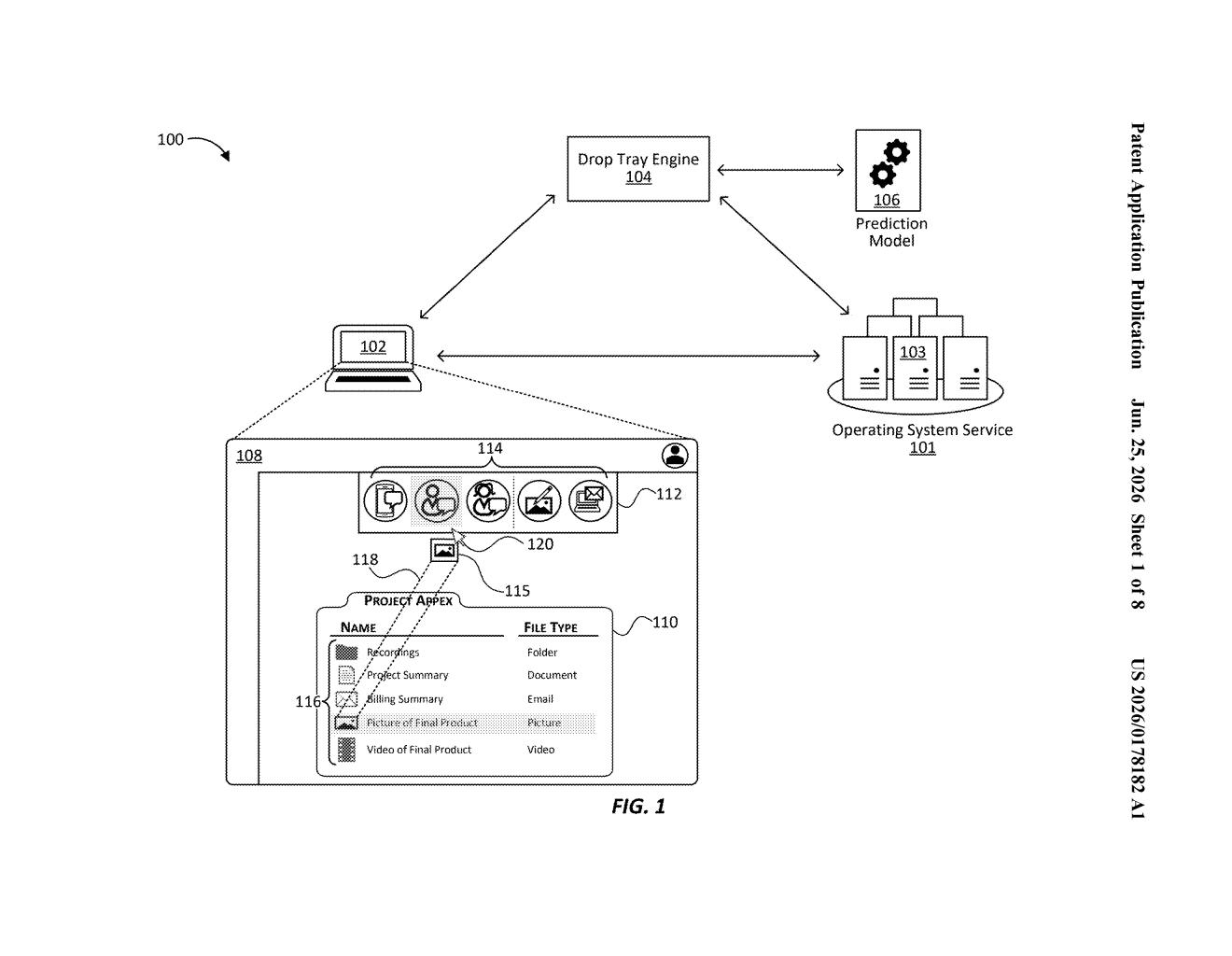
What Microsoft's predictive drag-and-drop tray actually does
Imagine you grab an image file on your desktop and start dragging it somewhere. Right now, you have to know in advance where you're dropping it. Microsoft's new system would change that by popping up a small tray of options the instant you start dragging, showing you actions like "attach to email," "insert into document," or "share with a contact."
The system figures out those suggestions by looking at what you're dragging. A photo, a spreadsheet, and a PDF would each get a different set of options, tailored to what people typically do with that kind of content. You just pick the action you want from the tray instead of navigating across your screen to find the right destination.
Think of it like a context menu that reads your mind a step early. Instead of right-clicking after you've already decided where to drop something, the tray meets you during the drag, when the decision is still open.
How the drop tray engine reads content and picks actions
The patent describes a drop tray engine, a software component that watches for drag-and-drop gestures on a device's interface. The moment it detects you've started dragging a piece of content, it analyzes the item's attributes (file type, metadata, context within the app) to generate a list of likely actions.
Those predicted actions are then displayed in a drop tray, a floating panel of selectable targets that appears in response to the drag gesture. Each target in the tray represents a specific thing you could do with the content. Tapping or clicking one tells the relevant application to execute that action.
The claim covers the full pipeline:
- Detecting the drag gesture on any UI element
- Reading one or more attributes of the dragged content
- Predicting a ranked set of likely actions based on those attributes
- Rendering the tray with action targets
- Passing the user's selection to the appropriate app to execute
The patent doesn't specify exactly how the prediction is made, leaving room for rule-based logic, machine-learning models, or a combination of both. The core claim is about the architecture of detecting, predicting, and surfacing actions inside a single engine.
What this means for Windows and Microsoft 365 workflows
For Windows and Microsoft 365 users, drag-and-drop is one of those interactions that hasn't changed much in decades. You drag, you find a drop target, you release. This system flips that order by surfacing the destination options before you commit to a location, which could meaningfully cut down the friction of moving content between apps like Outlook, Teams, Word, and OneDrive.
It also fits neatly into Microsoft's broader push to add AI-driven suggestions throughout its productivity software. If the prediction engine is good, the tray becomes a shortcut that feels almost invisible. If it's wrong too often, it just becomes a thing you learn to dismiss. The gap between those two outcomes is entirely in the quality of the prediction model, which the patent itself leaves open.
This is a genuinely useful UX idea that addresses a real friction point, the mental overhead of knowing where to drop something before you've even started dragging. Whether it ships depends entirely on how well Microsoft trains the prediction engine, because a tray that guesses wrong is more annoying than no tray at all. Worth watching if you spend your day moving files between Microsoft 365 apps.
There are more where this came from
We read every patent application Big Tech publishes and send you the ones worth knowing. Plain English, free, every week.
Want this weekly breakdown for a company we don't cover? Patentlyze Pro →