
Microsoft Files Patent to Keep Typed Messages on Screen as You Shrink a Meeting
If you type instead of talk in a video meeting, your words shouldn't vanish the moment someone shrinks their window. Microsoft's new patent application is built around that one problem.
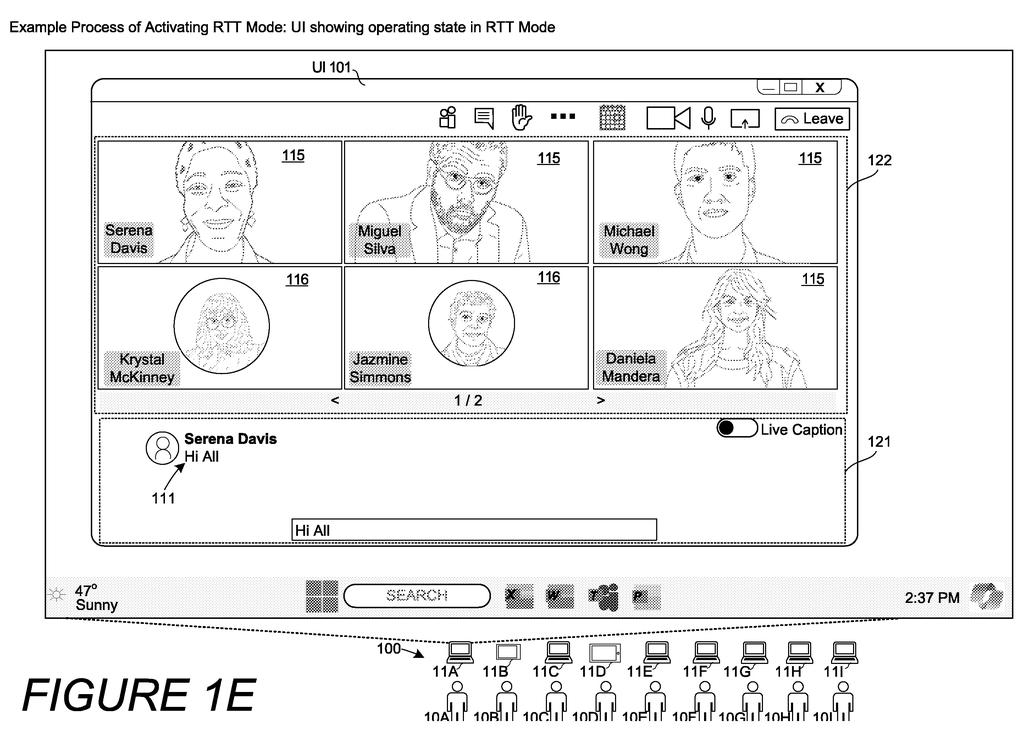
What Microsoft's typed-text meeting patent does
Imagine you're on a video meeting and you can't speak, maybe because you're deaf, you've lost your voice, or talking isn't safe. You type, and everyone sees your words appear letter by letter as you go. Then a coworker shrinks the meeting window to multitask, and your message disappears from their screen.
Microsoft's patent application is about stopping that. When anyone turns on real-time text mode, the typed words stay visible even if a participant shrinks, strips down, or closes the video part of the meeting. The text can move into its own small window.
The filing adds a few extras. Whoever is typing gets a highlight, much like an active speaker does. Live captions of spoken words can be mixed into the same stream. And if you close the text window, it pops back open when someone starts typing again.
… maintaining display of the real-time text at the participant computing device while causing the meeting-stage content to enter the reduced-display state by reducing at least one of a display area occupied by the meeting-stage content, a number of displayed items of the meeting-stage content, or visibility of the meeting-stage content.
Translation: Shrinking the meeting window keeps your live typed text visible on screen.
How the text stays up when the video shrinks
The core idea is a real-time text (RTT) mode. In a normal chat, your message arrives only after you hit send. In RTT mode, each character you type goes out to everyone in the call right away, so they watch your message form letter by letter, deletions included.
The claims cover what happens on a participant's screen. The meeting window shows the typed text alongside the "stage," the main area with video feeds and shared images. When that participant asks to shrink the stage, the system keeps the text on screen while reducing the stage in at least one of these ways:
- Making the stage take up less room
- Showing fewer videos or images
- Making the stage content less visible
The filing describes several versions. The text can move to its own window while the shrunken meeting view keeps one video and the control buttons, or just the buttons, or the meeting view can be removed entirely. If someone closes the text window, the system watches for new typing and reopens it automatically.
Other described touches include a highlight around whoever is typing, a fixed timestamped entry once the typist pauses (the filing suggests 3 to 5 seconds), live captions of spoken words in the same stream, and an optional computer-generated voice that reads the text aloud.
… when at least one user minimizes a meeting stage, such as for the purpose of multitasking while listening, the conference application maintains a display area for displaying RTT.
Translation: When you minimize the meeting to multitask, the app keeps your text chat open.
Why this matters for deaf and hard-of-hearing users
For you, the practical change is simple: whoever types in a meeting stays part of it. People who are deaf or hard of hearing, have lost their voice, have a broken microphone, or are in a situation where speaking isn't safe could still reach a presenter, even while that presenter is sharing a screen and has the text window closed.
The filing also says the combined stream of typed text and live captions can be passed to a transcript or an AI tool such as Copilot, so typed comments count like spoken ones. That would keep typed contributions from being left out of a meeting record.
Microsoft's 613th filing in our Microsoft coverage since May adds to a pattern that includes AI content labeling and swappable AI skill packs.
The core of this filing is nearly all software. A meeting window, a text box, and a way to send each keystroke to other participants already exist in common meeting apps. No new camera, chip, or sensor is involved.
The shortest route to a product is a setting in an existing meeting app that keeps a text panel pinned when the video view shrinks. The extras, such as highlights around the typist, merged captions, and a reopen-on-typing rule, are interface touches that could arrive one at a time.
The main hurdle is a design call: the filing says one person turning on typed text mode switches it on for everyone, so the feature has to explain itself clearly. That makes it a practical accessibility feature that looks cheap to build.
Get our take in your Top Stories
Liked this breakdown? Add Patentlyze as a preferred source on Google, and our plain-English take shows up more often in your Top Stories the next time Microsoft patent news breaks.
There are more where this came from
We read every patent application Big Tech publishes and send you the ones worth knowing. Plain English, free, every week.
The drawings
48 drawing sheets from US 2026/0349768 A1 · click any drawing to enlarge


Show the other 40 sheets


Want this weekly breakdown for a company we don't cover? Patentlyze Pro →
Be the first to weigh in