
Microsoft Files Patent to Let You Search Your Clipboard History in Plain English
Your clipboard history is a long list that only gets longer. Microsoft's patent filing would let you search it by describing what you remember, like a recipe you saved two months ago.
What Microsoft's searchable clipboard actually does
Ever copied a recipe, forgotten about it, and then scrolled through two months of clipboard clutter trying to find it? Today's clipboard history is just a list, and the longer it gets, the harder it is to dig anything out.
Microsoft's filing describes a tool that saves each thing you copy along with details like when you saved it, which device you used, and which app you were in. It then turns the item into a numeric fingerprint of its meaning, so you can type something like "the recipe I saved two months ago" and get matching results.
You could then narrow the results by device, time or type of item, and paste your pick right where you want it. The filing also lets you set your own rules, such as automatically saving every screenshot you take on your phone.
… generating a plurality of semantic embeddings of the plurality of content items and the metadata using one or more semantic models; storing the plurality of semantic embeddings in a content database …
Translation: The system turns your copied items and their details into mathematical data and saves them in a database.
How copied items get turned into searchable meaning
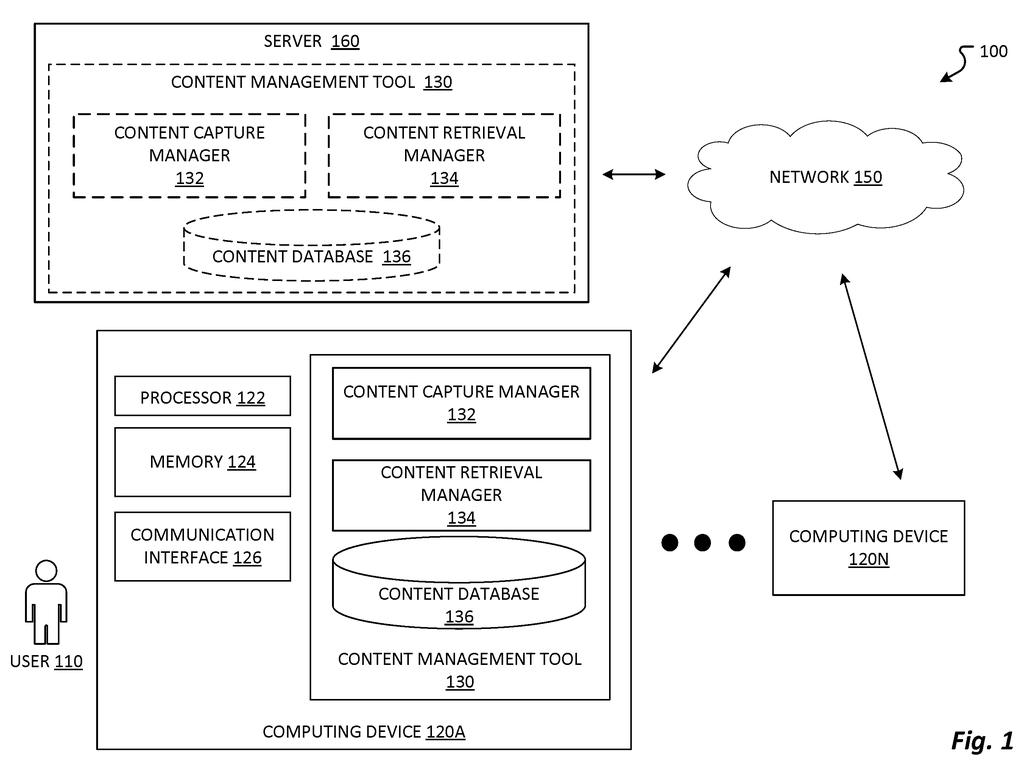
The filing describes a content management tool, which is basically a clipboard upgrade. When you trigger a capture (with a keyboard shortcut, a gesture you assign, or a rule like "save every screenshot I take on my phone"), it stores the item. That can be text, a document, a photo, a video or audio, saved together with metadata (background details) such as date and time, file name, the device and app used, and location.
Next it builds an embedding, a long list of numbers that captures what the item means, using a language model or a similar AI model. The embeddings go into a database that syncs across your devices. A laptop can do this work itself, while a phone, which has less computing power, can send the item to a server and get the embedding back.
When you search, your typed or spoken question gets its own embedding, and the tool finds stored items whose numbers sit closest to it. The main claim also says results are filtered using the embeddings of both the items and their metadata. In the filing's example, "a recipe I saved two months ago" returns recipes captured within about three days of that date, and you can narrow it to chicken recipes screenshotted on your phone.
Once you pick a result, it pastes at the spot you choose. The description also adds optional actions, like emailing a recipe screenshot to yourself or texting a dog photo to a friend the moment you capture it.
… receive a user query to search the captured content history; and provide search results based on the user query.
Translation: When you type a search, the system looks through your saved history to find the right item.
Why your clipboard history could finally be useful
The practical payoff is simple: the things you copy, screenshot and save would stop disappearing into a pile. Most people already use a clipboard history, a screenshots folder and a camera roll as a rough memory aid, and finding anything in them means scrolling. A search that understands meaning, plus filters for device, app and date, matches how you actually remember things.
The filing's keyboard shortcut examples (a Windows logo key plus a letter) point toward a clipboard like the one in Windows, though the patent itself only calls it a clipboard or any similar tool. It is also worth noting what this stores: a searchable record of what you captured, where and when. That is useful, and it makes the storage rules the filing mentions, where you decide what gets saved, an important part of the design.
This is the 578th Microsoft filing in our Microsoft coverage since May, adding to work like button labels for AI and selective data lockdown.
Losing something you copied last month is a small annoyance, but nearly everyone runs into it, and a clipboard list that only grows makes it worse every week. The size of the fix fits the size of the problem: a search box that understands what you mean, plus a few filters.
The metadata deserves the most credit. Remembering "it was a screenshot on my phone, around two months back" is how people actually recall things, and the filing lets you search that way.
The open question is how much you want kept. A history that saves every screenshot with its location and app is handy and also works as a detailed diary, so how it handles storage and deletion will matter more than the search itself.
Get our take in your Top Stories
Liked this breakdown? Add Patentlyze as a preferred source on Google, and our plain-English take shows up more often in your Top Stories the next time Microsoft patent news breaks.
There are more where this came from
We read every patent application Big Tech publishes and send you the ones worth knowing. Plain English, free, every week.
The drawings
8 drawing sheets from US 2026/0340025 A1 · click any drawing to enlarge


Want this weekly breakdown for a company we don't cover? Patentlyze Pro →
Be the first to weigh in