
Samsung
Samsung · Software · Filed Apr 6, 2026 · USPTO published Aug 13, 2026 · Aug 13 release
Samsung Patents a Way to Keep IoT Controls the Right Size in 3D Room Views
When you pull up a 3D map of your home to tap a light switch or thermostat, the on-screen button needs to be big enough to actually hit. Samsung's new patent describes a system that automatically figures out the right zoom level to keep those controls a usable size, no matter what device you're using.
- Publication number
- US 2026/0237174 A1(US20260237174A1)
- Applicant
- Samsung Electronics Co., Ltd.
- Filed · Published
- Apr 6, 2026 · Aug 13, 2026
- Inventors
- Kunhoon BAIK, Joonsoo KIM, Jiwon PARK, Heonjae JANG, Kyuho JO
- Status when we published
- Waiting for an examiner
- Document
- 20 claims
- US classification
- 345/419
- Parent application
- Continuation of PCT/KR2024/014403 (filed Sep 24, 2024)(PCTKR2024014403)
What Samsung's auto-scaling 3D room view actually does
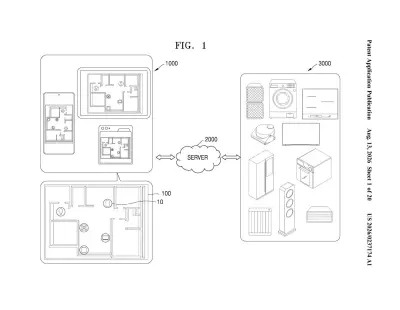
Ever tried to tap a tiny button on a map and missed three times in a row? That's the problem Samsung is trying to fix here, specifically for 3D views of your home that let you control smart devices by tapping on their icons.
The system calculates how big a control icon should appear on your screen and then works backwards to figure out how much to zoom the entire 3D room image in or out. A phone with a small, high-density screen and a tablet with a large lower-density screen will both end up showing the icon at a tap-friendly size, even though they're displaying the same scene.
The end result: you don't have to pinch-to-zoom or squint to find a usable button. The app does the math for you before the image even loads.
… determining a density-independent pixel (DP) value of the image indicator, the DP value corresponding to a size at which the image indicator is to be displayed on the screen; obtaining, based on the DP value of the image indicator, a size ratio of the image indicator in the image of the 3D space …
Translation: The system calculates the exact pixel size needed for an icon so it remains readable regardless of the screen resolution.
How Samsung calculates the zoom level for each screen
The patent describes a multi-step calculation that runs every time a 3D space image is loaded on a device.
- Step 1 - Camera setting: The system first grabs the camera's current field-of-view setting, which controls how wide or narrow the 3D scene looks on screen.
- Step 2 - DP target size: It determines the target size of the IoT control icon in density-independent pixels (DP) (a unit that stays physically consistent across screens of different pixel densities, so a 48 DP button looks the same physical size on a cheap phone and a flagship).
- Step 3 - Magnification math: Using that target DP size, the ratio of how large the icon is inside the original 3D image, and the device's own DP value, it calculates a magnification factor, essentially a zoom level.
- Step 4 - Camera adjustment: The camera's field-of-view setting is adjusted using that magnification factor, and the zoomed image is displayed.
The key insight is that this works at the camera-settings level rather than stretching or cropping the rendered image after the fact, which keeps the 3D perspective mathematically consistent.
… acquiring a magnification for enlarging or reducing the image of the 3D space on the basis of the DP value of the image indicator, a size ratio of the image indicator in the image of the 3D space, and a DP value of the electronic device …
Translation: The software automatically zooms the 3D room view in or out to ensure the smart home controls stay at a usable size.
What this means for Samsung's smart home ambitions
Samsung's SmartThings platform already lets users see and control connected home devices from a single app, and a 3D floor-plan view is a natural next step for that experience. A system that makes control icons reliably tappable across phones, tablets, and potentially TVs removes one of the most basic usability barriers to that kind of interface.
This is a software-only approach that needs no new hardware, which puts it on a short path to shipping inside an existing app update. Samsung's Galaxy ecosystem spans an unusually wide range of screen sizes and pixel densities, from small budget phones to large foldables, making this kind of automatic scaling more valuable than it would be for a single-device platform. The filing sits alongside the broader wave of interesting tech patents around spatial home-control interfaces, where the race to make 3D smart-home views feel natural is just getting started.
Source: US 2026/0237174 A1 at the USPTO (PDF). Full patent text and figures are in the official publication.
Get our take in your Top Stories
Liked this breakdown? Add Patentlyze as a preferred source on Google, and our plain-English take shows up more often in your Top Stories the next time Samsung patent news breaks.
Add Patentlyze on Google
One click.
There are more where this came from
We read the new patents from Big Tech, carmakers and more and send you the ones worth knowing. Plain English, free, every week.
The drawings · 20 sheets
20 drawing sheets from US 2026/0237174 A1 · click any drawing to enlarge


Show the other 12 sheets


More from Samsung
All 1,662 Samsung patents →
More in Software
All 816 Software patents →
Apple
Apple Patents a Display That Adjusts Text Size Based on How You've Changed
Google
Google Patents Remote Control of Conference Room Devices From Meet's UI
Apple
Apple Patents a Floor-Plan View That Shows How Air Quality Moves Through Your Home
Samsung