
Samsung Files Patent to Let a Smartphone Screen Recognize Which Ring Is Sitting on It
Set a ring on a tablet and, under Samsung's filing, the screen flashes a light code that the ring reads and reports back, so the tablet knows exactly which ring it is. Then the screen shows the ring's battery and shortcuts right beneath it.
What Samsung's ring-on-screen patent actually does
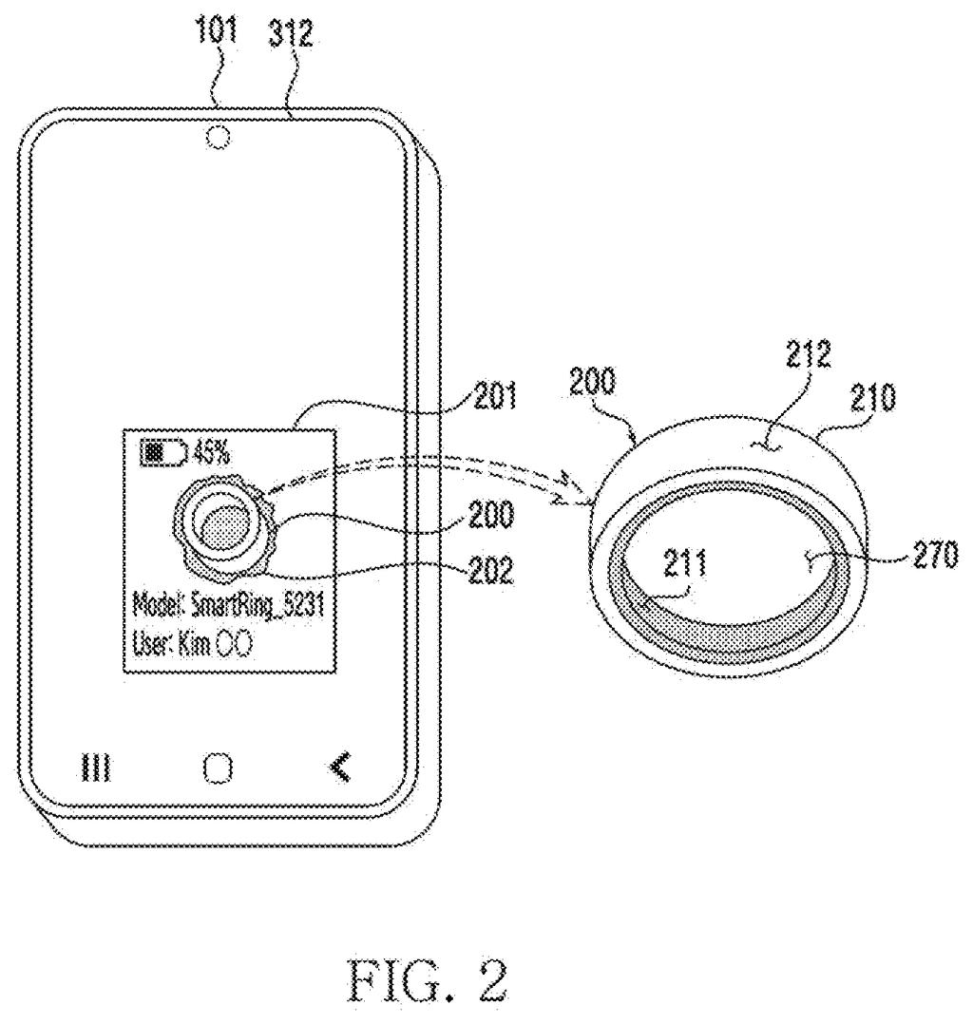
You set your new ring on the screen of a tablet lying on the coffee table. An animation glows under it, and a moment later the screen shows your ring's battery level, your account, and buttons for things like sending a file.
The tricky part is that your tablet may be paired with several rings or watches, and a touch alone only says something ring-shaped is here. So the filing has the screen flash a short pattern of light in just that spot. The ring has a light sensor on its inner side, the one it uses to read your pulse, and it reports back over a wireless link what flashes it saw.
If the pattern the ring saw matches the one the screen sent, the screen knows which ring it is and where it sits, with no extra tapping from you.
… output a light emitting signal with a first pattern through an area on the display, wherein the area corresponds to the touch input …
Translation: The phone flashes a hidden optical code right where you placed the ring.
How the screen and ring confirm a match
The claims describe a screen device with a touch panel (or an electromagnetic layer, the thin sensing grid that also tracks stylus pens) plus a wireless chip. It first watches for a touch of a designated shape, such as a circle for a ring, by checking whether the touch points line up along that outline.
From there, the steps run like this:
- The screen lights the area under the touch with a first pattern, set by brightness, color, or how often the light blinks.
- The wearable's light sensor records what it saw and sends details back over the wireless chip, sometimes with its ID.
- The device reads a second pattern from that report. If it matches the first, the wearable is confirmed to be on the screen.
- The screen shows information about the wearable in that spot.
The filing also covers several wearables on one screen, each spot getting its own pattern. A wearable paired with someone else's phone can have that phone relay the report. The roles can flip too: the wearable flashes and the screen's camera or fingerprint sensor reads it. To cope with noise, the wearable averages its readings and turns them into 1s and 0s.
Once the wearable is located, the device can follow it. Slide two rings together and their panels merge, which in the filing's example sends a file. Rotating a ring can change volume.
… obtaining, using the communication circuit, information on a light receiving signal identified by a wearable device after outputting the light emitting signal …
Translation: The ring reads the flash and tells the phone what it is using wireless signals.
Why a ring with no screen needs a screen nearby
If you wear a ring with no screen, checking its battery or confirming it is yours means opening a phone app. Under this filing, you set the ring on a phone or tablet and the answer appears right where the ring sits. Because the screen can tell several rings apart, it would also work on a table with a friend's ring next to yours.
The bigger idea is using the ring as a physical key. The filing lists payments, money transfers, contact swaps and file sending as things a ring could do, and it shows two rings brought together to send a file. That is a patent application, not a product, but it shows one way a ring with no display could talk to the screens around it.
Samsung's latest application is the 125th we've tracked in our Samsung display technology watchlist since May, joining filings like the rollable alert screen and sliding car displays.
The itch here is small but constant. A ring has no screen, so everything you want to know about it, from battery to account to what it can do, lives in an app you have to go find.
For one ring and one phone, the fix is heavy machinery for a modest annoyance: a flashing screen, a light sensor and a wireless reply. The problem gets bigger on a table with two people's rings on it, because a touch alone cannot say whose is whose. There the pattern matching earns its keep.
A screen that blinks on command sounds irritating, and the filing admits as much, suggesting slower timing and the moon-phase animation to hide it. Whether people would notice the flicker is the open question.
Get our take in your Top Stories
Liked this breakdown? Add Patentlyze as a preferred source on Google, and our plain-English take shows up more often in your Top Stories the next time Samsung patent news breaks.
There are more where this came from
We read every patent application Big Tech publishes and send you the ones worth knowing. Plain English, free, every week.
The drawings
22 drawing sheets from US 2026/0329377 A1 · click any drawing to enlarge


Show the other 14 sheets


Want this weekly breakdown for a company we don't cover? Patentlyze Pro →
Be the first to weigh in