
Adobe Patents a Drag Control That Dials Photo Effects Up or Down
Editing out a distracting lens flare — or dialing one in for mood — usually means hunting through separate sliders or menus. Adobe's latest patent describes a single draggable control that handles both in one gesture.
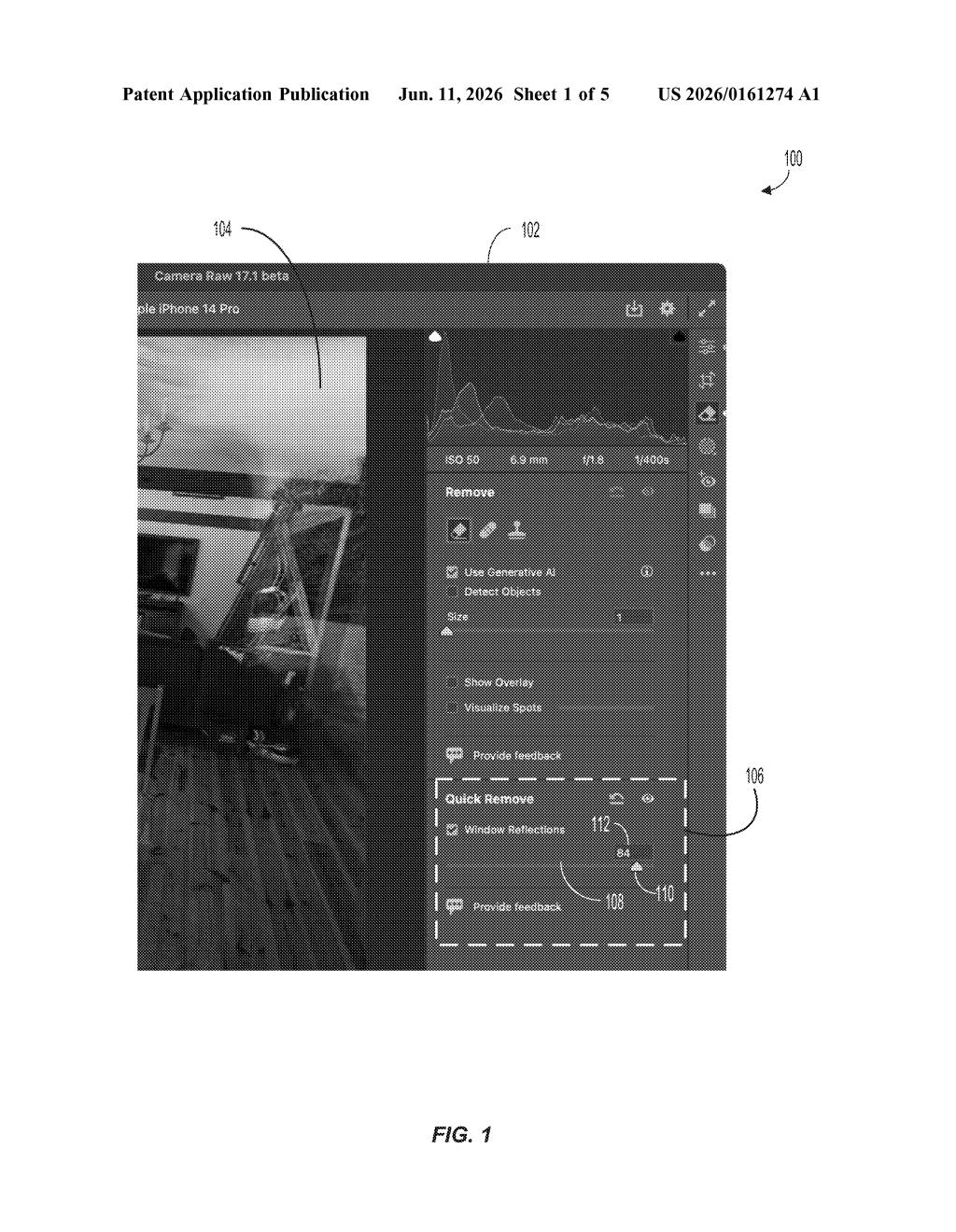
What Adobe's new image-effect slider actually does
Imagine you're editing a portrait and the camera caught a bright reflection you didn't want. Right now, removing that kind of effect in photo software often means digging through several settings. Adobe is patenting a cleaner approach: one control you simply drag.
The way it works is pretty intuitive. A visual bar shows you the full range of an effect — say, a lens flare or a shiny reflection. A handle sits in the middle. Drag it one way and the effect fades. Drag it the other way and the effect gets stronger. You can see the change happen in real time as you move your finger or mouse.
It's the kind of small UX fix that sounds obvious once you hear it, but can genuinely speed up a photographer's workflow — no more toggling between separate "add" and "remove" controls for the same effect.
How the control maps drag direction to effect intensity
The patent describes an image-effect control interface — a UI widget designed to let users adjust effects like lens flares, reflections, and similar optical phenomena that appear in photos.
Here's the structure of the control:
- An effect-range element: a visual track or bar that represents the full spectrum of how intense an effect can be — from fully removed to fully amplified.
- A control handle: a draggable point that starts at a neutral (initial) position in the middle of that range.
The core mechanic is directional dragging. Moving the handle in one direction reduces the effect (say, dialing down an unwanted glare). Moving it in the opposite direction enhances the effect (intensifying a cinematic flare). The system tracks where the handle lands — its "updated position" — and adjusts the image accordingly in real time.
The patent specifically calls out reflection effects and flare effects as examples, though the framework applies broadly to any adjustable image effect. Thomas Knoll, one of the inventors, is the original creator of Photoshop, which adds some credibility to this being a considered UX design decision rather than a throwaway interface concept.
What this could mean for Photoshop and Lightroom users
For anyone who edits photos regularly, the appeal is straightforward: fewer clicks to do the same thing. Collapsing "reduce" and "enhance" into a single bidirectional control means your hands stay on the image, not hunting through panel menus. That kind of friction reduction compounds across a long editing session.
It's also worth noting the timing. As AI-generated images and AI-assisted edits become more common in tools like Adobe Firefly and Photoshop, controls for adding or removing synthetic effects — flares, glows, reflections — are becoming more central to the editing experience. A cleaner way to tune those effects fits squarely into where photo editing software is heading.
This is a modest but genuinely useful UI patent — the kind of interaction design improvement that makes a real difference in daily use without needing a press release. The involvement of Thomas Knoll, Photoshop's original creator, suggests this isn't a patent-for-the-sake-of-it filing. Don't expect headlines, but do expect to see something like this in a future Photoshop or Lightroom update.
There are more where this came from
We read every patent application Big Tech publishes and send you the ones worth knowing. Plain English, free, every week.
Want this weekly breakdown for a company we don't cover? Patentlyze Pro →