
Microsoft Patents a Drag-and-Speak Interface That Gives Voice Commands Real Context
Telling your computer to 'summarize this email' only works if it knows which email you mean. Microsoft's new patent solves that by letting you drag a microphone icon directly onto whatever you're talking about.
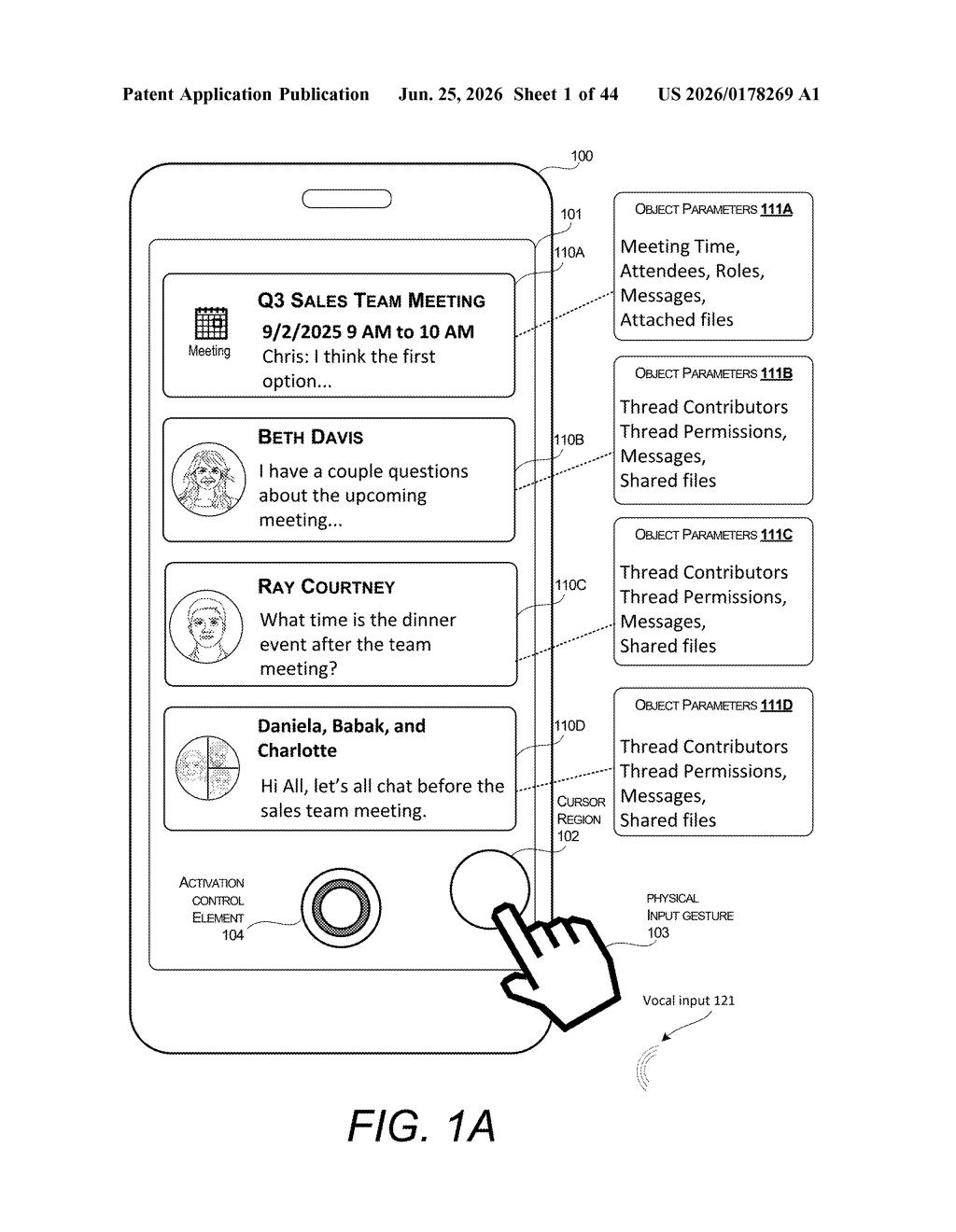
What Microsoft's drag-to-speak interface actually does
Imagine telling your computer 'schedule a follow-up for this' and having it actually know which meeting you meant, not guess from some vague keyword in your sentence. Right now, voice commands tend to work best when they're completely self-contained ('Set a timer for 10 minutes') and fall apart when they need context ('Reply to that thing from Sarah').
Microsoft's patent describes a different approach: a movable microphone icon you drag around your screen like any other cursor. When you hover it over an email, a calendar event, or a file, the system registers that item as the subject of whatever you say next. You speak, and your words get combined with the data from that specific item to carry out your request.
The result is that you never have to spell out 'the Tuesday 3pm meeting with the quarterly review agenda' in your voice command. You just drag the microphone icon over it and say 'send the agenda to everyone.' The pointing gesture does the explaining for you.
How the microphone icon picks up context from your cursor
The system works by tracking the position of a voice input control element (the on-screen microphone icon) relative to the objects displayed in the user interface, such as email threads, calendar entries, or document thumbnails.
When the icon overlaps a displayed item beyond a set threshold (meaning you've clearly hovered it over something intentionally, not just drifted past it), the system pulls a set of parameters from that item. Think of these as background data: the meeting's attendees and time, the email's sender and subject line, the file's name and location.
When the user then speaks, the system processes the audio into instructions or additional parameters. The key step is the combination: those spoken instructions get merged with the pre-loaded item data to form a complete, context-aware command that the computer can execute. Neither input alone would be enough.
- The physical gesture (dragging the icon) supplies the object and its associated data
- The voice input supplies the action or intent
- The system fuses both to produce a precise, executable instruction
Why voice commands have always struggled with context
Voice assistants have had a context problem since they were invented. You can ask Siri or Cortana to do something, but if the command is ambiguous, the assistant either guesses wrong or asks a clarifying question, which is often more work than just using the mouse. Microsoft's approach shifts context-setting from spoken language to physical gesture, which is something users already do intuitively when they point at things on a screen.
If this ends up in Windows or Microsoft 365, it could make voice control genuinely useful inside productivity apps, especially for people who prefer or need hands-free interaction. The patent frames the technique as working across meetings, emails, and files, which maps almost exactly onto the core Outlook and Teams workflow.
This is a genuinely practical idea. The reason voice control hasn't taken over desktop computing isn't that speech recognition is bad, it's that spoken language is too ambiguous without a shared visual reference. Anchoring voice commands to a physical pointing gesture is a logical fix, and it's the kind of interaction model that could become indispensable once people try it. Whether Microsoft ships it is another question, but the concept itself is solid.
There are more where this came from
We read every patent application Big Tech publishes and send you the ones worth knowing. Plain English, free, every week.
Want this weekly breakdown for a company we don't cover? Patentlyze Pro →