
Adobe Patents an AI Tool That Generates Themed Design Elements From a Text Prompt
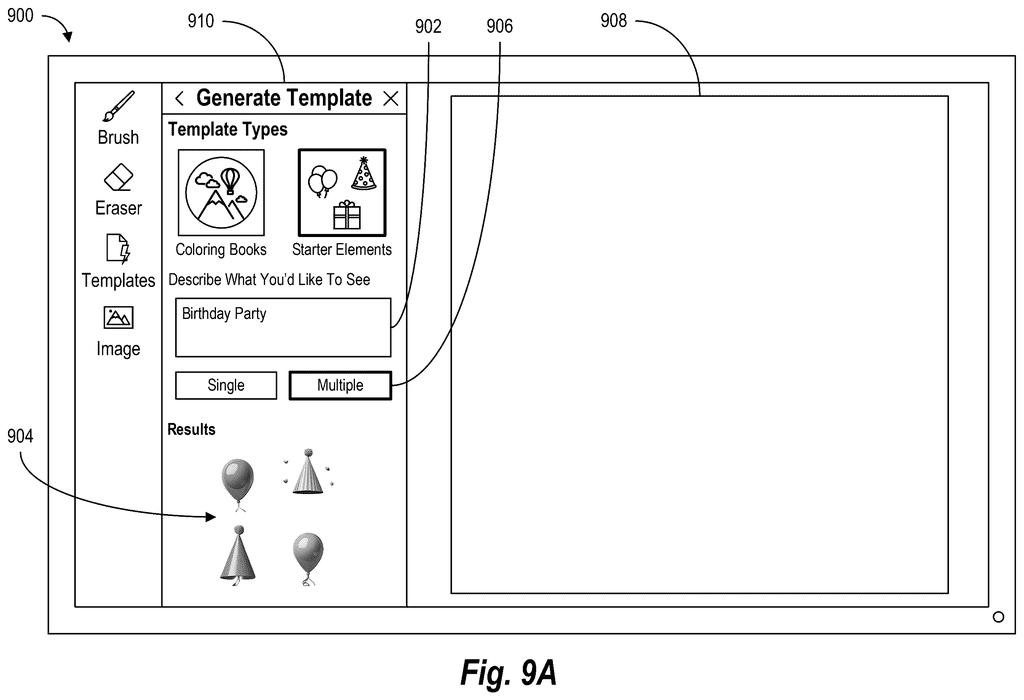
Type 'birthday party' into an Adobe app and watch a set of matching clipart-style objects appear, ready to drag into your design. That's the core idea in this newly filed Adobe patent.
What Adobe's theme-to-image object system actually does
Every time you open a design app and stare at a blank canvas, you face the same small chore: hunting down images that actually match your theme. You search a stock library, scroll through results that are almost right, and eventually settle. Adobe's new patent describes a system that tries to skip that whole loop.
You type a theme, like 'tropical vacation' or 'winter holiday,' and the system uses AI to figure out what objects belong in that theme, then generates images of those objects on the spot. The results show up as interactive pieces you can tap and drag directly into your design.
Think of it like a custom sticker pack that builds itself around whatever mood you describe, instead of making you search for one that already exists.
determining, by at least one processor and from a text input via a graphical user interface, a theme for inserting image content into a digital image within the graphical user interface …
Translation: The software figures out what kind of design style you want based on what you type.
How the LLM and image model split the work
The system works in two stages, using two different AI models working in sequence.
Stage one: theme interpretation. When you type a text prompt into the app's interface, a large language model (the same category of AI behind tools like ChatGPT) reads your words and figures out which specific objects belong to your theme. If you type 'Halloween,' it might decide the relevant objects are a pumpkin, a ghost, a black cat, and a cauldron. It outputs a more detailed prompt describing those objects.
Stage two: image generation. That detailed prompt gets handed to an image generation neural network (an AI model that creates pictures, similar to Midjourney or DALL-E). The model produces actual images of each object, styled to be usable as design elements rather than full scenes.
The generated objects are then presented inside the graphical user interface as interactive elements, meaning you can select, move, resize, or place them into your digital image without leaving the app. The patent describes the whole pipeline as happening in response to the original text input, so the experience is meant to feel like one fluid step rather than two separate AI calls.
… generating one or more interactive object elements consistent with a determined theme using a large language model in combination with an image generation neural network …
Translation: It combines a text AI and an image AI to create matching artwork you can click and move around.
What this means for everyday Adobe design users
For anyone who uses Adobe's creative tools, this points toward a future where building out a themed design takes a sentence instead of an afternoon. Right now, finding matching assets usually means bouncing between Adobe Stock, free clipart sites, and your own files. A system that generates a coherent set of theme-matched objects on demand, styled for your document, would remove a lot of that friction.
The filing is a modest but direct step in the direction Adobe has been moving since it started baking generative AI into Firefly. Patentlyze covers plain-English patent summaries across the full Adobe AI pipeline, and this one fits neatly into the pattern of the company replacing manual asset-hunting with prompt-driven generation inside the same app window.
Adobe's 15th filing we've tracked since May on controllable AI images follows earlier applications like one using multiple reference photos and one converting 3D models via text.
The path from patent to real product is short here. Both AI pieces Adobe describes, one that reads your text instructions and one that draws the objects, already exist inside Adobe's tools today.
This patent is not about building new technology. It is about locking in the specific design of how you type a request and get back themed, editable artwork inside the editing window. The only new piece is the screen interface itself, which means the gap between this patent and a real shipping feature is measured in button placement, not years of research.
There are more where this came from
We read every patent application Big Tech publishes and send you the ones worth knowing. Plain English, free, every week.
The drawings
21 drawing sheets from US 2026/0245273 A1 · click any drawing to enlarge


Want this weekly breakdown for a company we don't cover? Patentlyze Pro →
Be the first to weigh in