
Sony Files Patent That Rethinks How Users Resize Touchscreen Windows
Resizing a window with your finger on a touchscreen is awkward enough that most people avoid it. Sony has filed a patent for a system that tries to fix the core reason why: you always seem to be pulling from the wrong corner.
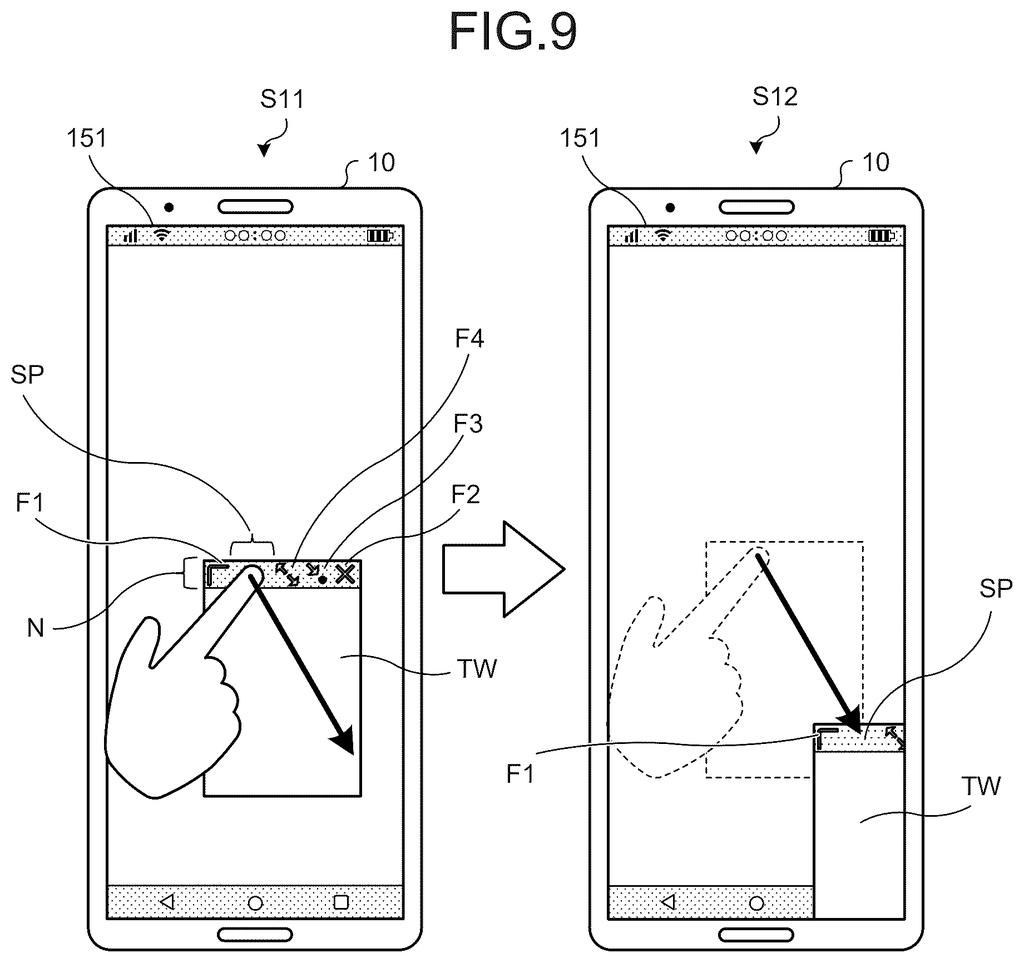
What Sony's corner-locking resize system actually does
On most touchscreen devices today, resizing a window by dragging its corner requires you to land your finger precisely on a tiny grab handle and keep it there without slipping. Miss the handle, or slide off it, and the whole operation either fails or does something you didn't intend.
Sony's patent describes a system that makes this feel more forgiving. When you touch a corner of a window to resize it, the system automatically decides which corner stays locked in place (the "fixed corner") and which corner moves under your finger. The locked corner is always the one diagonally opposite to where you're touching.
The interesting part: if your finger drifts or you slide it across to a different corner handle, the system doesn't break. It simply updates which corner is now fixed, always choosing the one diagonally opposite your new position. You stay in control without needing to lift your finger and start over.
… sets adjustment areas for size adjustment of the window through a touch operation at positions of at least four corners of the window, and sets one of the four corners of the window as a fixed corner for the size adjustment …
Translation: It sets up touch zones at the four corners of a window and keeps one corner locked in place.
How the fixed-corner logic shifts as your finger moves
The system works by setting four adjustment areas, one at each corner of a resizable window displayed on a touchscreen. It also designates one corner as the fixed corner, meaning that corner stays anchored in place on screen while you resize.
The rule is consistent: the fixed corner is always the one diagonally opposite to where your finger is currently touching. So if you grab the bottom-right corner, the top-left stays put, and the window grows or shrinks from there. This matches the most natural mental model of stretching a rectangle.
The key addition is what happens when your finger slides from one corner's adjustment area into another corner's adjustment area during a single continuous touch gesture. Instead of treating this as an error or dropping the resize operation, the system:
- Detects that the touch has moved into a new corner's zone
- Reassigns the fixed corner to the diagonal of the new corner
- Continues the resize operation uninterrupted
This means the window reanchors itself mid-gesture without the user lifting their finger. The patent also covers cases where adjustment areas are set along window edges, not just at corners, broadening where the user can initiate or continue a resize.
… when the user slides a touch position to an adjustment area associated with another corner, the setting unit changes setting of the fixed corner to a diagonal corner of the other corner …
Translation: Sliding your finger to a different corner automatically shifts the anchor point to the opposite side.
What this means for touch-first tablet and PC interfaces
For anyone who has used a tablet or a touchscreen laptop in desktop mode, fiddly window management is one of the biggest reasons it still feels worse than a mouse. Small resize handles on high-resolution screens are easy to miss, and a single slip usually means starting over. A system that gracefully recovers when your finger wanders reduces that friction in a real way, especially for larger-screened devices where windows are more commonly resized.
Sony makes tablets, laptops, and professional displays, so this kind of touch interaction research fits the company's product range. The broader trend of making desktop-style multitasking work well on touch hardware is one that plain-English patent summaries for touch and display filings have been tracking across multiple companies working on tablet OS interfaces.
This is the 370th Sony filing in our Sony coverage since May, adding to work like the mid-shoot screen fix and biometric virtual logins.
The automatic rule here, where the system always locks the opposite corner from wherever your finger is dragging, gives up one real capability: you cannot choose which corner stays fixed. For casual window resizing, that limitation rarely matters. For someone carefully arranging a layout, it does.
The smoother piece, where sliding your finger from one corner zone to another shifts the anchor point automatically, is also the more fragile one. The boundaries between zones have to be calibrated exactly right, because too sensitive and the anchor jumps unpredictably, too forgiving and the whole feature stops working. That calibration problem is where the design's real cost lives, and the patent describes the concept without resolving it.
The tradeoff reads as reasonable for everyday use, but it earns its convenience by removing precision, and whether that holds up depends entirely on tuning the patent leaves open.
Get our take in your Top Stories
Liked this breakdown? Add Patentlyze as a preferred source on Google, and our plain-English take shows up more often in your Top Stories the next time Sony patent news breaks.
There are more where this came from
We read every patent application Big Tech publishes and send you the ones worth knowing. Plain English, free, every week.
The drawings
32 drawing sheets from US 2026/0252225 A1 · click any drawing to enlarge


Want this weekly breakdown for a company we don't cover? Patentlyze Pro →
Be the first to weigh in