
Sony
Sony · Software · Filed Oct 17, 2024 · USPTO published Aug 27, 2026 · Aug 27 release
Sony Files Patent That Rethinks How Users Resize Touchscreen Windows
Resizing a window with your finger on a touchscreen is awkward enough that most people avoid it. Sony has filed a patent for a system that tries to fix the core reason why: you always seem to be pulling from the wrong corner.
- Publication number
- US 2026/0252225 A1(US20260252225A1)
- Applicant
- Sony Group Corporation
- Filed · Published
- Oct 17, 2024 · Aug 27, 2026
- Inventors
- Shota MATSUMOTO, Seiji MURAMATSU, Hiroaki ADACHI, Yukako MURAKAMI
- Status when we published
- Examiner raised objections; the company can respond
- Document
- 20 claims
- US classification
- 715/705
- Examiner
- YI, RINNA (Art Unit 2179)
- Parent application
- National Stage Entry of PCT/JP2023/014733 (filed Apr 11, 2023)(PCTJP2023014733)
What Sony's corner-locking resize system actually does
On most touchscreen devices today, resizing a window by dragging its corner requires you to land your finger precisely on a tiny grab handle and keep it there without slipping. Miss the handle, or slide off it, and the whole operation either fails or does something you didn't intend.
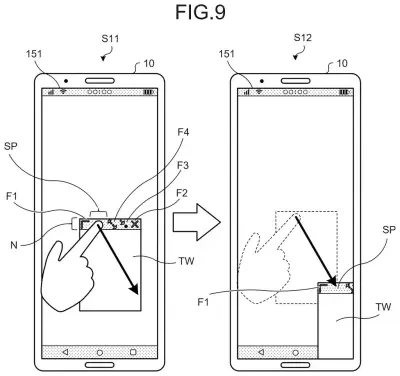
Sony's patent describes a system that makes this feel more forgiving. When you touch a corner of a window to resize it, the system automatically decides which corner stays locked in place (the "fixed corner") and which corner moves under your finger. The locked corner is always the one diagonally opposite to where you're touching.
The interesting part: if your finger drifts or you slide it across to a different corner handle, the system doesn't break. It simply updates which corner is now fixed, always choosing the one diagonally opposite your new position. You stay in control without needing to lift your finger and start over.
… sets adjustment areas for size adjustment of the window through a touch operation at positions of at least four corners of the window, and sets one of the four corners of the window as a fixed corner for the size adjustment …
Translation: It sets up touch zones at the four corners of a window and keeps one corner locked in place.
How the fixed-corner logic shifts as your finger moves
The system works by setting four adjustment areas, one at each corner of a resizable window displayed on a touchscreen. It also designates one corner as the fixed corner, meaning that corner stays anchored in place on screen while you resize.
The rule is consistent: the fixed corner is always the one diagonally opposite to where your finger is currently touching. So if you grab the bottom-right corner, the top-left stays put, and the window grows or shrinks from there. This matches the most natural mental model of stretching a rectangle.
The key addition is what happens when your finger slides from one corner's adjustment area into another corner's adjustment area during a single continuous touch gesture. Instead of treating this as an error or dropping the resize operation, the system:
- Detects that the touch has moved into a new corner's zone
- Reassigns the fixed corner to the diagonal of the new corner
- Continues the resize operation uninterrupted
This means the window reanchors itself mid-gesture without the user lifting their finger. The patent also covers cases where adjustment areas are set along window edges, not just at corners, broadening where the user can initiate or continue a resize.
… when the user slides a touch position to an adjustment area associated with another corner, the setting unit changes setting of the fixed corner to a diagonal corner of the other corner …
Translation: Sliding your finger to a different corner automatically shifts the anchor point to the opposite side.
What this means for touch-first tablet and PC interfaces
For anyone who has used a tablet or a touchscreen laptop in desktop mode, fiddly window management is one of the biggest reasons it still feels worse than a mouse. Small resize handles on high-resolution screens are easy to miss, and a single slip usually means starting over. A system that gracefully recovers when your finger wanders reduces that friction in a real way, especially for larger-screened devices where windows are more commonly resized.
Sony makes tablets, laptops, and professional displays, so this kind of touch interaction research fits the company's product range. The broader trend of making desktop-style multitasking work well on touch hardware is one that plain-English patent summaries for touch and display filings have been tracking across multiple companies working on tablet OS interfaces.
This is the 370th Sony filing in our Sony coverage since May, adding to work like the mid-shoot screen fix and biometric virtual logins.
Source: US 2026/0252225 A1 at the USPTO (PDF). Full patent text and figures are in the official publication.
Get our take in your Top Stories
Liked this breakdown? Add Patentlyze as a preferred source on Google, and our plain-English take shows up more often in your Top Stories the next time Sony patent news breaks.
Add Patentlyze on Google
One click.
There are more where this came from
We read the new patents from Big Tech, carmakers and more and send you the ones worth knowing. Plain English, free, every week.
The drawings · 32 sheets
32 drawing sheets from US 2026/0252225 A1 · click any drawing to enlarge


Show the other 24 sheets


More from Sony
All 722 Sony patents →
More in Software
All 816 Software patents →
Samsung
Samsung Patents a Home Screen That Shrinks Surrounding Icons When You Enlarge One
Samsung
Samsung Patents a Smarter Pop-Up Window System That Remembers Window Positions
Sony
Sony Patents Touchscreen Game Controls That Change Behavior Mid-Play
Samsung