
Microsoft Patent Would Re-Check Your Identity If Someone Else Reads Your Screen
Most login systems ask you to prove who you are once, then trust you indefinitely. Microsoft's new patent describes a system that keeps watching the room and re-checks your identity based on who else might be looking at your screen.
What Microsoft's risk-aware document lock actually does
Most computers ask you to log in once and then leave you alone. That works fine when you're home alone, but it creates a real problem when you're working in a coffee shop, a shared office, or a conference room where anyone can glance at your screen.
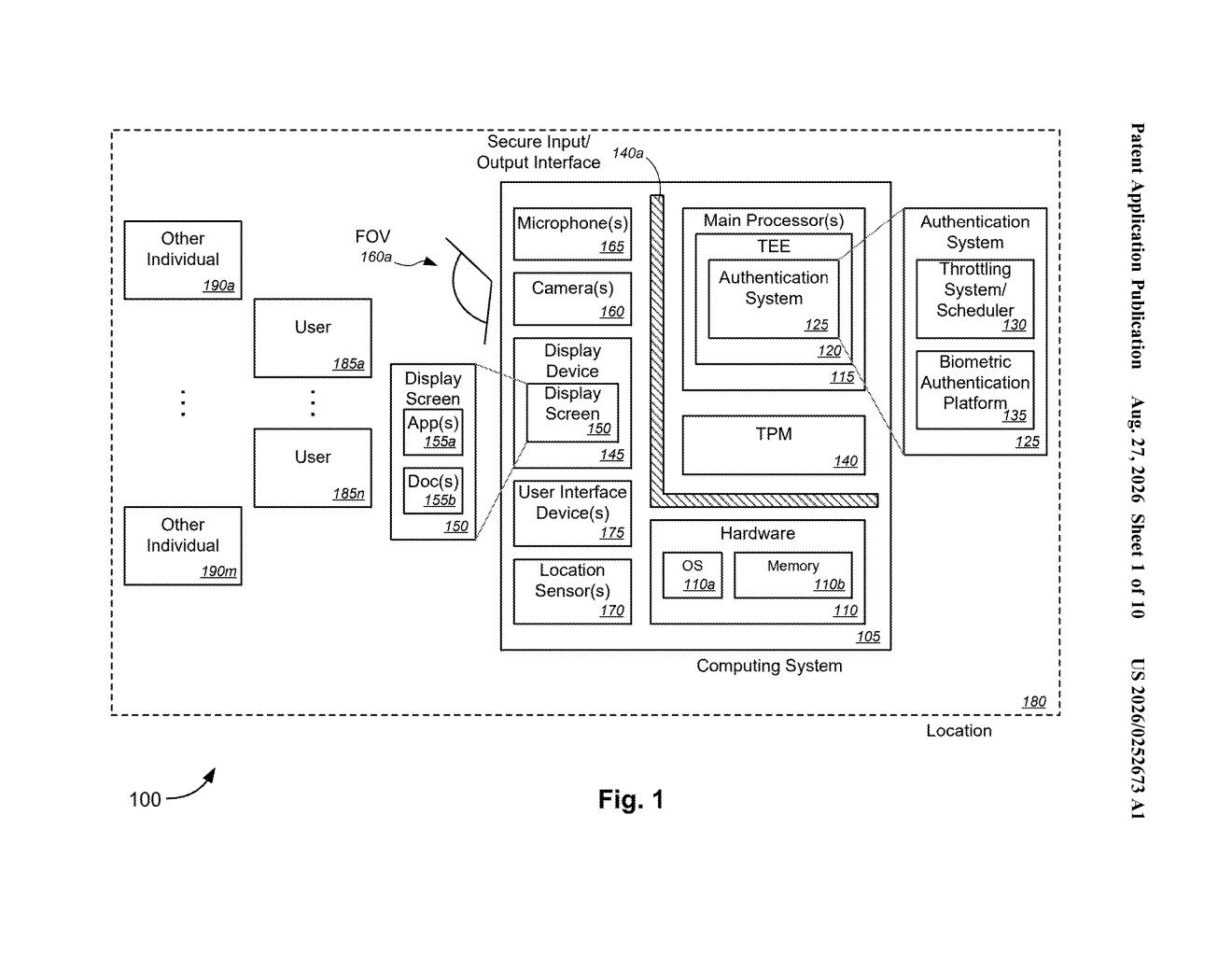
Microsoft's patent describes a system that constantly weighs how risky your current situation is. It looks at three things: where you are, how sensitive the document on your screen is, and whether anyone nearby is authorized to see it. The higher the risk, the more often it asks you to verify your identity, using something like a fingerprint or face scan.
The key idea is that the re-authentication schedule isn't fixed. If you're in a secure, private office reading a low-sensitivity file, the system might barely bother you. If you're in a public space with a confidential document open and a stranger in view, it might prompt you constantly, or even blur the screen until you re-verify.
determining a security risk level of a displayed content that is displayed on a display device, based on at least one of a lowest level of access permission for any observer of the displayed content or a location setting of the display device …
Translation: The system figures out how sensitive your screen is based on who might be watching and where you are sitting.
How the system reads location, access level, and observers
The system works by combining three streams of data to calculate a real-time security risk score.
- Location data: The device knows where it is, whether that's a trusted corporate office, a home network, or a public space. Riskier locations push the risk score higher.
- Document security level: Each document or piece of content has a sensitivity classification. A confidential financial report scores higher than a general memo.
- Observer detection: The system identifies who is nearby and checks whether those people have permission to view the content currently on screen. This is the most novel piece: it isn't just about the person logged in, but about everyone who could see the display.
Based on the combination of those factors, the system sets or adjusts how often it triggers a biometric authentication check (a face scan, fingerprint read, or similar verification). This frequency can also follow a schedule, tightening during business hours in shared spaces and loosening when the device is in a trusted environment after hours.
When the system detects that at least one observer is not authorized to see what's on screen, it can take action. That action could be prompting the user to re-authenticate, dimming or obscuring the display, or locking access entirely until the unauthorized party leaves or the content is closed.
… sets or modifies a frequency and/or a schedule for triggering an authentication verification process.
Translation: It changes how often the computer demands you prove who you are.
What this means for enterprise security on shared screens
For anyone who handles sensitive information on a laptop in shared spaces, the problem this addresses is real. Standard re-authentication systems are binary: you're logged in or you're not. They don't account for the fact that the security calculus changes entirely when you move from your home office to an airport lounge. A fixed 15-minute lock timer is simultaneously too aggressive in private and too lax in public.
Enterprise IT teams have long tried to solve this with rigid policies that frustrate employees, because the policies can't adapt to context. This patent points toward software that behaves more like a reasonable security guard than a blunt timer. It fits into a broader wave of interesting tech patents around adaptive authentication, where identity verification in enterprise software is becoming a continuous, context-sensitive process rather than a one-time gate.
This is the 334th Microsoft filing in our Microsoft coverage since May, adding to work like the code editor patent and the secret timer patent.
Sensitive information leaking through physical exposure, someone glancing at your screen in a coffee shop or open office, is a real and underappreciated security problem in workplaces that have moved away from private offices. Most organizations have no meaningful defense against it beyond hope.
The approach here matches the scale of that problem. Tying how often a device asks you to confirm your identity to a live read of the surrounding situation, who is nearby, where you are, how sensitive the document is, addresses the actual risk rather than just logging activity after the fact.
The harder question is whether the surrounding hardware and company directory systems will be reliable enough to make that risk read accurate. The logic described here is sound, but the protection is only as strong as the sensors and access records feeding it.
Get our take in your Top Stories
Liked this breakdown? Add Patentlyze as a preferred source on Google, and our plain-English take shows up more often in your Top Stories the next time Microsoft patent news breaks.
There are more where this came from
We read every patent application Big Tech publishes and send you the ones worth knowing. Plain English, free, every week.
The drawings
10 drawing sheets from US 2026/0252673 A1 · click any drawing to enlarge


Want this weekly breakdown for a company we don't cover? Patentlyze Pro →
Be the first to weigh in