
Adobe Patents a System That Repositions People in Photos by Matching Body Parts Between Images
Changing how a person is standing or sitting in a photo has always meant either reshooting the scene or spending hours with manual editing tools. Adobe is patenting a system that takes a target pose from one image and applies it to a subject in another, automatically.
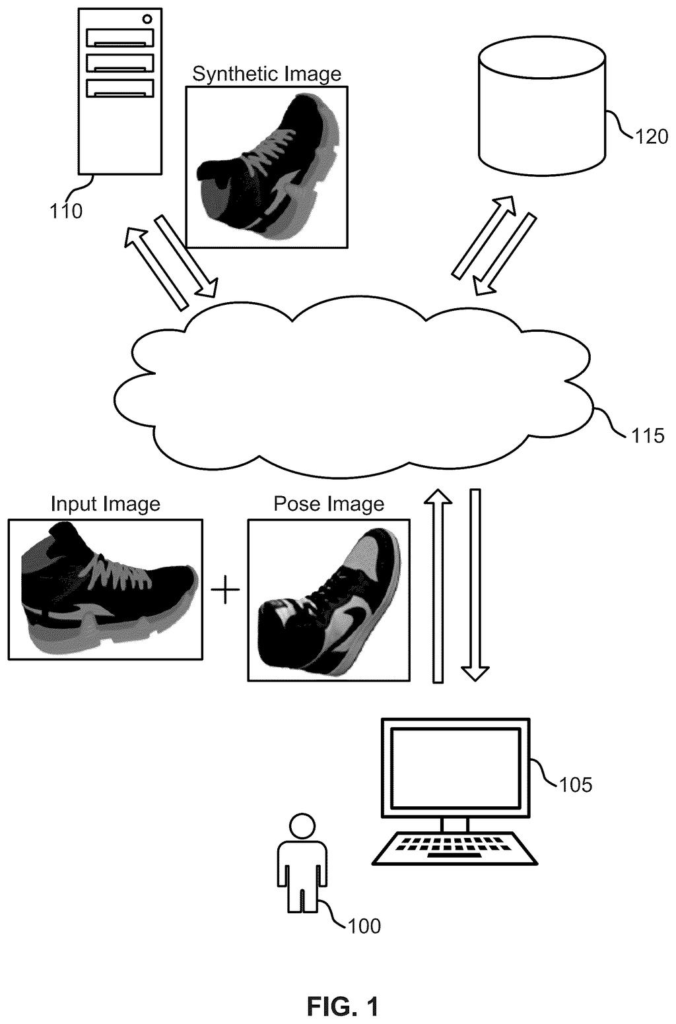
How Adobe's pose-copying tool actually works
Ever tried to move someone's arm in a photo without making it look like a nightmare? Even with professional software, repositioning a person's body is one of the messiest tasks in image editing.
Adobe's patent describes a system that takes two images: one showing the person or object you want to repose, and one showing the target pose you want them to adopt. The system identifies matching body parts across both images, then figures out how to stretch, warp, and shift the subject image so the body ends up in the new position. You supply an example photo of the pose you want, and the system handles the geometry.
The key idea is doing that geometric transformation carefully, at multiple levels of detail at once, so the result doesn't look distorted or smeared. The output is a reposed version of your subject that reflects the target stance.
… obtaining keypoint information that associates a part of the subject image and a corresponding part of the pose image; generating, using a warping model, a flow map indicating a transformation of the part of the subject image …
Translation: The system maps body parts from one picture to another to figure out how they need to move.
How the warping model maps one pose onto another
The method takes two inputs: a subject image (the photo containing the person or object to be reposed) and a pose image (a reference photo showing the desired target pose). It then retrieves keypoint information, meaning coordinates that label specific body parts in both images, so the system knows which point in one image corresponds to which point in the other.
With those correspondences established, a warping model generates a flow map: a per-pixel instruction sheet that says how far and in what direction each pixel in the subject image needs to move to match the target pose. The distinctive part of the approach is that this flow map is built at multiple resolutions simultaneously, across different processing layers of the model. Think of it like adjusting a photo's exposure with both broad strokes and fine detail at the same time rather than correcting one then the other.
The final output is a warped image in which the subject appears in the target pose. The multi-resolution approach is intended to preserve fine details (fabric texture, hair, hands) that single-pass warping methods tend to smear or distort.
Critically, the pose is supplied as an example image rather than a manually specified skeleton or numerical angle, which means a user could grab any reference photo from the web and use it as the pose template.
… generating a warped image based on the flow map and the subject image, where the warped image depicts the object with the target pose.
Translation: It creates a final photo showing the person in the new position.
What this means for photo editing and design work
For designers, photographers, and anyone working in tools like Adobe Photoshop or Adobe Firefly, repositioning a subject today usually means compositing, heavy retouching, or starting with a new photo entirely. A system that reads a reference pose from any example image and applies it automatically could cut that process from hours to seconds.
Adobe's steady stream of AI image-editing filings suggests the company is building toward a suite of generative and corrective tools that treat photos as editable objects rather than fixed records. This particular patent handles a specific, practical gap: not generating a new image from scratch, but reshaping something that already exists, which is often what working editors actually need.
That makes this Adobe's 32nd filing we've tracked since May in the AI photo editing race, a group that includes their work on recoloring by light source and recoloring from text.
From a ship-path perspective, this patent is closer to a shippable feature than many AI filings. It describes a software-only pipeline with no specialized hardware requirements, and Adobe already has the infrastructure to run neural image-processing models inside its products.
The main open question is output quality at the edges of the input space: unusual poses, heavily occluded body parts, or non-human objects. The patent's multi-resolution warping approach is a reasonable engineering answer to the smearing problem, but patents don't prove the approach actually performs well across real-world photos.
If the model behind this works as described, the shortest route to a product is a Photoshop or Firefly feature where you drag in a reference photo and a slider applies the pose. That's a narrow, specific workflow improvement, which is exactly the kind Adobe's professional users pay for.
Get our take in your Top Stories
Liked this breakdown? Add Patentlyze as a preferred source on Google, and our plain-English take shows up more often in your Top Stories the next time Adobe patent news breaks.
There are more where this came from
We read every patent application Big Tech publishes and send you the ones worth knowing. Plain English, free, every week.
The drawings
19 drawing sheets from US 2026/0268437 A1 · click any drawing to enlarge


Show the other 11 sheets


Want this weekly breakdown for a company we don't cover? Patentlyze Pro →
Be the first to weigh in